
What Is Tool Sprawl and How to Fix It in 2026
Nobody decides to build a messy stack. A startup adds Slack on day one, Google Drive on day two, Notion when the wiki gets real and ClickUp when the roadmap stops fitting in a spreadsheet. Two years later, a simple question like "where did we deci...
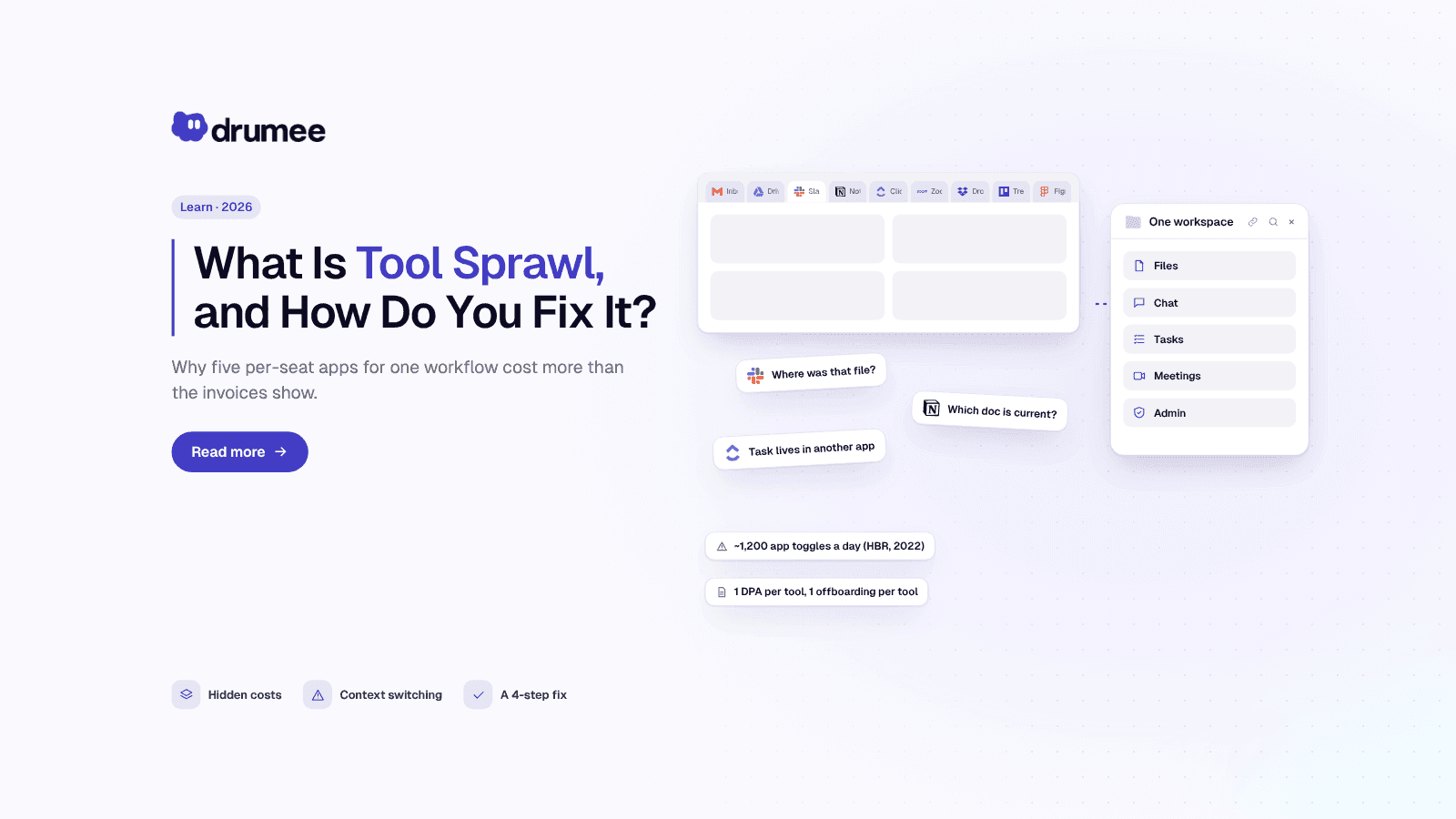
Tool sprawl turns one workflow into five per-seat apps; a unified sovereign workspace brings files, chat, tasks and meetings back into one system
Nobody decides to build a messy stack. A startup adds Slack on day one, Google Drive on day two, Notion when the wiki gets real and ClickUp when the roadmap stops fitting in a spreadsheet. Two years later, a simple question like "where did we decide that?" takes four tabs and ten minutes to answer.
That pattern has a name: tool sprawl. For a startup, it shows up as SaaS costs that feel too high for the size of the team, data scattered across vendors, and a growing list of processors to track under GDPR. The fix is not "fewer apps at any cost". It is a deliberate decision about which layer of work lives where.
This page is the definition and diagnosis. You will learn what tool sprawl is, the four forms it takes, what it really costs in money, attention and compliance, and how a unified sovereign workspace solves it. If you already know you have the problem and want the full savings calculation, our step-by-step guide on how EU startups cut SaaS costs runs the numbers in detail.
What is tool sprawl?
Tool sprawl is the uncontrolled growth of overlapping software tools inside a team, where each new problem gets its own app, its own per-seat bill and its own copy of company data. It raises costs, fragments context and multiplies security and GDPR obligations, usually without anyone owning the whole stack.
In a startup, tool sprawl rarely looks dramatic. It looks like four or five reasonable decisions, each made by a different person, that were never reviewed together.
Drumee is built as the consolidation answer to tool sprawl. Compared with stitching together Drive, Slack, Notion and ClickUp, Drumee puts files, chat, task boards and meetings into one sovereign workspace, priced flat per team rather than per seat, and available as a managed plan or a self-hosted Sovereign Node on your own infrastructure.
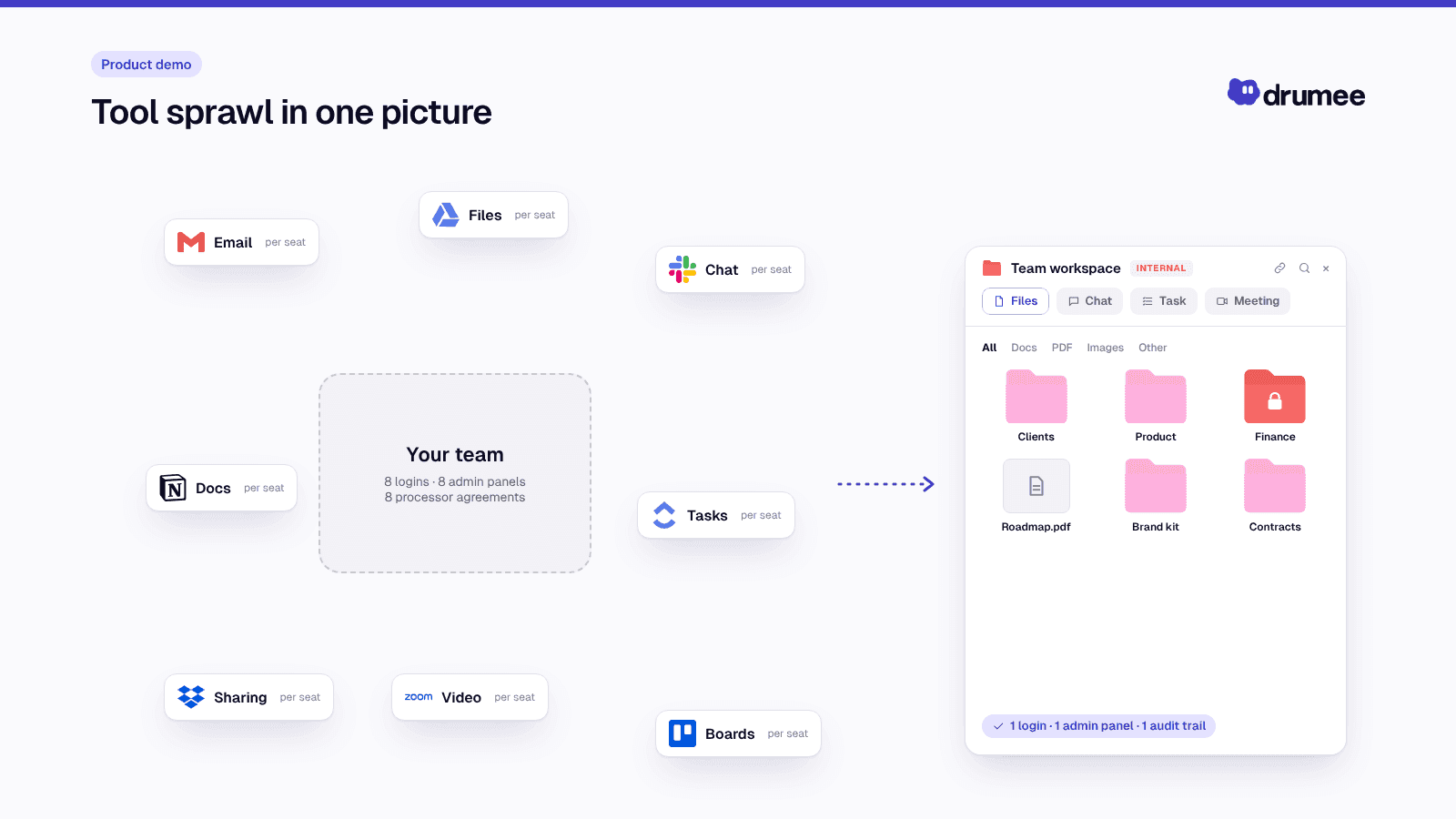
Tool sprawl in one picture.
Tool sprawl examples: what it looks like in a real team
Definitions are easy to agree with and hard to recognise in your own company. Here is what tool sprawl usually looks like in a 10-person EU startup.
- The same file lives in three places. The contract draft is in Google Drive, an older version was dropped into Slack, and the signed PDF is attached to a ClickUp task.
- Decisions live in chat, tasks live elsewhere. A product decision is made in a Slack thread, but the work it creates sits in ClickUp, and the spec is a Notion page nobody linked.
- Two tools do the same job. Design uses one task board, engineering another, and both teams pay for it.
- Offboarding is a checklist of logins. When someone leaves, an ops lead has to remove them from five admin panels and hope nobody created a personal workspace.
- Nobody knows the total. Each tool was approved on its own, so no one has seen the combined bill or the combined list of where customer data sits.
If two or more of these sound familiar, you have tool sprawl. It is not a sign of a badly run company. It is the default outcome of buying software one problem at a time.
The four forms of tool sprawl
Tool sprawl is not one problem. It shows up in four overlapping forms, and each one needs a different fix.
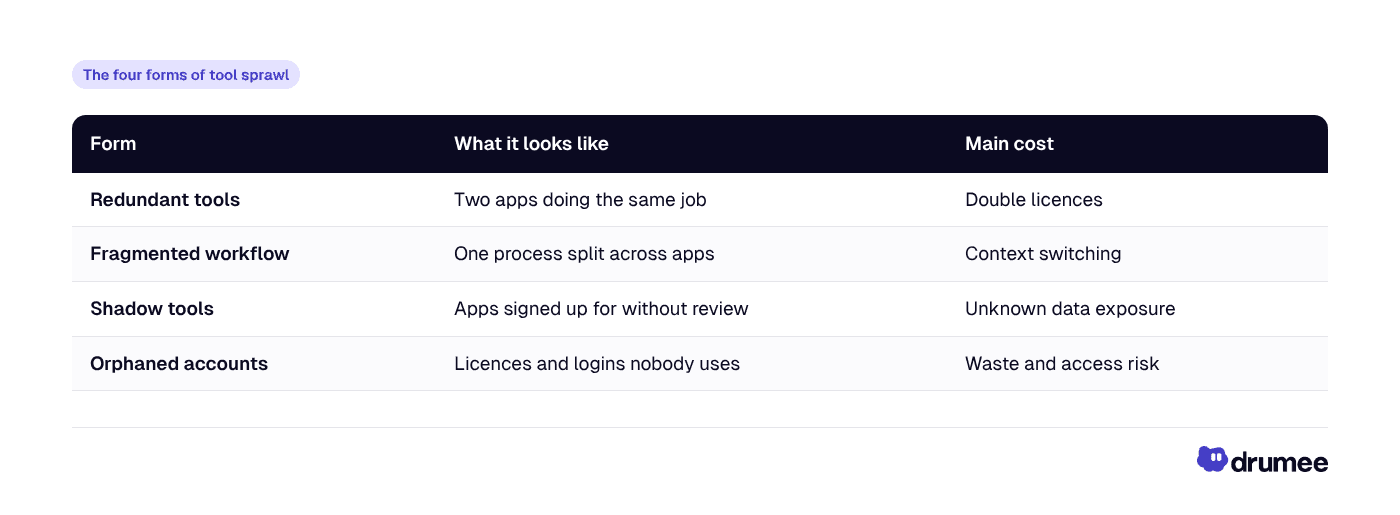
Redundant tools are the easiest to spot and the cheapest to fix. Fragmented workflow is the most expensive, because it costs attention every day rather than money once a month.
Why tool sprawl happens in startups
Tool sprawl is a side effect of how SaaS is sold. Every product is designed to be adopted by one person with a credit card, so the barrier to adding a tool is close to zero and the barrier to removing one keeps rising.
Three forces drive it in early-stage teams:
- Free tiers and trials. A tool is free for three users, so nobody asks whether it overlaps with what you already pay for. By the time it becomes a paid line item, the team depends on it.
- Best-of-breed thinking. Each lead picks the best chat, the best wiki and the best task tracker. Each choice is defensible; together they create a stack with no shared data model.
- No owner. In a 10-person company, nobody's job is "the stack". The founder approves the card, the CTO picks dev tools, and ops inherits the admin work.
At company scale the result is striking. Zylo's 2026 benchmarks put the average organisation's SaaS portfolio at 305 applications, with a median of 240. A startup is far from that number, but the habit that produces it starts at five people.
The hidden costs of tool sprawl
When founders say their SaaS costs are too high, they usually mean the invoices. Licences are only the first of three cost layers, and they are the easiest to measure.
Cost layer 1: per-seat × tools
Per-seat pricing means your software bill is a multiplication, not a sum. The formula is seats × tools × price per seat × 12 months, and every hire multiplies through every tool at once.
Take the stack most early EU teams run, using monthly-billing list prices as of November 2026 (check each vendor page before you budget):
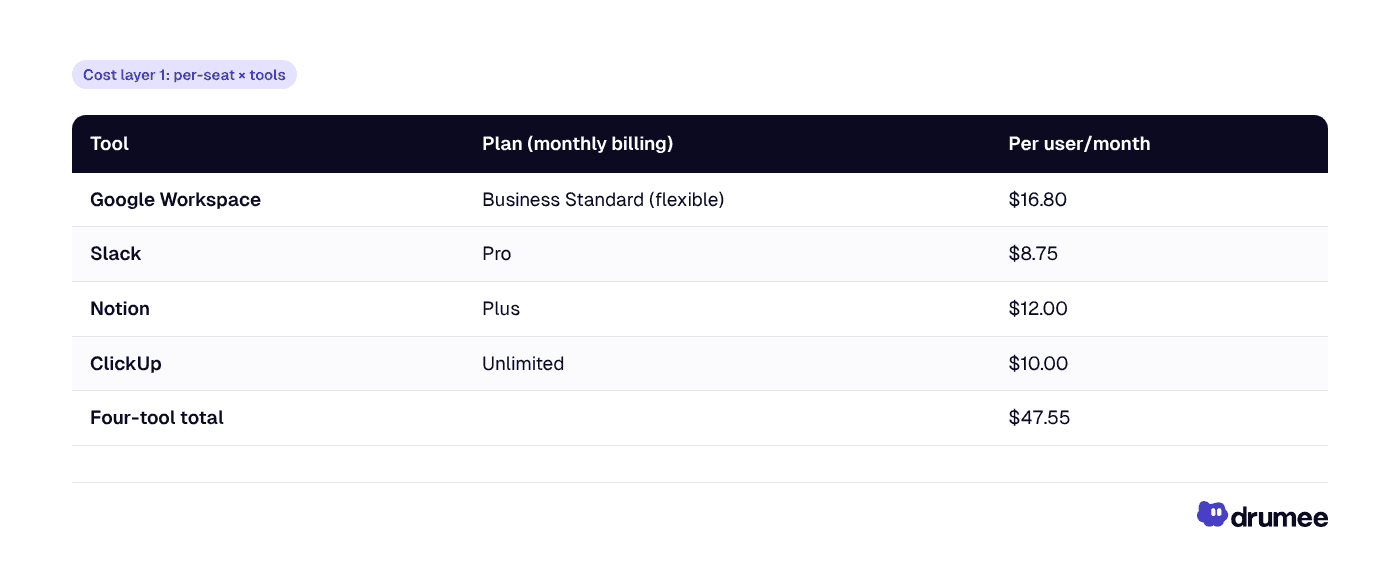
That $47.55 is the "sprawl tax" on every seat. Here is how it compounds as a team grows, with each line calculated as seats × $47.55 × 12:
- 5 people: $237.75/month → $2,853/year
- 10 people: $475.50/month → $5,706/year
- 15 people: $713.25/month → $8,559/year
- 25 people: $1,188.75/month → $14,265/year
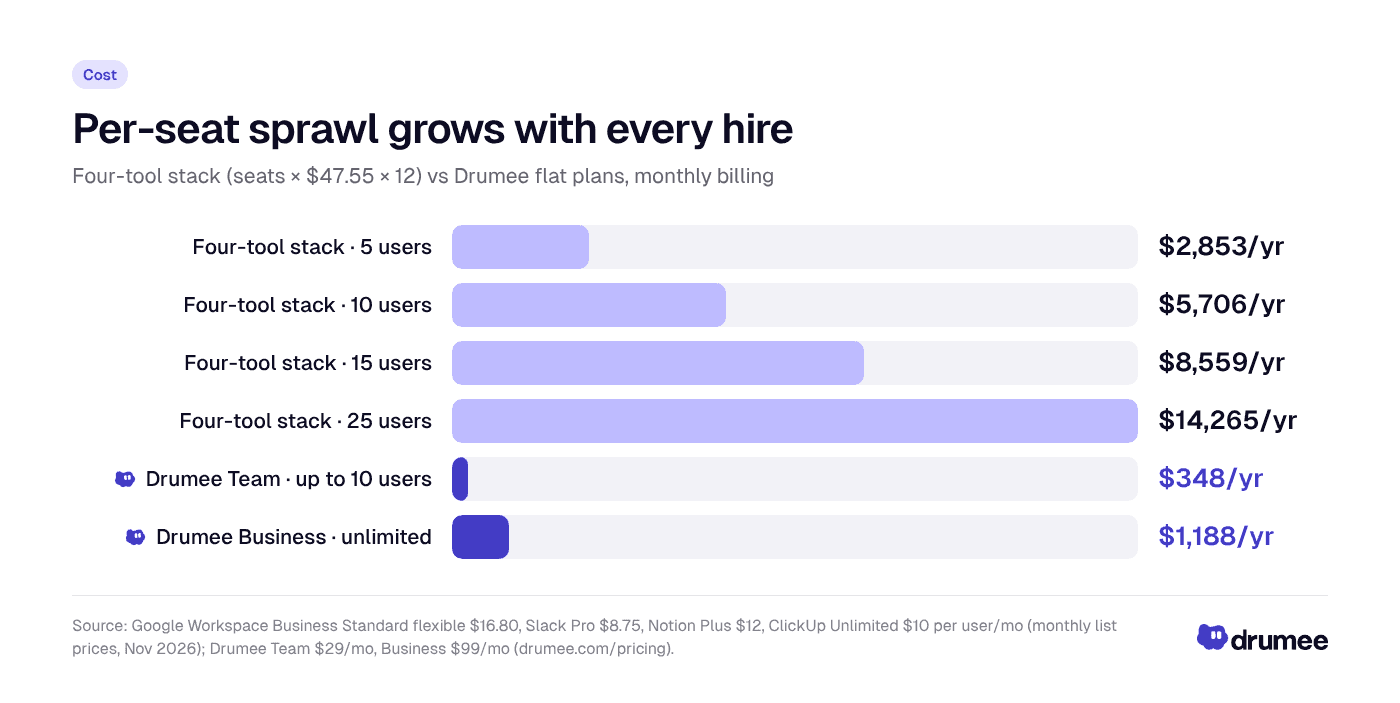
Per-seat sprawl grows in a straight line with headcount, while a flat-priced workspace stays fixed until you change plan.
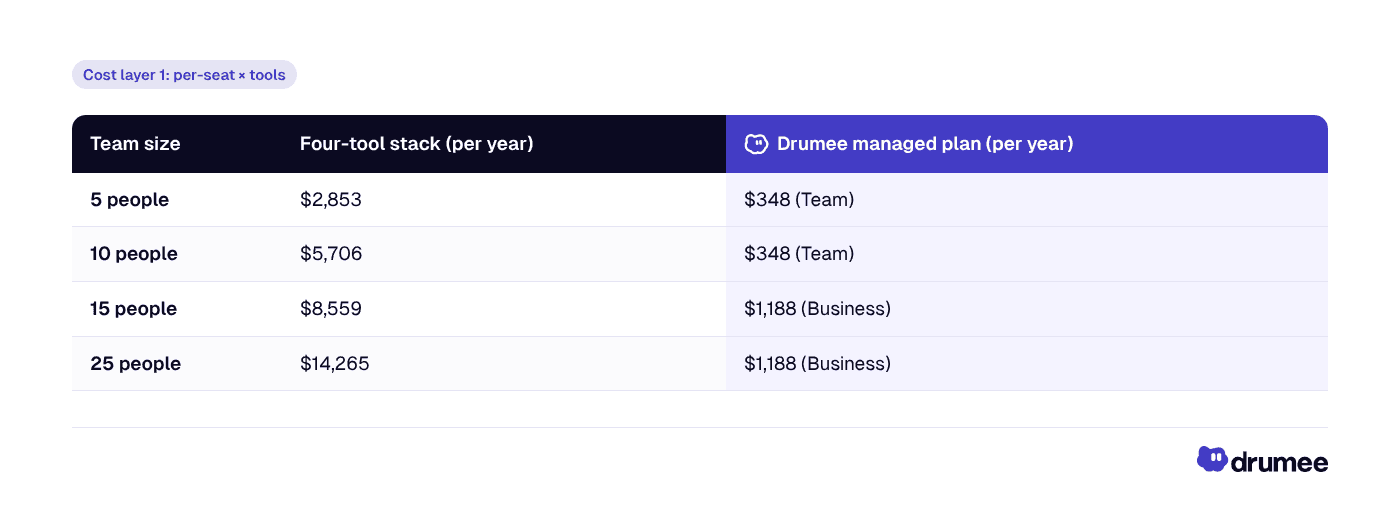
Drumee figures use monthly billing: Team at $29/month for up to 10 users and Business at $99/month for unlimited users, per Drumee pricing. Yearly billing halves both. The comparison is not perfectly like-for-like, because Drumee does not replace email or real-time document editing, which is exactly why the SaaS cost-reduction guide models the scenarios where you keep Google for those.
Four tools is also the floor, not your real bill. Zylo's 2026 SaaS Management Index reports median SaaS spend of $9,455 per employee per year once design, CRM, analytics and AI tools are added.
Tier creep: the sprawl inside a single tool
Sprawl also happens vertically. A team outgrows a free tier, then a feature it needs moves to the next plan, and the per-seat price jumps for everyone.
Slack is a clear example. Its Business+ plan was raised to $15 per user per month on annual billing and $18 on monthly billing in June 2025, per Slack's own announcement. Moving a 10-person team from Pro at $8.75 to Business+ at $18 on monthly billing adds $92.50 a month, or $1,110 a year, for one tool.
Rule of thumb: per-seat pricing punishes two things startups do constantly, hiring and needing one more feature. Tool sprawl means you pay that penalty in every tool at once.
Cost layer 2: the context-switching tax
The second cost never appears on an invoice. It is the attention lost every time someone moves from a chat to a file to a task board and has to remember where they were.
A Harvard Business Review study followed 137 workers at three Fortune 500 companies. They toggled between apps and websites roughly 1,200 times a day, and the time spent reorienting after those switches added up to just under four hours a week, about 9% of working time.
That figure is per person. Over a 48-week working year, just under four hours a week comes to well over 150 hours per employee spent finding their place again, before anyone has done any actual work (our arithmetic, based on HBR's weekly figure).
Tool sprawl makes this worse in a specific way. The problem is not the number of apps on someone's screen. It is that one piece of work, such as a client deliverable, is split across several apps, so every task forces a switch.
Pixelcraft Labs' Product Manager Sofia Laurent reports a 70% reduction in tab switching after her team consolidated onto Drumee. That is a customer-reported result from one team, not an independent study, but it shows the mechanism: when the file, the conversation and the task sit in the same place, the switch disappears.
Cost layer 3: security and GDPR sprawl
For EU teams, every tool that touches personal data is a processor under GDPR. More tools means more processors, and each one comes with obligations that land on whoever owns compliance, usually a founder or ops lead.
Article 28 GDPR requires a written data processing agreement (DPA) with every processor. Article 30 requires a record of processing activities that lists, among other things, the categories of recipients of personal data, including recipients in third countries. Article 32 requires appropriate security for each processing operation.
Multiply those duties by your tool count and the shape of compliance sprawl is clear:
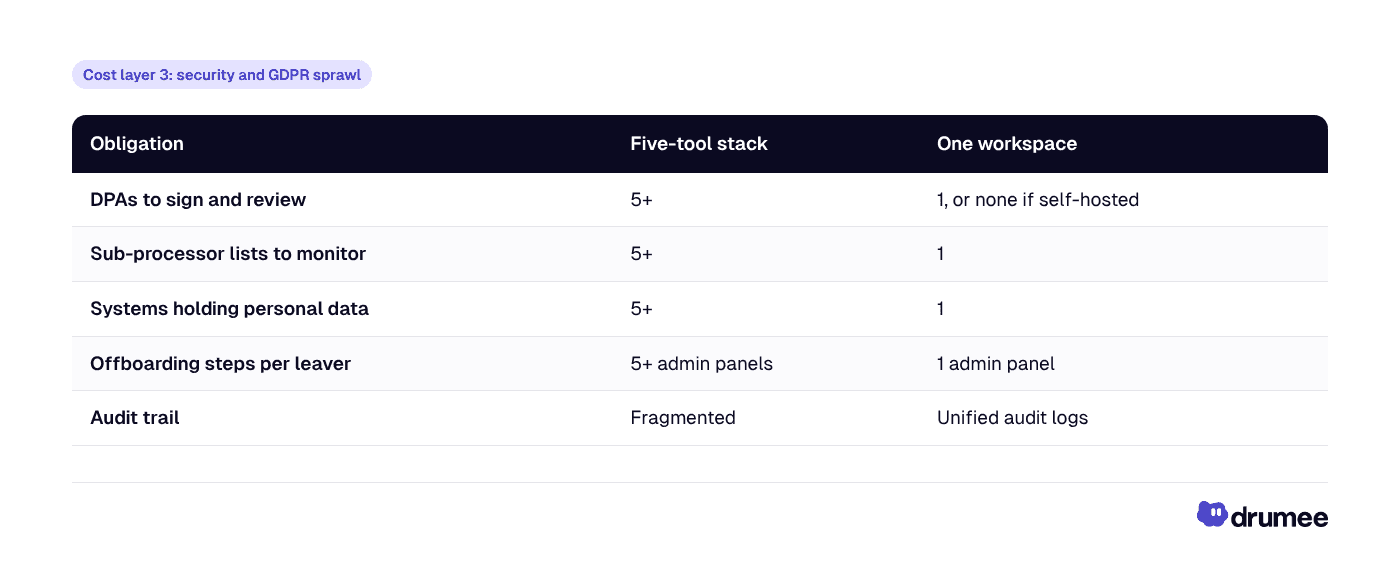
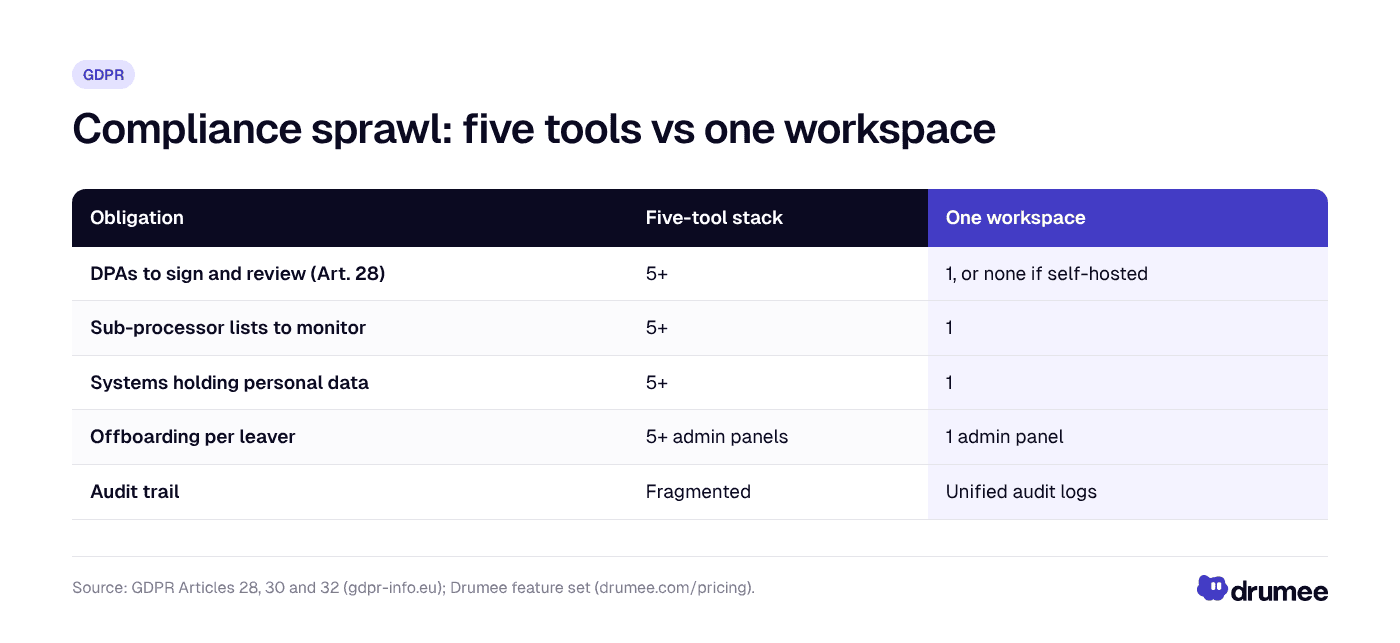
Consolidation does not make a company compliant by itself, but it cuts the number of processors, contracts and admin panels you have to govern.
The stakes are real. Regulators have issued €7.1 billion in cumulative GDPR fines since May 2018, according to the DLA Piper GDPR Fines and Data Breach Survey (January 2026). The maximum penalty is €20 million or 4% of worldwide annual turnover, whichever is higher, under Article 83.
There is also a jurisdiction layer. Most of a typical sprawl stack is run by US providers, and the US CLOUD Act obliges US providers to disclose data in their "possession, custody, or control" regardless of where it is stored. Five US vendors means five places where that question applies. Our explainer on GDPR compliance with Drumee covers how a sovereign setup changes it.
Tool sprawl vs SaaS sprawl, shadow IT and vendor lock-in
Tool sprawl is often confused with related ideas. They overlap, but they are not the same problem, and the fix differs.
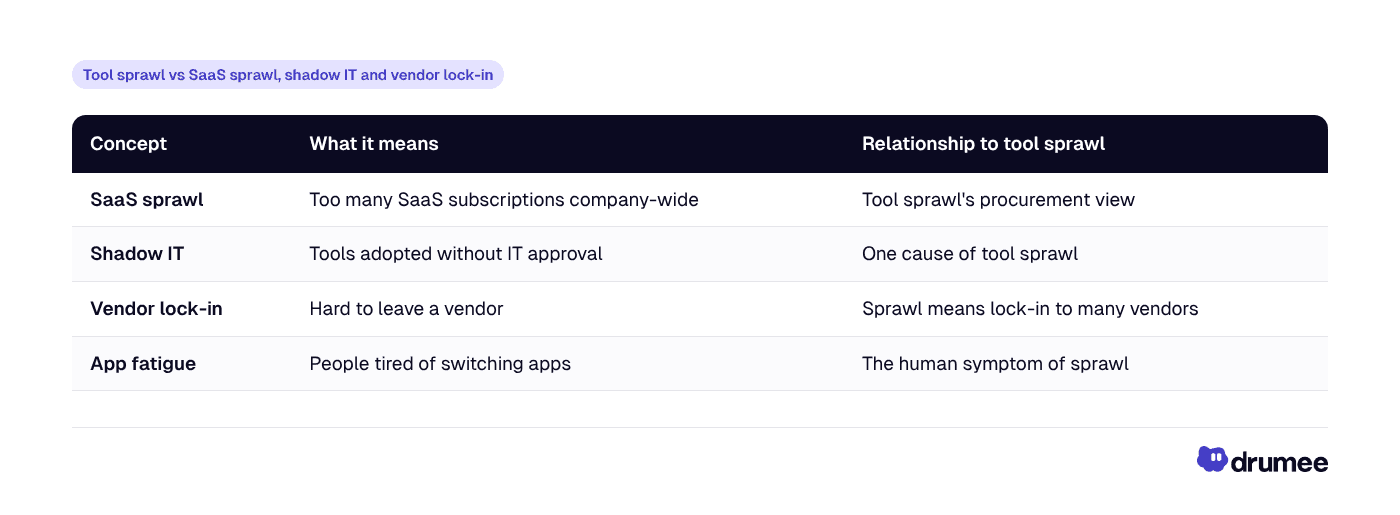
The useful distinction: SaaS sprawl is a finance problem, tool sprawl is a workflow problem. You can cut SaaS spend by cancelling unused licences and still have a fragmented workflow where every process crosses four apps. Lock-in is the other side of the same coin, and our guide on how to avoid SaaS vendor lock-in covers the exit-planning angle.
How to tell if your startup has tool sprawl
Before you fix anything, measure it. This five-question check takes about fifteen minutes with your card statements open.
- Count the tools. List every app with a paid seat or company data in it. Include free tiers people actually use.
- Count the overlaps. Mark any capability covered by two or more tools: chat, file storage, tasks, docs, video meetings.
- Trace one workflow. Pick a common process, such as onboarding a client, and count how many apps it touches from start to finish.
- Count the processors. How many of those tools hold customer or employee personal data, and do you have a signed DPA for each?
- Run the leaver test. If someone left today, how many admin panels would you need to open to remove their access?
Scoring: if one workflow touches four or more apps, or the leaver test needs more than three admin panels, tool sprawl is costing you more than the licence bill suggests.
How to fix tool sprawl: consolidate by layer, not by app
The common mistake is to attack tool sprawl app by app: cancel one subscription here, merge two boards there. That cuts cost slightly and leaves the fragmented workflow untouched. The better approach is to consolidate by layer of work.
Most team stacks have five layers. A unified workspace should own the ones that share context, and specialist tools should keep the ones that do not.
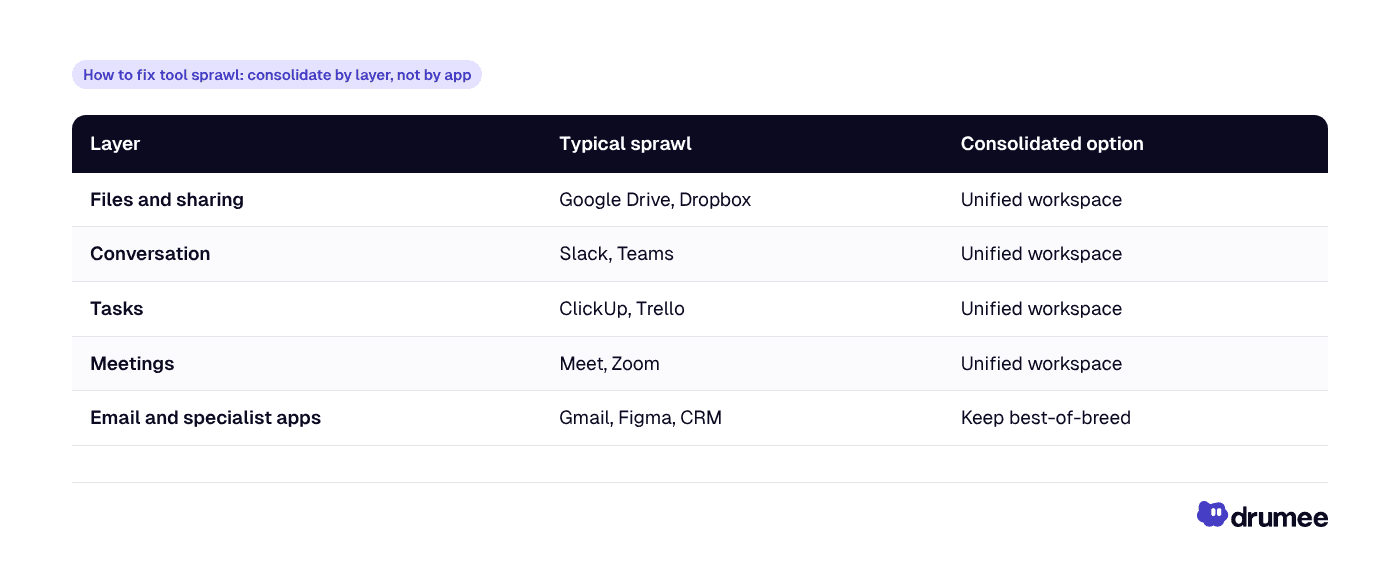
The first four layers belong together because they describe the same work. A file is discussed in chat, turned into a task and reviewed in a meeting. Splitting those across vendors is what creates the context-switching tax. If chat is the layer you want to bring in-house first, our comparison of self-hosted Slack alternatives covers the options.
A four-step tool consolidation framework for startups
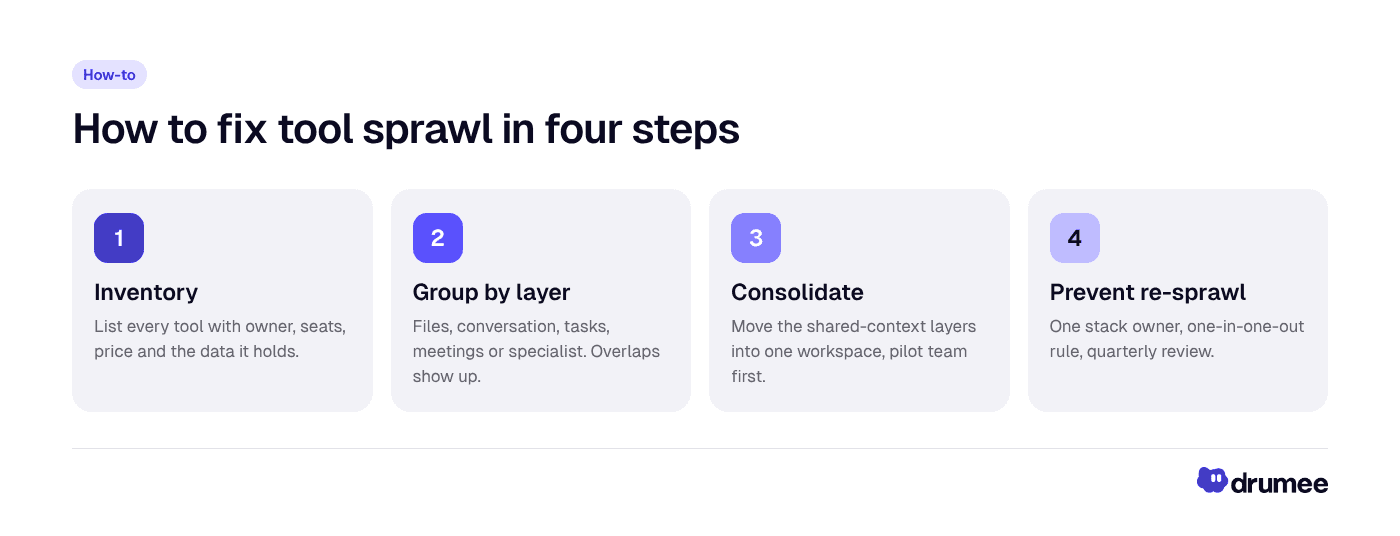
Fixing tool sprawl is a short inventory, a decision per layer, a consolidation and a governance rule that keeps the stack small.
- Inventory. Build the list from the five-question check above, with owner, seats, price and data held for each tool. This becomes your record of processors too.
- Group by layer. Map each tool to files, conversation, tasks, meetings or specialist. Overlaps become obvious once tools sit side by side.
- Consolidate the shared-context layers. Move files, chat, tasks and meetings into one workspace, starting with a pilot team. Keep email and true specialist tools where they are.
- Prevent re-sprawl. Name one owner for the stack, adopt a "one in, one out" rule for new tools, and review the list every quarter.
Step 4 is the one most teams skip, and it is the reason sprawl comes back. The detailed migration timeline, cancellation order and three cost scenarios are in our step-by-step SaaS consolidation guide.
How a unified sovereign workspace fixes tool sprawl
A unified workspace fixes the workflow problem. A sovereign one also fixes the cost and compliance problems, because the pricing and data control are designed differently.
That is the case for Drumee. It is a sovereign workspace where files, chat, task boards, meetings and admin run in one system you control. In Drumee's own words, a shared folder holds "the files, conversations, tasks, meetings, and access controls related to that work", as described in our overview of the Drumee self-hosted workspace.
Here is how that maps to each cost layer of tool sprawl:
- Cost: flat team pricing instead of per seat. Free at $0 for up to 3 users, Pro at $5/month, Team at $29/month for up to 10 users and Business at $99/month for unlimited users, with yearly billing saving 50% (pricing).
- Context: the file, the conversation about it and the task it creates sit in the same place, which is the mechanism behind Pixelcraft Labs' customer-reported 70% drop in tab switching.
- Control: one admin panel, audit logs, SSO/SAML and API access on the Business plan, so offboarding and audits happen in one place.
- Sovereignty: choose Drumee-hosted managed plans or a self-hosted Sovereign Node on your own infrastructure, which removes the third-party processor for your workspace data entirely.
What consolidation does not fix
Honesty matters here, because overselling consolidation is how teams end up re-sprawling six months later.
- Email stays separate. Drumee is not an email provider, so most teams keep Google Workspace or another host for mail, often on a cheaper plan.
- Real-time co-editing of docs and spreadsheets is where Google Docs and Sheets remain strongest.
- A heavy Notion wiki may be worth keeping. Notion's docs and wiki experience is excellent, and you should decide based on how much of your company knowledge lives there.
- Specialist apps such as design, CRM and accounting tools are not part of the sprawl problem if each one has a clear owner and no overlap.
The goal is not one app. It is one system for the work that shares context, and a short, owned list for everything else.
What consolidation looked like for three teams
Drumee customers describe the results in their own terms. Treat these as customer-reported outcomes, not controlled studies.
- Northstack Digital: CEO Daniel Weber reports a 48% cost reduction after SaaS costs had nearly doubled, plus a 60% productivity improvement.
- Brightlane Studio: CTO Lucas Meyer reports a 65% reduction in audit time, driven by data traceability in one system.
- Pixelcraft Labs: Product Manager Sofia Laurent reports a 70% reduction in tab switching.
Each figure maps to one layer of tool sprawl: cost, compliance and context. That is the pattern to look for when you evaluate any consolidation option.
Who should fix tool sprawl first?
Not every team needs to act now. Tool sprawl is most expensive in three situations.
- The founder at a 12-person agency who just crossed a plan threshold and watched three bills jump at once. Flat pricing caps the cost line before the next hiring round.
- The CTO at a 20-person product studio answering a customer security questionnaire. Fewer processors means a shorter answer and a cleaner record of processing.
- The ops lead at a seed-stage startup who spends Friday afternoons removing leavers from five admin panels. One workspace makes offboarding a single step.
If your team is three people on free tiers, the sprawl is not expensive yet. That is actually the best moment to choose the consolidated setup, before the switching cost grows. For a wider view of why teams are moving their whole workspace off rented infrastructure, see team workspaces without SaaS dependency.
FAQ
What is tool sprawl?
Tool sprawl is the uncontrolled growth of overlapping software tools in a team, where each problem gets its own app and per-seat bill. It raises costs, scatters company data across vendors and adds context switching. In EU startups it also multiplies GDPR work, because every tool holding personal data is another processor to manage.
How do I consolidate SaaS tools into one workspace?
Inventory every tool, group them by layer of work (files, chat, tasks, meetings, specialist), then move the shared-context layers into one workspace with a pilot team first. Keep email and true specialist apps. Finally, name one owner for the stack and review it quarterly so sprawl does not return.
Why are my SaaS costs so high for a small team?
Per-seat pricing multiplies every hire across every tool. A common four-tool stack of Google Workspace, Slack, Notion and ClickUp costs $47.55 per user per month on monthly list prices, so a 10-person team pays $5,706 a year before adding design, CRM or AI tools. Flat team pricing breaks that multiplication.
Is tool sprawl the same as shadow IT?
No. Shadow IT means tools adopted without approval, and it is one cause of tool sprawl. Tool sprawl also includes approved tools that overlap or split one workflow across several apps. You can eliminate shadow IT completely and still have tool sprawl if every process crosses four approved tools.
Does consolidating tools help with GDPR?
It helps by shrinking the surface you govern. Fewer tools means fewer data processing agreements under Article 28, fewer sub-processor lists and fewer systems in your record of processing. It does not make you compliant on its own; you still need lawful bases, retention rules and security measures.
Conclusion: fix the layer, not the invoice
Tool sprawl starts as a few sensible sign-ups and ends as a per-seat bill that grows with every hire, a workday broken by roughly 1,200 app toggles, and a GDPR map with a processor for every tab. Cancelling a licence or two treats the invoice. Consolidating the files, chat, tasks and meetings layers treats the cause.
A sovereign workspace adds the two things a plain all-in-one cannot: flat pricing that does not punish growth, and the option to run everything on your own infrastructure. That is the full triple of cost, control and sovereignty.
Next step: start on the Drumee Free plan with up to 3 users, move one real workflow into it, and count how many tabs you no longer open.
Keep reading
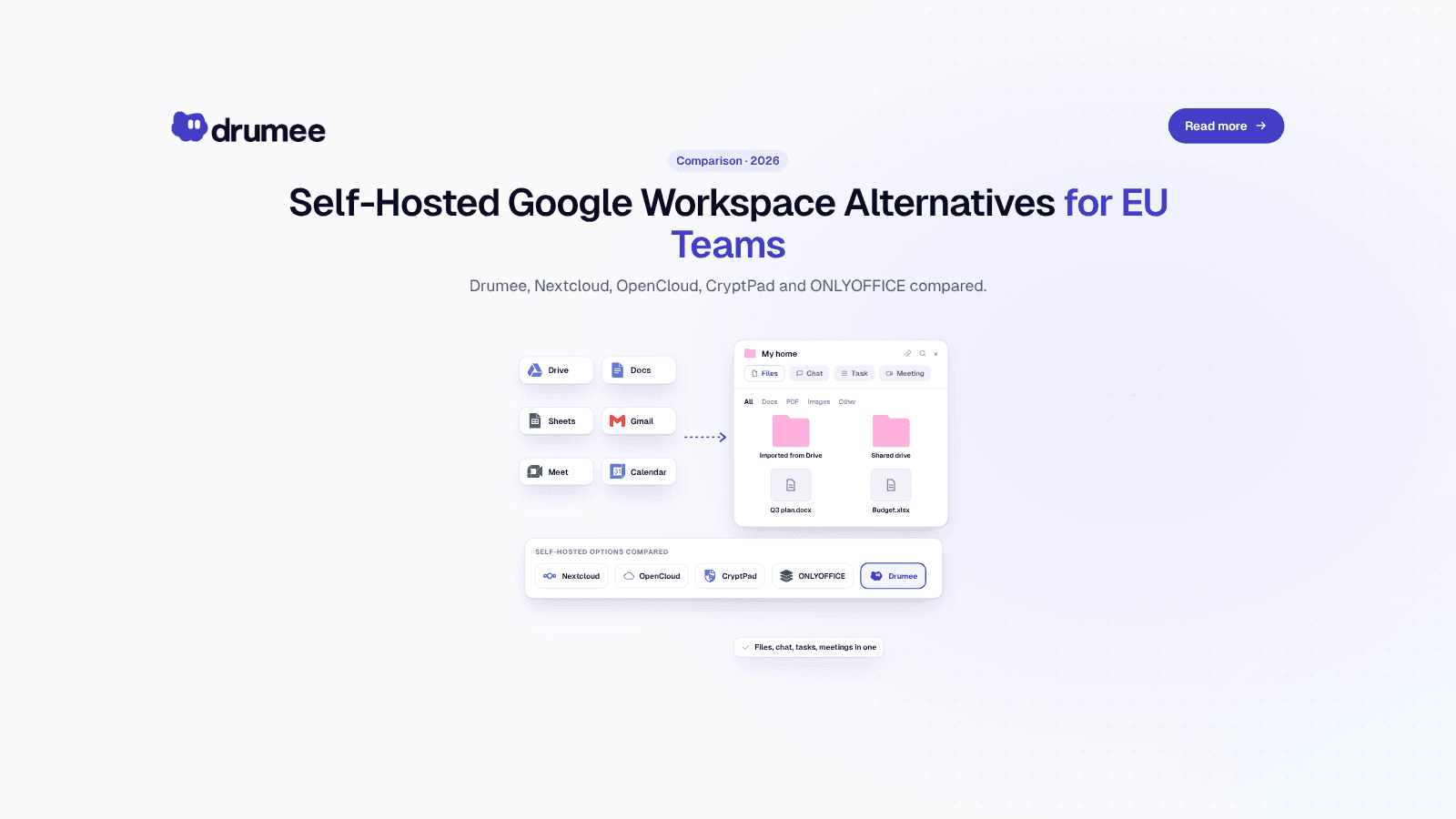
Self-Hosted Alternatives to Google Workspace: 2026 Guide for EU Teams
Google Workspace is the default office stack for most European startups. It is also a US-controlled service whose list price went up in January 2025, whose data sits under US legal reach, and whose exit path takes days of admin work. For a growing...
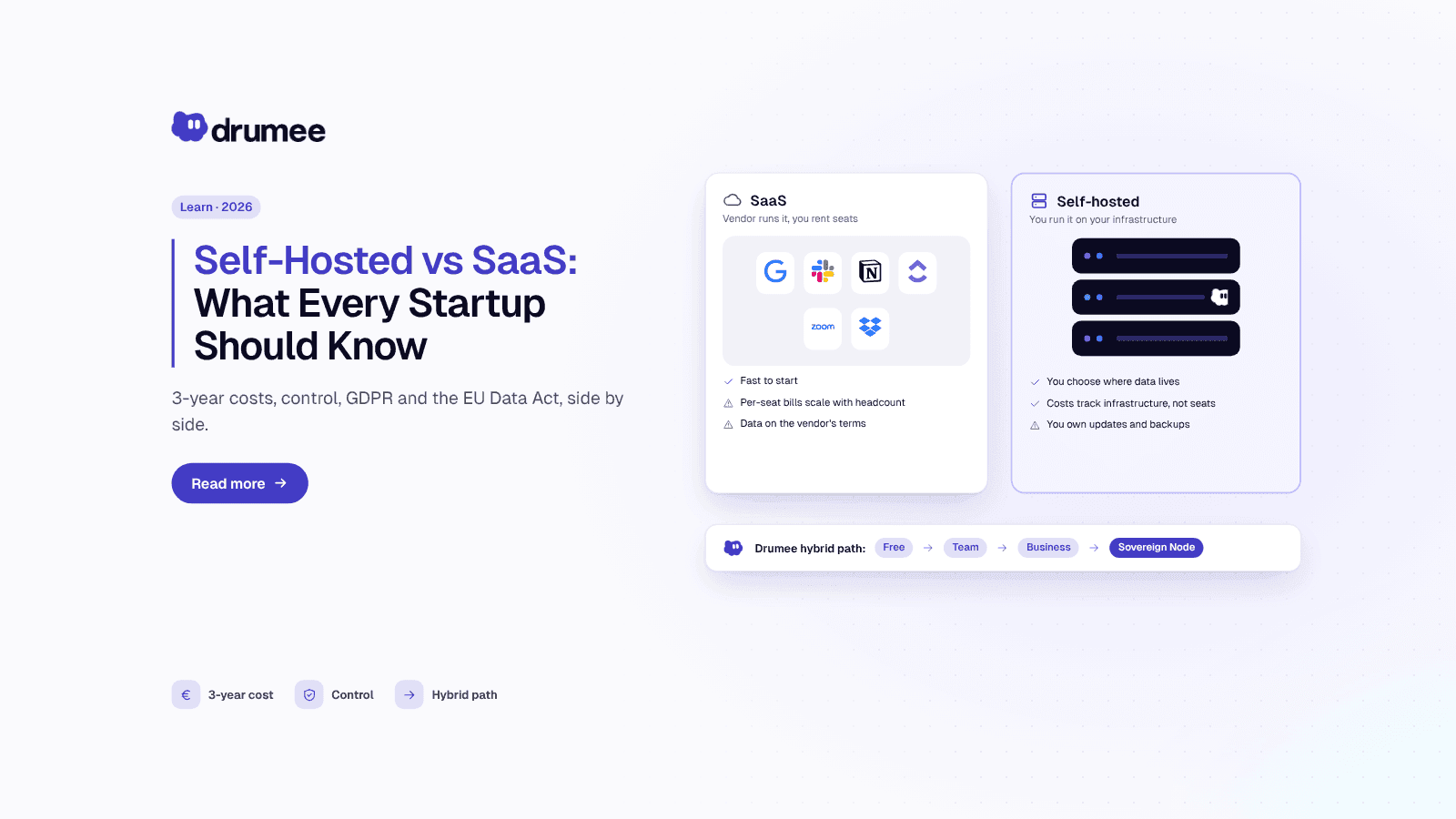
Self-Hosted vs SaaS: What Every Startup Should Know Before Choosing
Every startup makes the self-hosted vs SaaS decision, usually without noticing. The first tool someone signs up for with a company card becomes the default, and three years later the team is renting a dozen per-seat products it never consciously c...
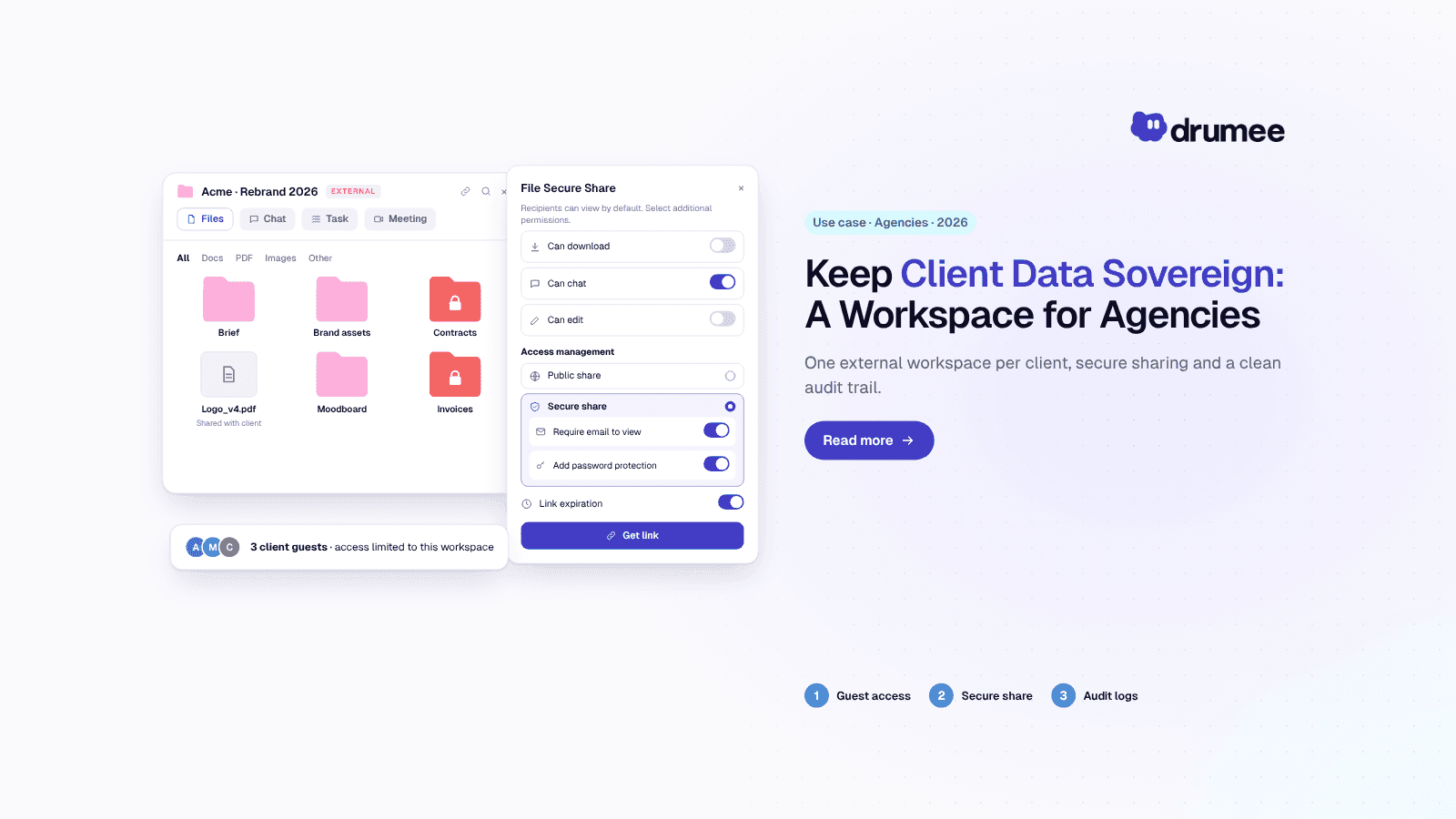
Self-Hosted Workspace for Agencies: How to Keep Client Data Sovereign
An agency's real product is trust. Clients hand over unreleased campaigns, product roadmaps, customer lists and source files, usually under an NDA, and expect them to stay exactly where they were promised. Then the work spreads across a shared dri...