
Self-Hosted Workspace for Agencies: How to Keep Client Data Sovereign
An agency's real product is trust. Clients hand over unreleased campaigns, product roadmaps, customer lists and source files, usually under an NDA, and expect them to stay exactly where they were promised. Then the work spreads across a shared dri...
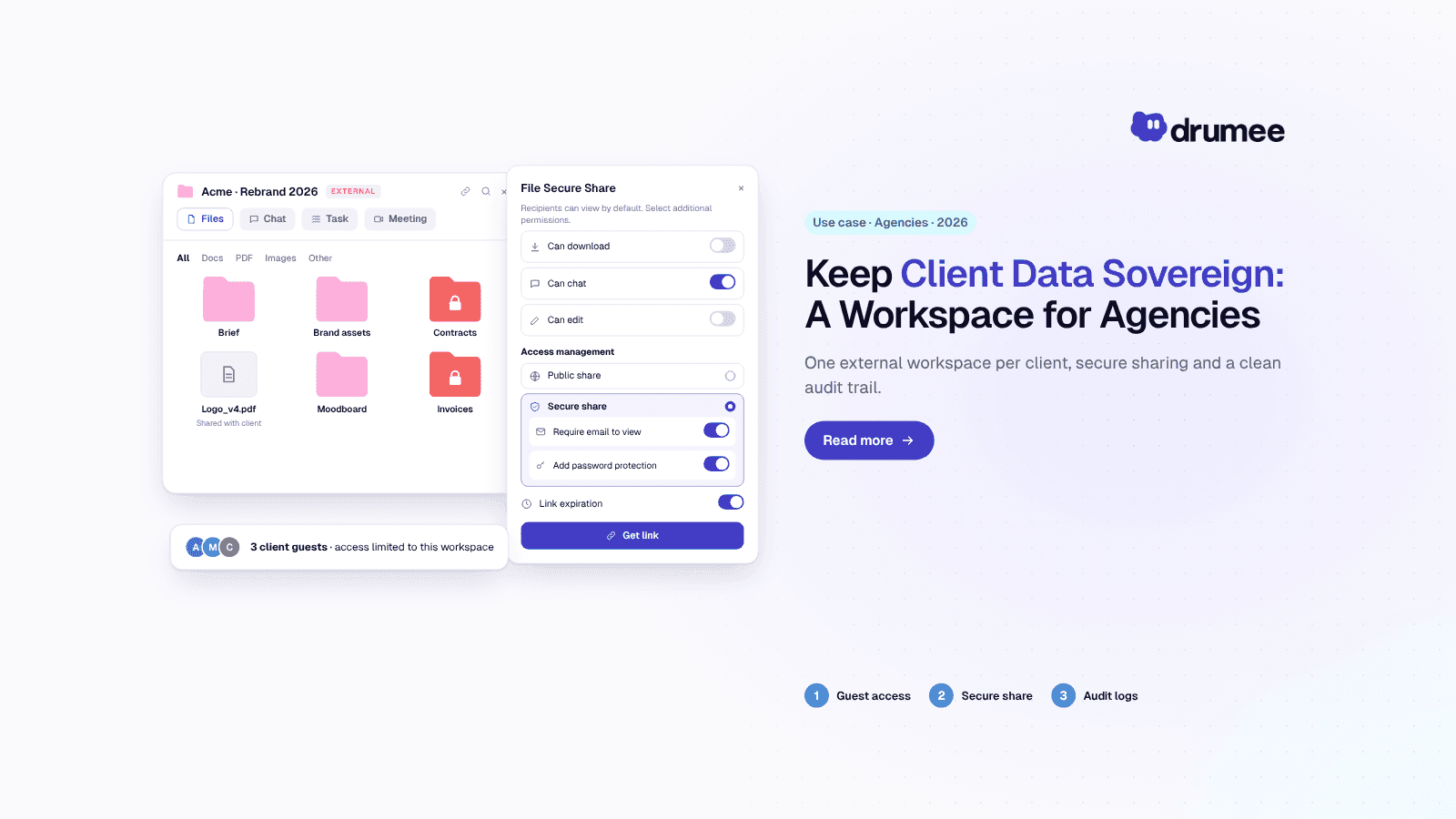
Agencies keep client data sovereign by moving client work from scattered SaaS tools into one operator-controlled Drumee workspace with guest access, share…
An agency's real product is trust. Clients hand over unreleased campaigns, product roadmaps, customer lists and source files, usually under an NDA, and expect them to stay exactly where they were promised. Then the work spreads across a shared drive, two chat tools, a project board, a password manager and a dozen freelancer inboxes.
Agency client data protection is the discipline of keeping that material inside boundaries you can name, prove and close when the engagement ends. For EU agencies it is also a legal duty: when you handle a client's personal data, you are usually their processor under GDPR Article 28, and every tool you add becomes your client's problem too.
This guide is for agency founders, account directors and operations leads. It explains why client data is so hard to contain in a typical SaaS stack, how a sovereign workspace such as Drumee changes the picture, and gives you a setup checklist and three role scenarios you can apply this quarter.
How do I protect client data as an agency?
To protect client data as an agency, put every client's files, conversations and tasks in one workspace you control, give external people time-boxed guest access instead of open links, log who touched what, and remove access the day a project or contract ends. Under GDPR, sign an Article 28 agreement and keep your sub-processor list short.
That answer has three parts: contain, control and prove. Containment means fewer places where client data lives. Control means permissions that follow the client folder rather than the tool, and proof means audit logs you can hand to a client or a regulator without asking a vendor for help.
Drumee is best for agencies that want all three in one system. It combines files, chat, task boards, meetings, guest access, share links, an admin panel and audit logs in a single sovereign workspace, and it can run on your own infrastructure as a Sovereign Node. Compared with stitching Drive, Slack and Notion together, the client boundary lives in one place you operate.
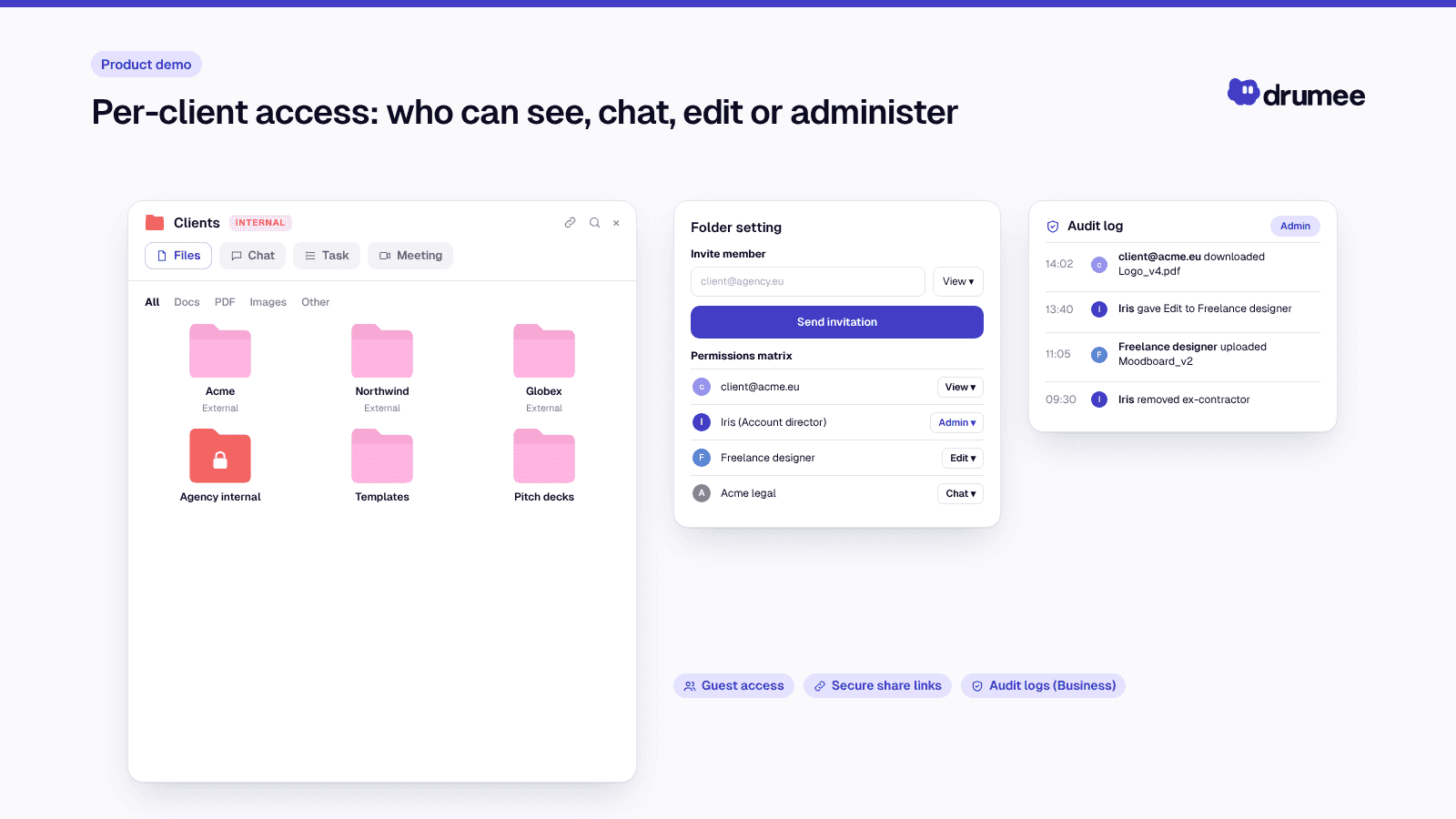
Per-client access: who can see, chat, edit or administer.
Why agency client data protection is harder than it looks
Agencies sit in an awkward position. You are not the owner of most of the data you handle, yet you carry the obligations and the reputational damage when it leaks. Three layers of duty stack on top of each other.
Layer 1: Client NDAs and IP clauses
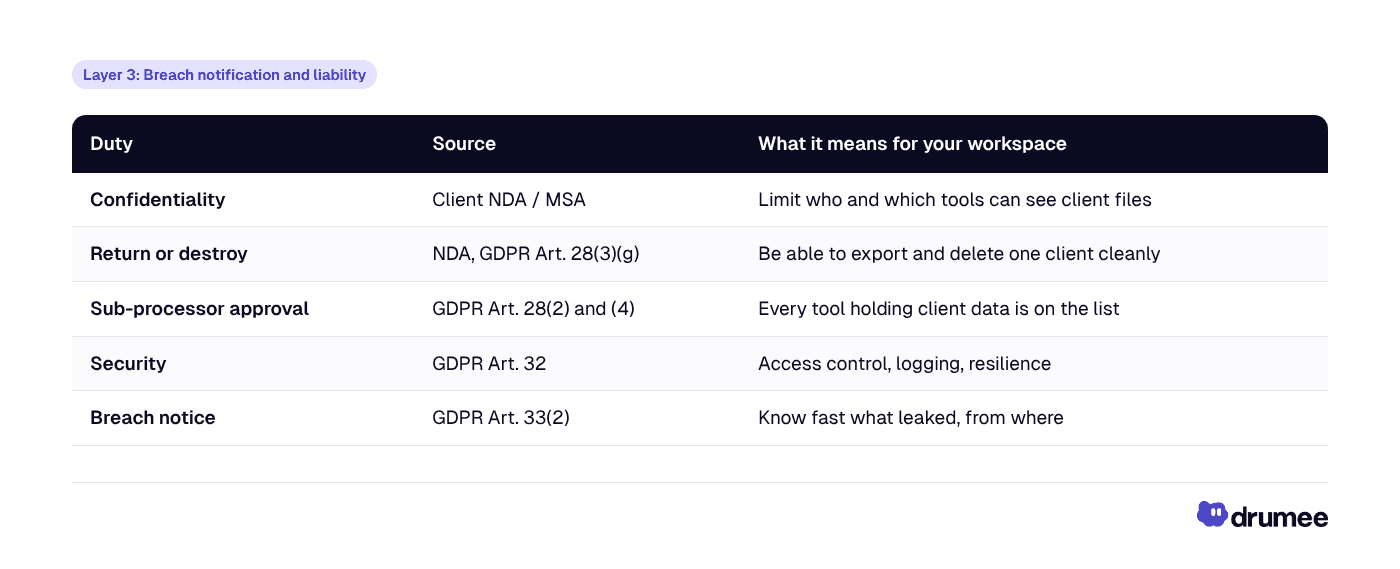
Most master service agreements and NDAs restrict who can see client material, require you to return or destroy it at the end of the engagement, and limit disclosure to third parties. Every SaaS tool that stores a client file is, in practice, a third party with access to that file.
Client IP adds a second dimension. Unreleased creative, brand strategy, product specs and source code often carry more commercial value than any personal data, and a leak can end a relationship even when no regulator is involved.
Layer 2: GDPR processor obligations
When your agency processes personal data on a client's behalf, such as a customer list for a campaign, CRM exports, user-research recordings or newsletter audiences, the client is the controller and you are the processor. The EDPB's Guidelines 07/2020 on controller and processor explain that the role follows the activity, so one agency can be a processor for campaign data and a controller for its own staff and sales records.
As a processor, Article 28 GDPR requires you to:
- Process personal data only on the client's documented instructions.
- Ensure everyone with access is bound by confidentiality.
- Apply the security measures required by Article 32.
- Engage sub-processors only with the client's prior written authorisation, and flow the same obligations down to them.
- Help the client respond to data-subject requests, breaches and impact assessments.
- Delete or return all personal data at the end of the service, and give the client the information it needs to audit you.
The sub-processor rule is the one agencies most often miss. Every tool that stores client personal data, from your file-sharing service to your chat app and project board, is a sub-processor your client is entitled to approve. A ten-tool stack means ten entries on that list, each with its own data-processing terms and its own sub-processors underneath.
Layer 3: Breach notification and liability
If something goes wrong, Article 33(2) requires a processor to notify the controller "without undue delay" after becoming aware of a personal data breach. Your client then has 72 hours to notify its supervisory authority, so you need to know quickly what was exposed, to whom and from which tool.
Processors are also directly exposed to fines. Under Article 83(4), breaches of processor obligations can reach €10 million or 2% of worldwide annual turnover, whichever is higher. Enforcement is real: the DLA Piper GDPR Fines and Data Breach Survey (January 2026) counts €7.1 billion in cumulative GDPR fines since May 2018.
Why sprawling SaaS stacks expose client IP
None of the popular collaboration tools is insecure by default in an absolute sense. The exposure comes from how agencies use many of them at once, with clients, freelancers and staff all moving between workspaces.
The scale is the first problem. Zylo's 2026 benchmarks put the median organisation at 240 SaaS applications. An agency is smaller, but the pattern repeats at its own scale: a drive, a chat tool, a board, a whiteboard, a file-transfer service, plus whatever each client insists on.
Guest access that never expires
Agencies invite clients and freelancers into their tools, and get invited into clients' tools in return. Guest accounts are easy to create and rarely reviewed. Six months after a pitch, the freelance illustrator may still see the client channel, and the client's former marketing manager may still see your internal board.
"Anyone with the link" sharing
Public share links are the fastest way to send a 4 GB video edit, which is why they multiply. Once a link is forwarded, you no longer control who opens it, and most teams have no inventory of which client files are reachable through an open link today.
Offboarding that misses half the stack
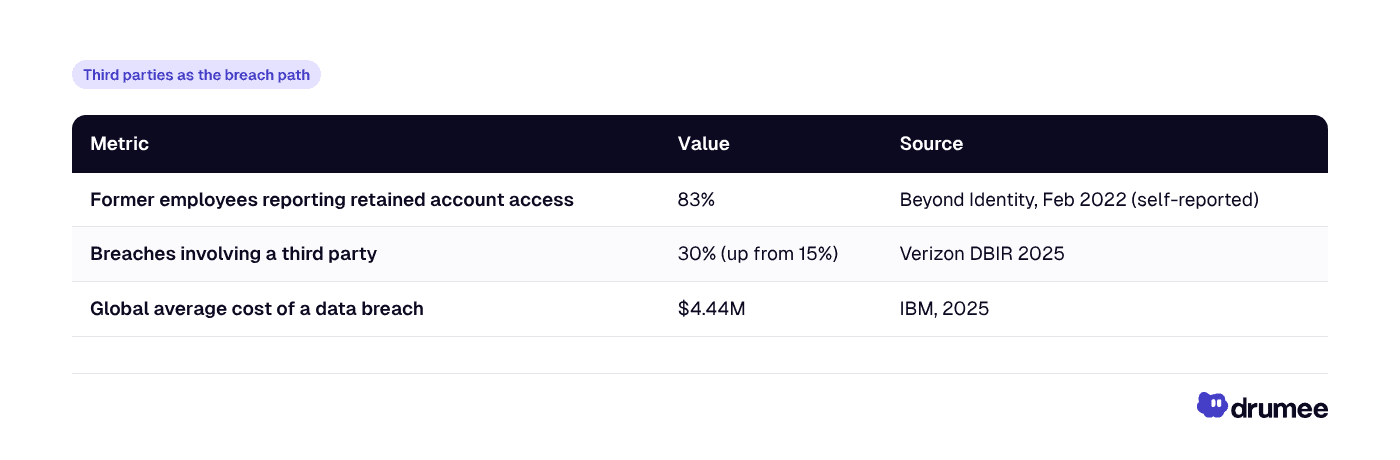
Offboarding is where sprawl hurts most, because access lives in many admin consoles. In a Beyond Identity survey of former employees (February 2022), 83% of respondents said they still had access to accounts from a previous employer, a figure also reported by Help Net Security. The figure is self-reported, but the pattern is familiar to anyone who has tried to remove a departing freelancer from eight tools.
Third parties as the breach path
Each tool is also a supplier with its own attack surface. Verizon's 2025 Data Breach Investigations Report found that third-party involvement in breaches doubled from 15% to 30%, as reported by Security Magazine. And when a breach happens, it is expensive: IBM's Cost of a Data Breach Report 2025 puts the global average at $4.44 million.
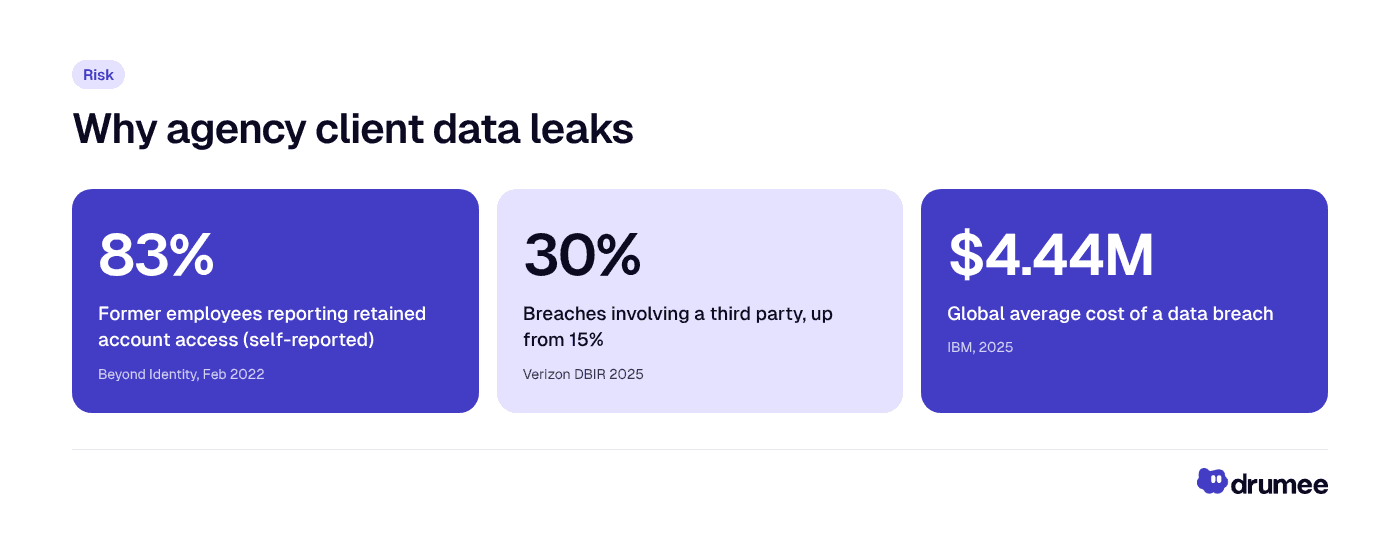
Access that outlives the relationship, suppliers as the breach path and the cost of a breach are the three numbers that make client data protection an operating priority for agencies.
Jurisdiction you did not choose
Finally, most mainstream collaboration suites are operated by US companies. The US CLOUD Act requires US providers to disclose data in their "possession, custody, or control" regardless of where it is stored. For an agency working with defence suppliers, public bodies or privacy-conscious European brands, that is a question clients increasingly ask in procurement.
For a deeper look at how sprawl builds up and what it costs, see our explainer on what tool sprawl is and how to measure it.
How Drumee helps agencies keep client data sovereign
Drumee is a sovereign workspace: files, chat, task boards, meetings and admin in one system that you control. For an agency, the important change is structural. The client boundary is a folder with its own permissions, conversations and tasks, rather than a set of matching channels, boards and drives in different tools.
As the product overview in Drumee: Your Data. Your Workspace. One System describes, a shared folder in Drumee is a working environment that holds the files, the chat about those files, the tasks that came out of them and the access controls in the same unit.
The capabilities that map to agency risks
- Guest access. Invite client stakeholders and freelancers into the specific work they need, instead of giving them a seat in the whole stack. The Pro plan already includes unlimited guests alongside up to three members.
- Share links. Send deliverables to people outside the workspace without moving them to a separate transfer service. Drumee offers a choice between Public Share and Secure Share, and a Secure Share link can be locked down with Require email to view, Add password protection and Link expiration, with an access list that shows who opened the file. Each link carries its own permissions (Can download, Can chat, Can edit), and folders have permission levels of View, Chat, Edit and Admin, as described in our overview of the Drumee self-hosted workspace.
- Audit logs. On the Business plan, audit logs give you a record of activity you can use when a client asks who accessed a file or when you investigate an incident.
- Admin panel. From the Team plan up, a central admin panel is where you add and remove members, which is what makes same-day offboarding realistic.
- SSO/SAML and API. On Business, single sign-on ties workspace access to your identity provider, so disabling one account closes access everywhere it is federated.
- Sovereign Node. For agencies whose clients require it, Drumee runs fully self-hosted on your own infrastructure, with unlimited users, full SDK access and a dedicated SLA. Read what the Drumee Sovereign Node is for the plan details.
How each deployment mode changes your GDPR position
Deployment mode matters for your sub-processor list. On Drumee-hosted plans (Free → Business), Drumee's operator is a sub-processor that replaces several separate tools, so your list gets shorter. On a Sovereign Node, the workspace itself adds no third-party processor; if you rent servers, that hosting provider is the sub-processor, and you choose its location.
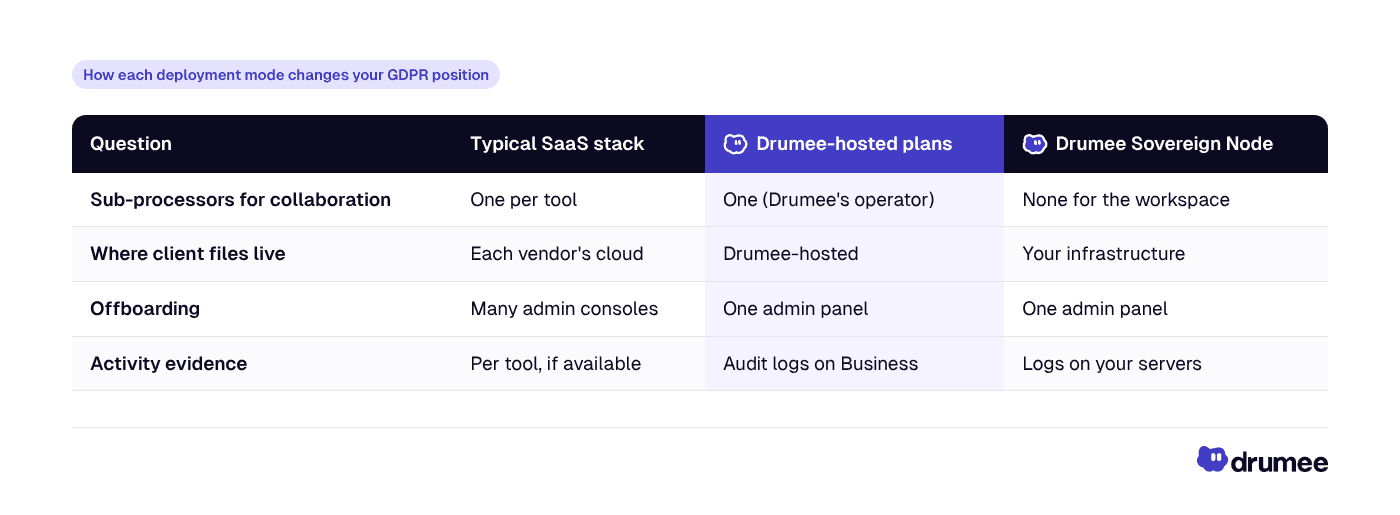
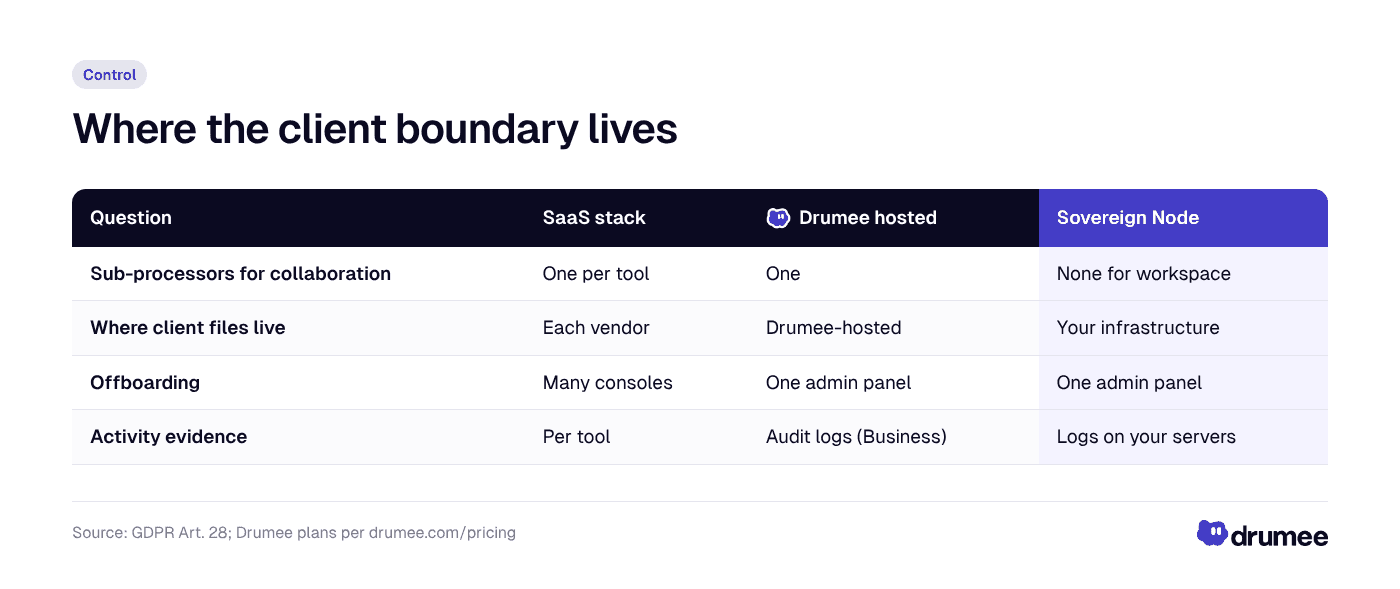
Moving from a sprawling stack to one sovereign workspace shortens your sub-processor list and puts offboarding and activity evidence in one place.
Drumee is developed by Thidima SA, a Swiss-registered company. The European Commission confirmed Switzerland's adequacy under GDPR in January 2024, which matters when clients ask where your software vendor sits. For the full controller-and-processor analysis, read Is Drumee GDPR compliant?.
Open source as an exit guarantee
Clients sometimes ask what happens to their data if your software vendor disappears. Drumee is open source under the AGPLv3 licence, as covered in our article on why AGPL guarantees sovereignty for self-hosted collaboration. A self-hosted deployment can keep running independently of the company that built it.
What this costs an agency
Cost is the third leg of the argument, after control and sovereignty. Agencies feel per-seat pricing sharply because headcount flexes with projects, and every freelancer who needs a real account is another seat.
Here is a transparent comparison for a 15-person agency using monthly-billing list prices, as of November 2026 (check each vendor page, as prices change):
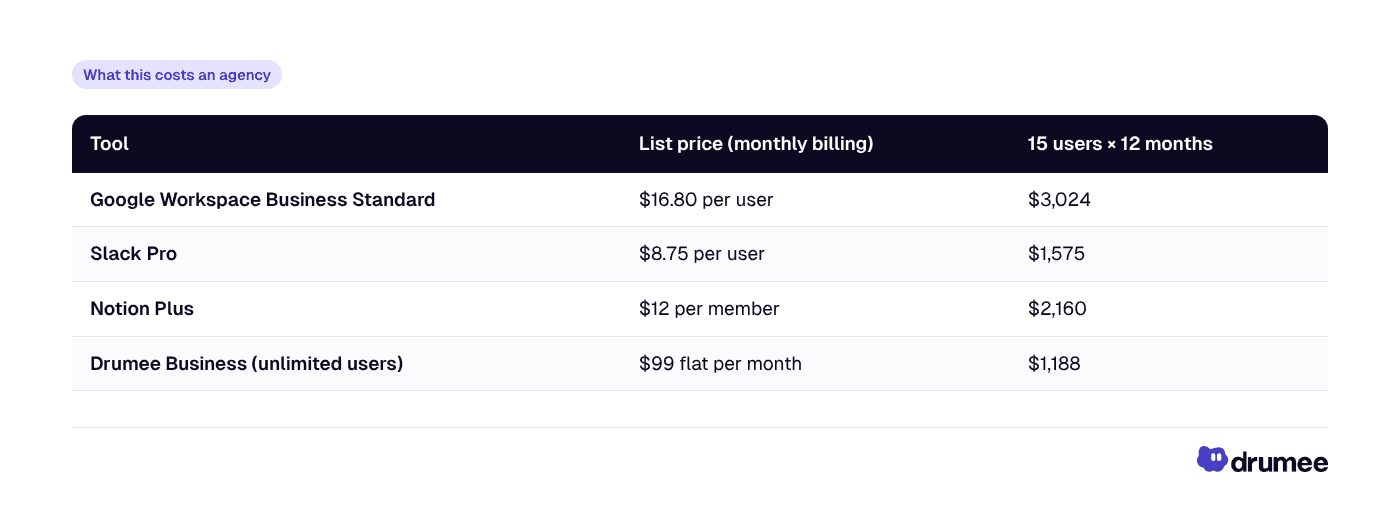
Sources: Google Workspace pricing, Slack's June 2025 pricing announcement, Notion pricing, and Drumee pricing.
The three-tool stack comes to $6,759 a year before any project-management, transfer or whiteboard tools. Drumee Business is $99 × 12 = $1,188 on monthly billing, or $594 with yearly billing, which saves 50%. An agency of ten or fewer can start on Team at $29 a month flat, which includes the admin panel; Business adds audit logs, SSO and API access.
Pricing is not the whole story. Google Docs and Sheets remain excellent for real-time co-editing, Slack has a huge integration ecosystem, and Notion offers best-in-class docs and wiki UX. The point is that agencies pay for those strengths per seat, multiplied across tools, while client data sprawls across all of them.
Proof point: what audit time looks like after consolidation
The clearest benefit agencies describe is faster answers when someone asks "who saw this, and when?". Brightlane Studio's CTO, Lucas Meyer, reports a 65% reduction in audit time after moving to Drumee, citing data traceability. This is a customer-reported result from Drumee's site testimonials, not an independent study.
Other Drumee customers report related gains. Northstack Digital's CEO Daniel Weber reports a 48% cost reduction after consolidating onto Drumee, and Pixelcraft Labs' Product Manager Sofia Laurent reports a 70% reduction in tab switching. Both are customer-reported.
A useful way to read these numbers: audit time falls when evidence sits in one system. If client files, the chat about them and the access history live in different tools, every audit is a reconstruction project.
Agency setup checklist: a sovereign workspace in eight steps
This checklist assumes you are moving client work into Drumee, but the first steps apply to any workspace decision. Each step lists the action, the result and why it matters to clients.
- Map client data and your role per activity. List each client, the personal data you process for them and whether you act as processor or controller. Result: you know which engagements need an Article 28 agreement and sub-processor approval.
- Choose the deployment mode. Team ($29/month flat, up to 10 users) suits small studios; Business ($99/month, unlimited users) adds audit logs and SSO; a Sovereign Node suits agencies whose clients require self-hosting. Result: your sub-processor list matches what clients will accept.
- Create one workspace folder per client. Keep files, chat, tasks and meetings for that client inside it, with permissions set at folder level. Result: "return or destroy" becomes one export and one deletion, not a hunt across tools.
- Set a guest-access policy. Invite client stakeholders and freelancers as guests to the specific folder, never to the whole workspace, and give each guest an owner on your team. Result: every external person has someone accountable for removing them.
- Replace open links with controlled share links. Use workspace share links for deliverables and avoid public "anyone with the link" sharing in other tools. Result: you can list which client files are shared externally.
- Turn on audit logs and SSO (Business or Sovereign Node). Connect your identity provider and agree a monthly log review for high-sensitivity clients. Result: you can answer access questions in minutes and spot anomalies early.
- Write the offboarding runbook. When a person leaves or a project ends, remove them from the admin panel and identity provider the same day, and review their guest invitations. Result: no lingering access of the kind the Beyond Identity survey describes.
- Document it for clients. Add Drumee (or your hosting provider, for a Sovereign Node) to your sub-processor list, describe your Article 32 measures and set an end-of-contract deletion date per client. Result: procurement questionnaires get faster, and renewals carry less friction.
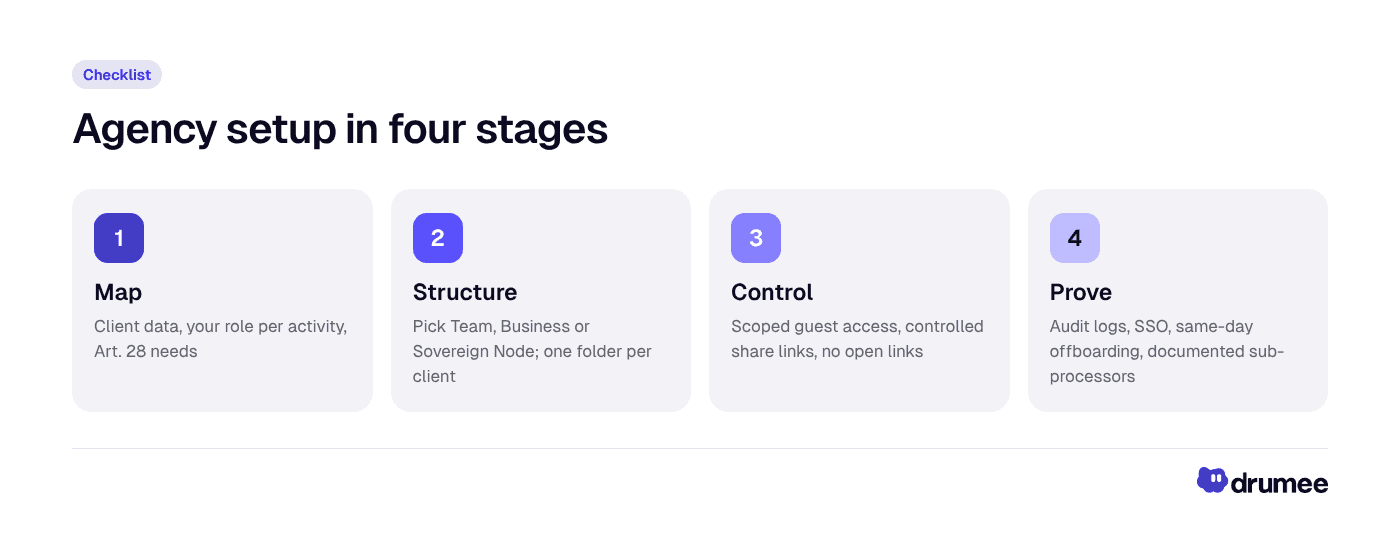
The eight steps group into four stages: map, structure, control and prove.
If your client files still live in Google Drive, Drumee's published product overview describes a one-click Google Drive migration that preserves the original folder hierarchy. Plan the move per client so each folder arrives with its permissions set, and see how to quit Google Workspace without losing data for the export side.
Common mistakes to avoid
- Treating the NDA as the only control. An NDA defines obligations; it does not stop a forwarded link. Pair it with technical controls.
- Inviting freelancers as full members. This multiplies seats and widens access. Guest access scoped to one client folder is usually enough.
- Forgetting your own sub-processors. Clients can object to a new tool. Add tools deliberately and tell clients before, not after.
- Self-hosting without an owner. A Sovereign Node puts infrastructure under your control, which also means patching, backups and monitoring are your responsibility or must be covered in the SLA.
Three role scenarios
The same workspace serves different people in different ways. Here is how three agency roles use it.
Agency founder at a 15-person brand and product studio
Problem: Two enterprise prospects send security questionnaires asking for a sub-processor list, data location and offboarding procedure. The honest answer today is "eight tools, three regions, it depends".
How Drumee helps: The founder moves client work onto Drumee Business, or onto a Sovereign Node for the prospect that requires self-hosting. The sub-processor list for collaboration shrinks to one entry, or to the agency's own hosting provider.
Outcome: The questionnaire answers become short and verifiable. On cost, the studio replaces roughly $6,759 a year in per-seat Drive, Slack and Notion licences with $1,188 for Business on monthly billing, per the pricing table above.
Account director running three retained clients
Problem: A client's legal team asks who accessed the launch assets before an unexpected leak. The files sit in a shared drive, the approvals in chat, and the feedback in a board, each with different guest lists.
How Drumee helps: Each client has one folder with its own files, chat, tasks and guest list. With audit logs on Business, the account director can pull the activity record for that folder without filing a ticket with three vendors.
Outcome: The account director answers the client the same day with evidence, not reconstruction. This is the kind of audit-time gain Brightlane Studio reports (65%, customer-reported).
Freelance motion designer collaborating with the agency
Problem: The freelancer works with four agencies and has accounts in all their tools. Files are downloaded to a laptop because shared folders are hard to find, and access is rarely removed after projects end.
How Drumee helps: The agency invites the freelancer as a guest to one client folder. The brief, assets, chat and tasks sit in that folder, so there is less reason to download and re-upload files elsewhere.
Outcome: When the project closes, the account owner removes the guest from the folder in one step. The freelancer keeps a clean boundary between clients, which many freelancers now offer as a selling point.
What is the best GDPR compliant workspace for teams?
The best GDPR compliant workspace for teams is one that keeps your processor list short, lets you choose where data lives, logs access and lets you export and delete per client. Drumee fits agencies because it unifies files, chat and tasks, offers audit logs and guest access, and can run self-hosted as a Sovereign Node.
No tool makes you compliant on its own; compliance depends on your contracts, configuration and processes. For a broader view of the file-storage side, see our guide to GDPR-compliant file storage for teams and our overview of the self-hosted workspace for teams.
When Drumee may not be the right fit: if your agency lives inside a single client's Google Workspace or Microsoft 365 tenant by contract, or depends on a niche integration only one SaaS tool offers, consolidation may be limited. In that case, apply the checklist's guest, link and offboarding steps inside the tools you must use.
FAQ
Is an agency a data controller or a data processor under GDPR?
Usually a processor for the client personal data it handles on the client's instructions, such as campaign audiences or CRM exports. The same agency is a controller for its own staff, recruitment and sales data. The EDPB's Guidelines 07/2020 confirm the role depends on the activity, not the label in the contract.
Do I need my client's permission to use a new collaboration tool?
If the tool will store personal data you process for that client, yes. Article 28(2) GDPR requires the controller's prior written authorisation, either specific or general with notice and a chance to object. Keeping client work in one workspace reduces how often you need to ask.
How do I give freelancers access to client files safely?
Invite them as guests to the specific client folder rather than as full members, give each guest an internal owner, and remove access the day the project ends. Use controlled share links for one-off deliveries instead of open public links.
Is a self-hosted workspace more secure than SaaS for agencies?
Not automatically. Self-hosting gives you control over location, access and logs, but you also take on patching, backups and monitoring unless they are covered by a support agreement. The security gain for agencies comes mostly from fewer tools, scoped guest access and one offboarding point.
How much does a GDPR compliant workspace cost for a small agency?
Drumee Team is $29 per month flat for up to 10 users, and Business is $99 per month for unlimited users with audit logs and SSO; yearly billing saves 50%. A Sovereign Node is priced through Drumee sales.
Conclusion
Before consolidation, an agency's client data lives in many tools, behind guest lists nobody reviews, with offboarding spread across consoles and a sub-processor list that grows with every project. After, each client has one folder you control, guests and links have owners, audit logs answer access questions, and the Sovereign Node option lets you keep the whole workspace on your own infrastructure.
The cost case follows: a 15-person agency can replace about $6,759 a year in per-seat licences with $1,188 on Drumee Business, while cutting the number of places client IP can leak.
Compare the Team, Business and Sovereign Node plans on the Drumee pricing page and start with the client whose data you would least like to explain to a regulator.
Keep reading
Self-Hosted Alternatives to Google Workspace: 2026 Guide for EU Teams
Google Workspace is the default office stack for most European startups. It is also a US-controlled service whose list price went up in January 2025, whose data sits under US legal reach, and whose exit path takes days of admin work. For a growing...
What Is Tool Sprawl and How to Fix It in 2026
Nobody decides to build a messy stack. A startup adds Slack on day one, Google Drive on day two, Notion when the wiki gets real and ClickUp when the roadmap stops fitting in a spreadsheet. Two years later, a simple question like "where did we deci...
Self-Hosted vs SaaS: What Every Startup Should Know Before Choosing
Every startup makes the self-hosted vs SaaS decision, usually without noticing. The first tool someone signs up for with a company card becomes the default, and three years later the team is renting a dozen per-seat products it never consciously c...