
How EU Startups Cut SaaS Costs by 48% with a Sovereign Workspace
Most startups do not decide to spend thousands a year on software. They add one tool per problem, pay per seat, and discover the total at the first serious budget review. If you want to reduce SaaS costs at a startup, the biggest lever is rarely a...
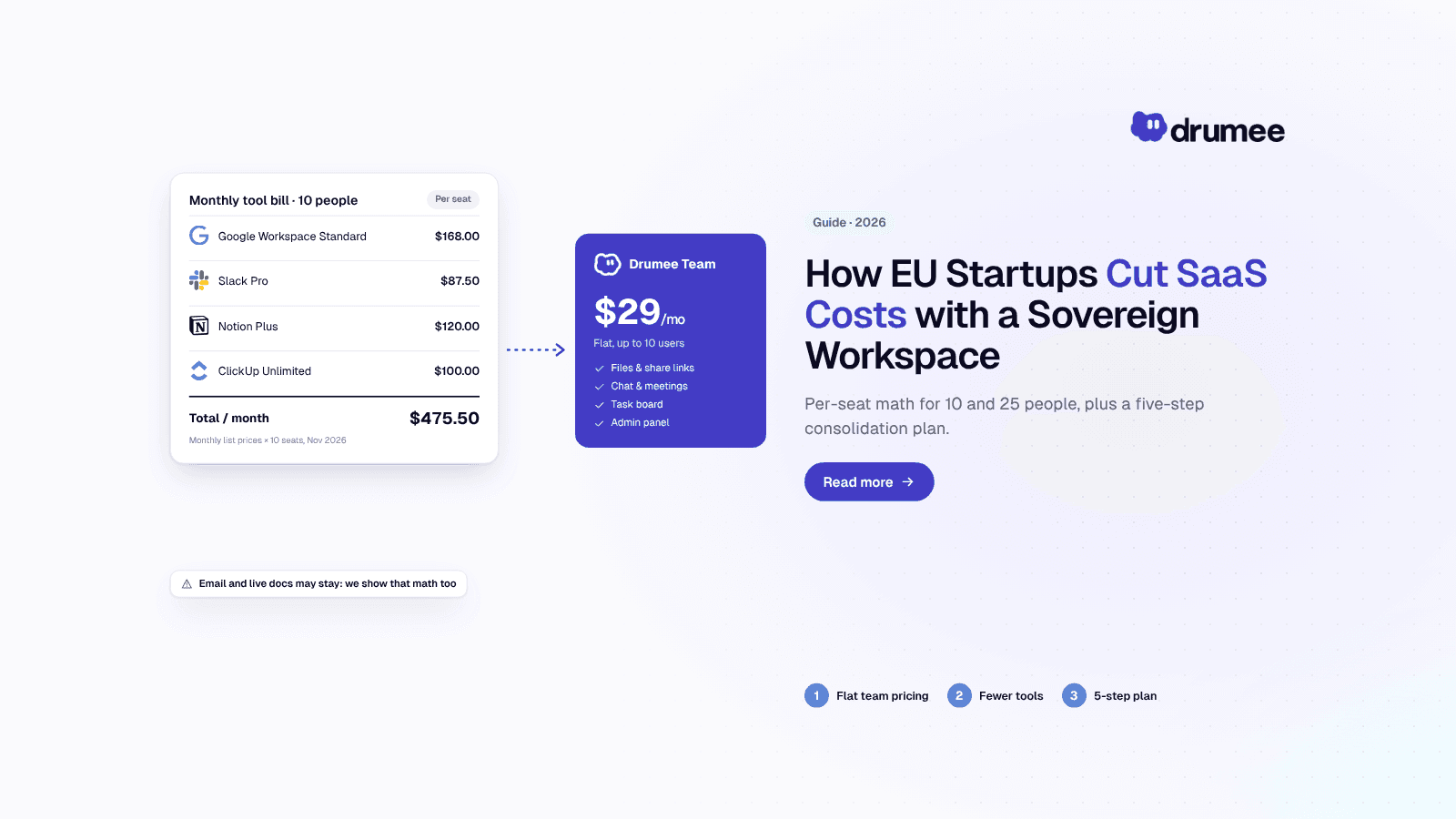
A 10-person startup paying monthly list prices spends $5,706 a year on a four-tool stack; consolidating chat, files and tasks onto Drumee Team cuts that to…
Most startups do not decide to spend thousands a year on software. They add one tool per problem, pay per seat, and discover the total at the first serious budget review. If you want to reduce SaaS costs at a startup, the biggest lever is rarely a better discount. It is running fewer overlapping tools.
This guide works through the per-seat math for a 10-person and a 25-person team on a typical stack: Google Workspace, Slack, Notion and ClickUp. It then compares that stack with a consolidated sovereign workspace, shows where consolidation works and where it does not, and gives you a five-step plan you can run in a quarter.
The headline number comes from one customer. Northstack Digital reports a 48% cost reduction after moving onto Drumee. That is their result, not a benchmark, and we will show you how to calculate your own instead of borrowing theirs.
How do you reduce SaaS costs for a startup?
Answer: To reduce SaaS costs at a startup, audit every paid tool, map where tools overlap (chat, files, tasks, meetings), pilot one workspace that covers the overlap, migrate in phases, then cancel the redundant seats. Per-seat pricing scales with headcount, so replacing several per-seat tools with one flat-priced workspace cuts the largest recurring line.
That is the short version. The rest of this guide is the long version, with numbers you can check.
Where Drumee fits: Drumee is a sovereign workspace that combines files, chat, meetings, task boards and admin in one system, priced flat rather than per seat. Team costs $29/month for up to 10 users and Business costs $99/month with unlimited users, on Drumee-hosted plans or a self-hosted Sovereign Node. For EU startups, it targets the three costs that compound together: money, control and GDPR exposure.
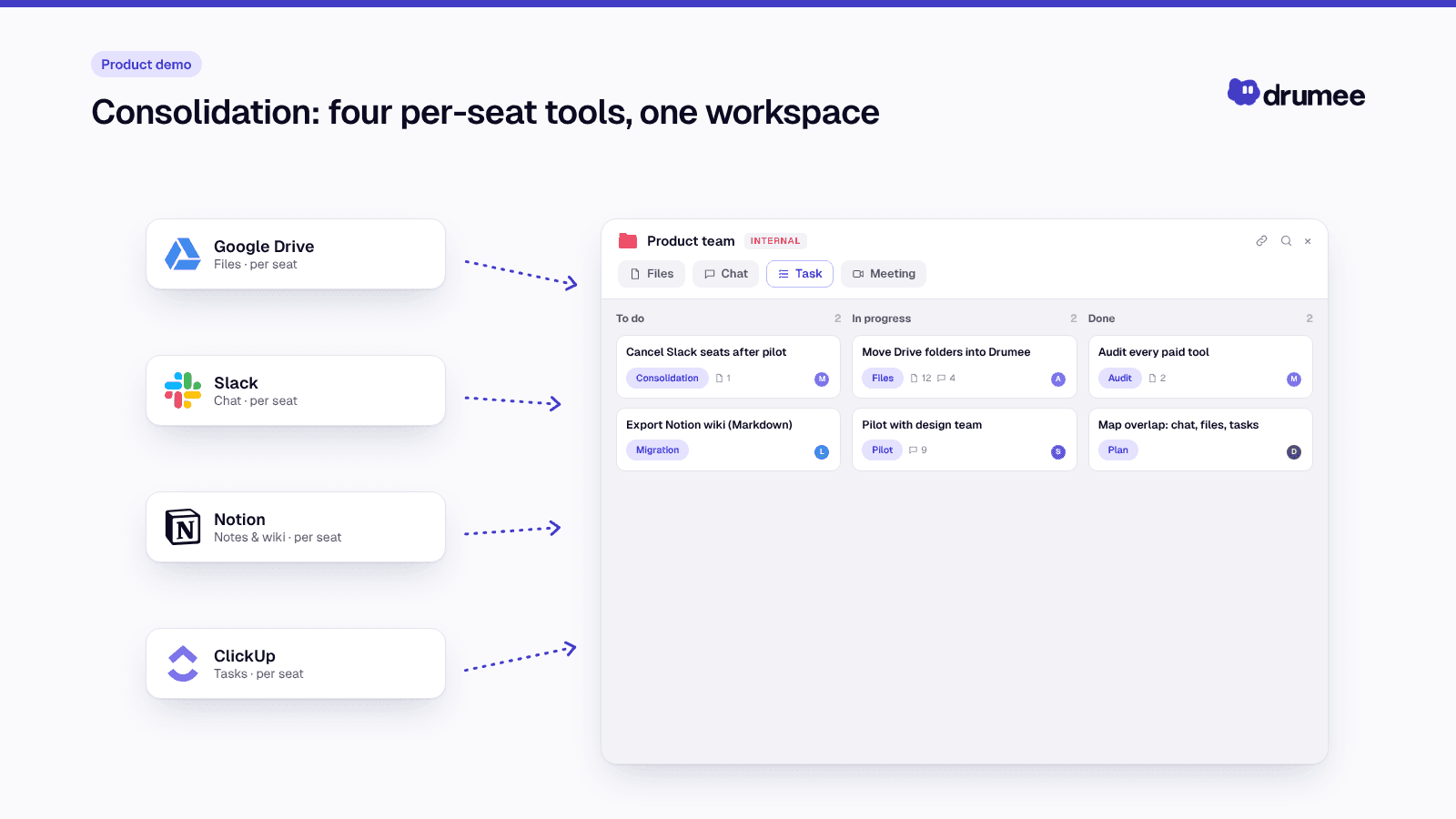
Consolidation: four per-seat tools, one workspace.
The SaaS cost spiral: why per-seat pricing hurts small teams
Per-seat pricing looks cheap at three people. Every hire then multiplies every tool, so your software bill grows in lockstep with headcount, before anyone negotiates or upgrades a tier.
The broader market makes this worse. According to Zylo's 2026 SaaS Management Index, median SaaS spend has reached $9,455 per employee per year. Gartner forecasts worldwide software spending of $1.44 trillion in 2026, up 15.1%, with much of that growth coming from price increases and bundled AI rather than new usage, as reported by SaaStr.
Startups feel those price moves directly. Three recent examples from the tools in our model:
- Google Workspace raised Business Starter, Standard and Plus from $6/$12/$18 to $7/$14/$22 per user per month (annual) when it bundled Gemini, with flexible monthly plans now at $8.40/$16.80/$26.40, per Google Workspace Admin Help.
- Slack raised Business+ from $12.50 to $15 per user per month (annual) in its June 2025 pricing announcement.
- Notion now bundles AI into its Business plan, which lists at $24 per member per month on monthly billing, per Notion's pricing page.
None of this is unfair. These are strong products, and vendors are adding real capability. But if your team uses a fraction of the new features, you are paying for someone else's roadmap.
What tool sprawl costs a 10-person team per year
Let's do the math on the stack most early-stage EU teams describe: email and docs on Google, chat on Slack, wiki on Notion and project management on ClickUp. We use monthly-billing list prices so every vendor is compared on the same terms. Prices are as of November 2026; check each vendor page before you budget.
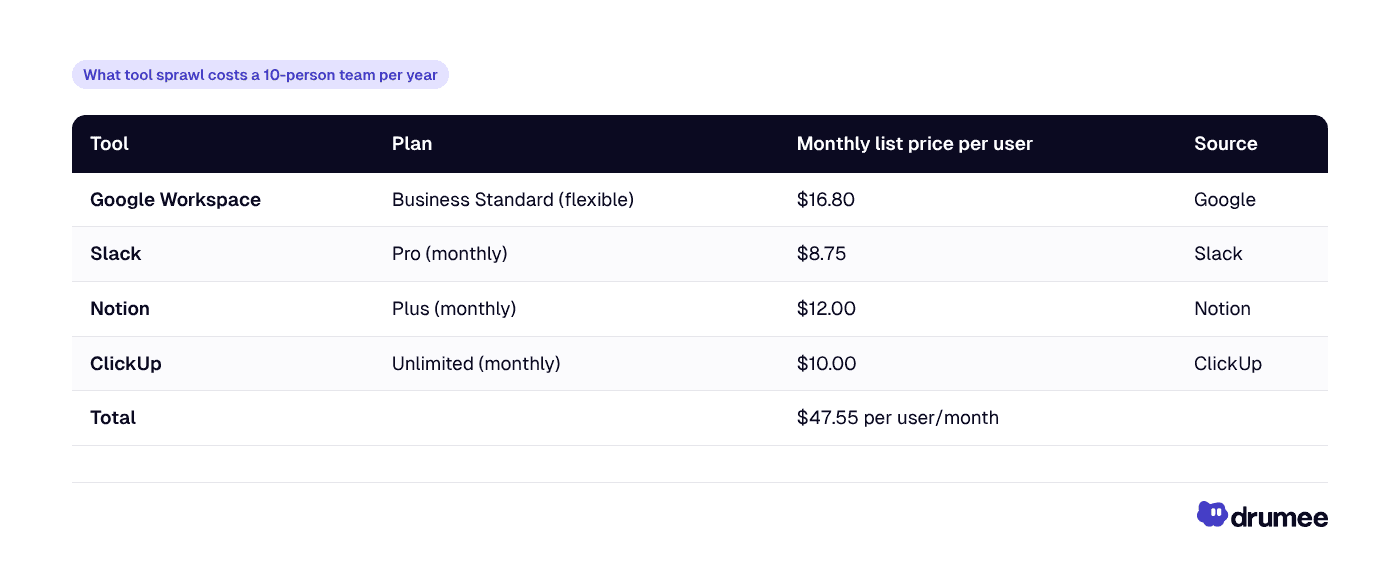
Now multiply it out. The formula is simply seats × combined per-user price × 12 months.
- Per user: $16.80 + $8.75 + $12.00 + $10.00 = $47.55/month
- 10 users: $47.55 × 10 = $475.50/month
- Per year: $475.50 × 12 = $5,706/year
That figure is far below Zylo's $9,455 per-employee median, because it covers only four core tools. Your real total will include design, CRM, analytics, password management and AI subscriptions on top. Treat $5,706 as the floor of the collaboration layer, not your whole software bill.
The same stack at 25 people
Startups that raise a seed round often go from 10 to 25 people in a year. Per-seat costs follow without negotiation.
- 25 users: $47.55 × 25 = $1,188.75/month
- Per year: $1,188.75 × 12 = $14,265/year
Hiring 15 people added $8,559 a year to the collaboration stack alone. Nobody signed a new contract to make that happen.
The hidden cost: context switching
Licence fees are the visible cost. The less visible one is attention lost to moving between tools.
A Harvard Business Review study of 137 workers at three Fortune 500 companies found people toggled between apps and websites roughly 1,200 times a day. The time spent reorienting after each switch added up to just under four hours a week, about 9% of working time.
Four hours a week across a 10-person team is roughly 40 hours, close to one full-time employee's working week, lost every week to reorientation, before anyone has done any actual work.
Tool count also grows quietly at company level. Zylo's benchmarks put the average organization's SaaS portfolio at 305 applications, with a median of 240. A startup is nowhere near that, but the pattern starts early: one tool per problem, nobody owning the whole stack.
Fewer tools does not automatically mean less switching. But when files, conversations and tasks live in one interface, the switches that remain are fewer and shorter. Pixelcraft Labs' Product Manager Sofia Laurent reports a 70% reduction in tab switching after her team consolidated onto Drumee, a customer-reported result rather than a controlled study.
The GDPR cost nobody budgets for
For EU startups there is a third cost line: compliance overhead per vendor. Every SaaS tool that stores personal data acts as a processor under GDPR, and Article 28 requires a written processing agreement with each one.
Four tools means at least four data processing agreements to review, four sub-processor lists to track, and four places where customer or employee data can end up. That work rarely appears in a budget, but it lands on a founder or ops lead every time a customer sends a security questionnaire.
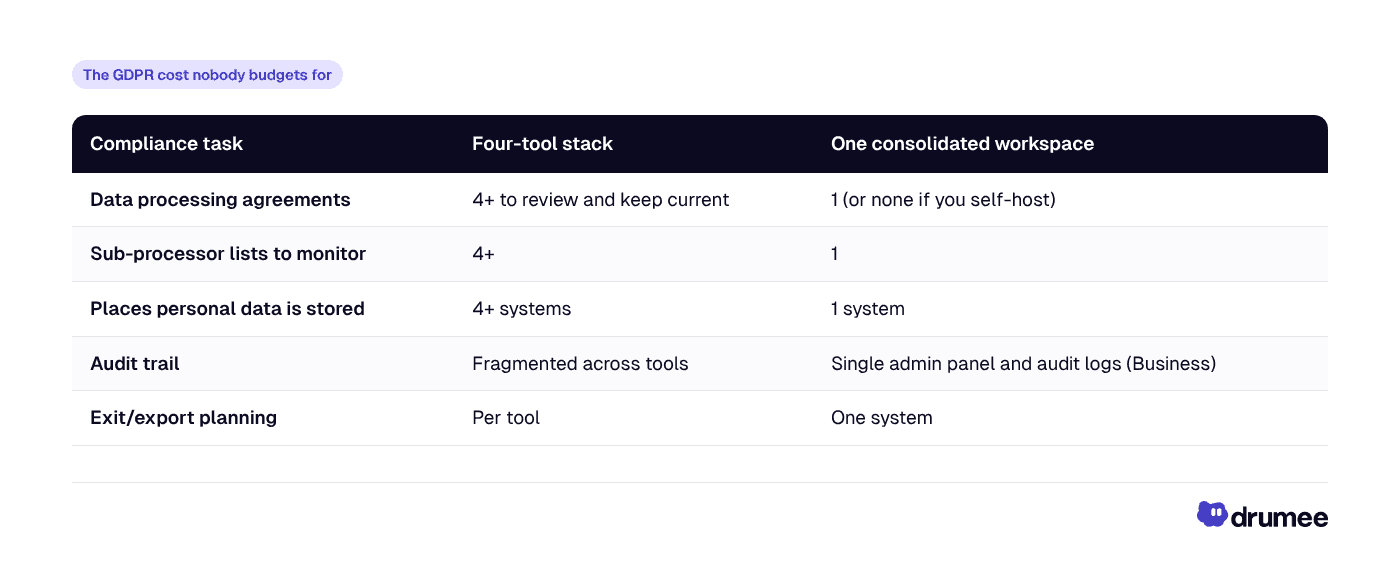
Consolidation does not make you compliant on its own. It shrinks the surface you have to govern. For the full picture, read our guide to GDPR compliance with Drumee.
The consolidation case: what one workspace replaces, and what it does not
This is where most "cut your SaaS bill" articles overstate things. A sovereign workspace like Drumee covers a lot of the stack, but not all of it. Be precise about the overlap before you promise your board a number.
Based on the feature set Drumee publishes, here is how the four tools map:
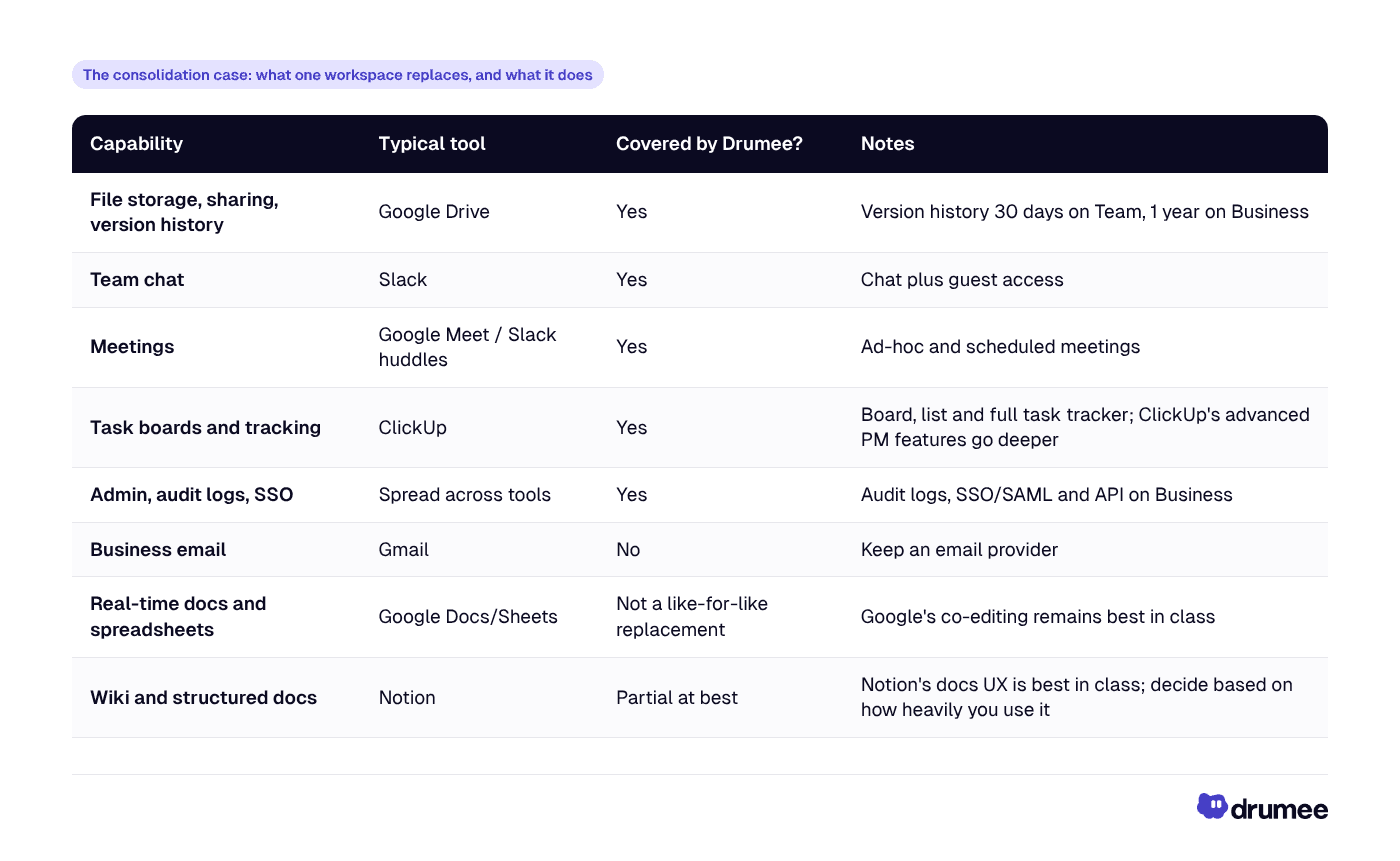
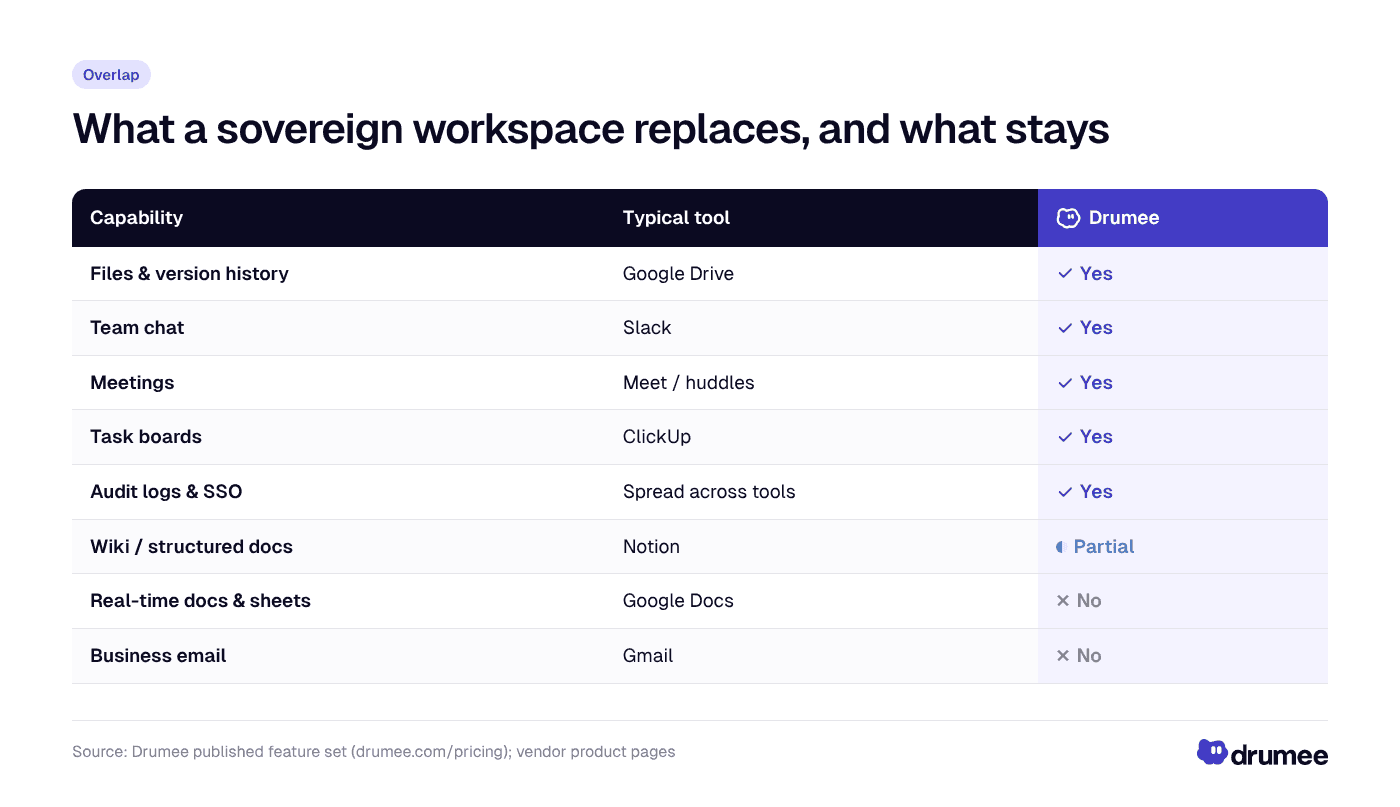
A sovereign workspace replaces the chat, files, meetings and task layers of a typical stack, while email and real-time document editing usually stay with Google or another provider.
Two honest conclusions follow. First, almost every team still needs email, so Google Workspace (or another provider) usually stays in some form. Second, if your team lives in Notion as its company wiki, you may want to keep it, at least for now.
The good news: you can downgrade rather than cancel. Most teams that keep Google only for email and docs can move from Business Standard to Business Starter, which lists at $8.40 per user per month on flexible billing, per Google. Check that Starter's storage and Meet limits suit you, since Drumee would now hold most of your files and meetings.
The numbers: three consolidation scenarios for 10 people
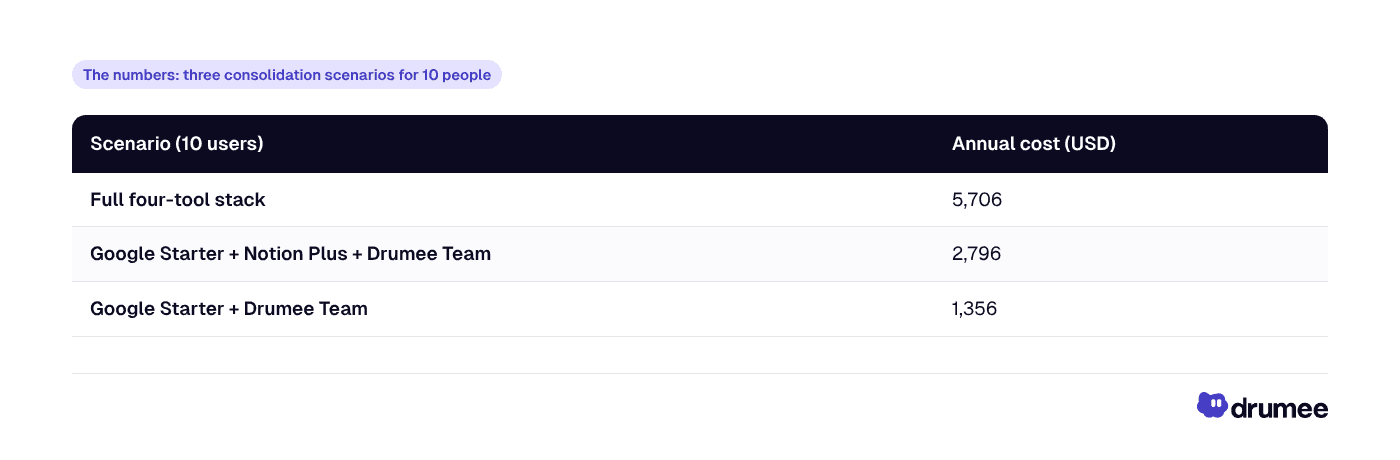
Here are three realistic outcomes for a 10-person team, all on monthly list prices as of November 2026. Drumee Team is $29/month flat for up to 10 users.
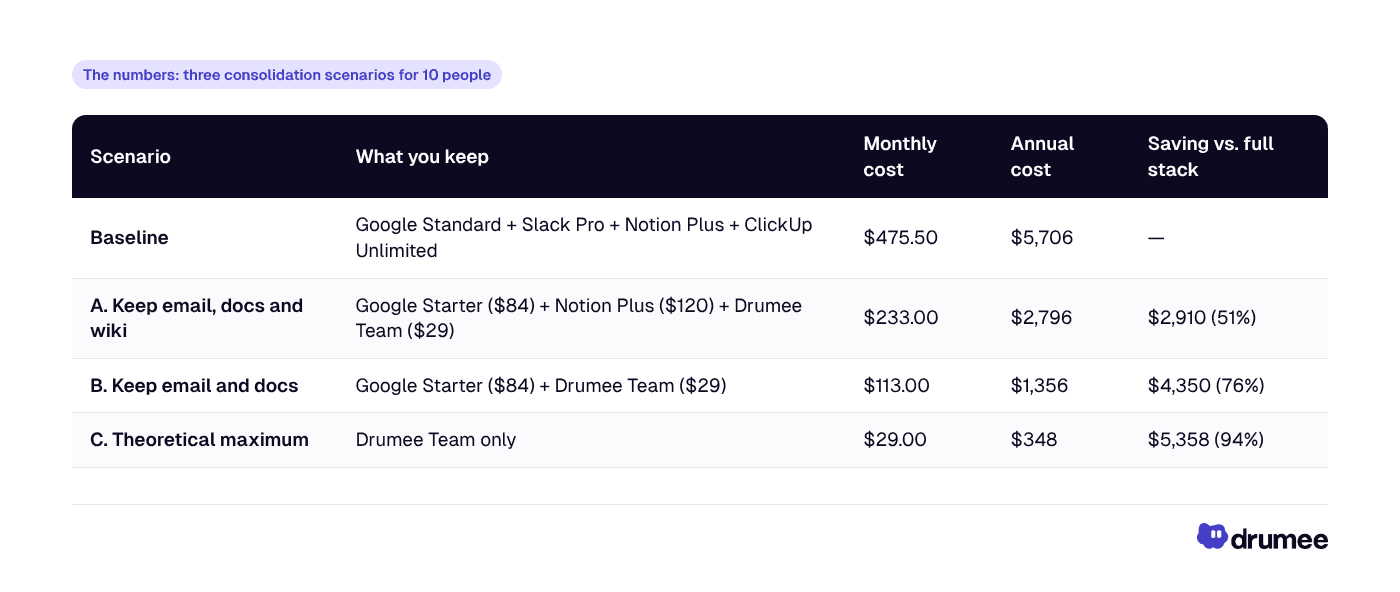
Scenario C is shown only to mark the ceiling. Almost no team runs without email, so treat Scenarios A and B as the realistic range. On yearly billing, Drumee's price drops by 50%, which widens the gap further, but most of the other vendors also discount annual plans, so compare annual against annual if you go that route.
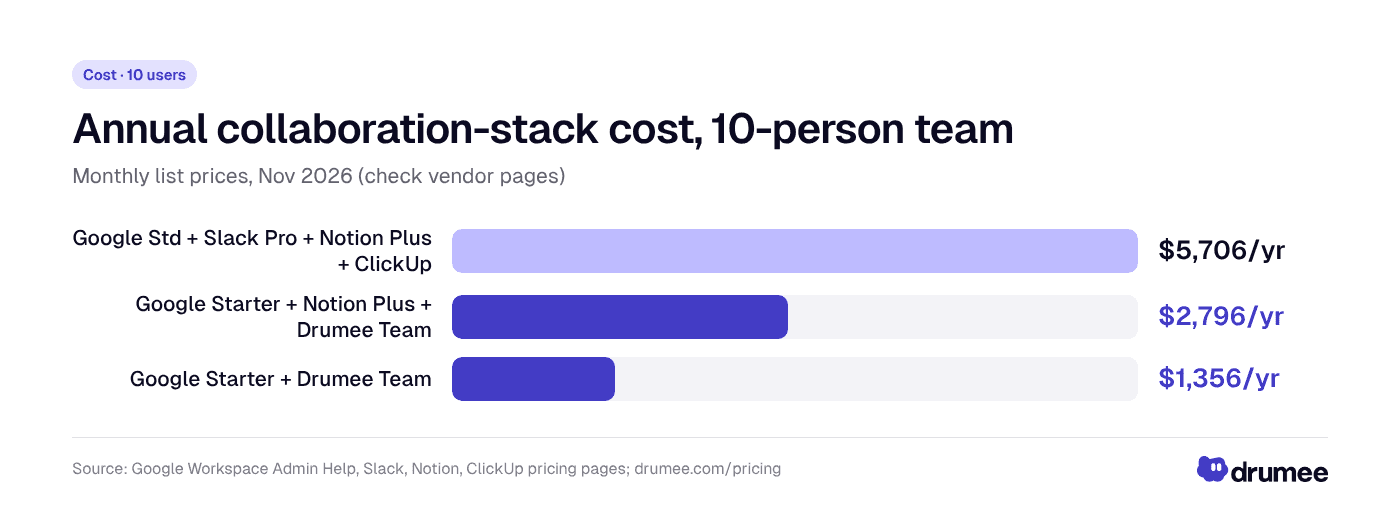
For a 10-person team, realistic consolidation onto Drumee Team cuts the annual collaboration-stack bill from $5,706 to between $1,356 and $2,796, a 51–76% saving, depending on whether Notion stays.
The numbers at 25 people: where flat pricing pulls ahead
Team is capped at 10 users, so the 11th hire moves you to Drumee Business at $99/month with unlimited users. That jump looks large in isolation. Compared with adding 15 seats across four per-seat tools, it is small.
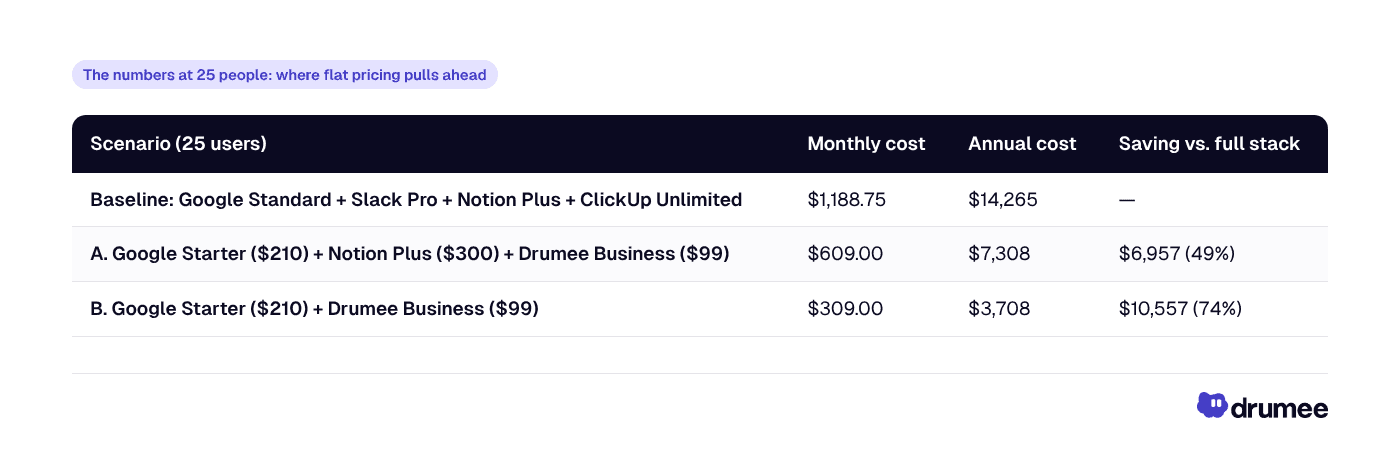
The pattern is the point. Per-seat tools grow linearly with every hire. A flat-priced workspace stays flat, so the saving widens as you grow. Business also adds audit logs, SSO and API access, which matter once you start selling to larger customers.
Northstack Digital's 48%: what it tells you, and what it does not
Northstack Digital's CEO, Daniel Weber, reports a 48% reduction in software costs after consolidating onto Drumee. He also says SaaS costs had nearly doubled before the switch, and reports a 60% productivity improvement. These figures come from a customer testimonial published by Drumee, not from an independent audit.
Northstack has not published a line-item breakdown, so we will not invent one. What we can say is that a 48% saving sits inside the range our model produces. It is close to Scenario A, where a team keeps email, docs and a wiki tool and consolidates chat, files, meetings and tasks.
Do not budget on someone else's percentage. Your saving depends on how many seats you pay for, which tiers you are on, and which tools you genuinely need to keep. Run the math on your own invoices.
Other Drumee customers report gains in different places, again self-reported:
- Brightlane Studio — CTO Lucas Meyer reports a 65% reduction in audit time, attributed to having data traceable in one system.
- Pixelcraft Labs — Product Manager Sofia Laurent reports a 70% reduction in tab switching.
Taken together, these suggest consolidation pays off in licence fees, admin time and focus. How much in each depends on your team.
Step-by-step: how to consolidate SaaS tools into one workspace
Consolidation fails when it is treated as a weekend migration. Run it as a five-step project over 6–10 weeks, with an owner and a cutover date.
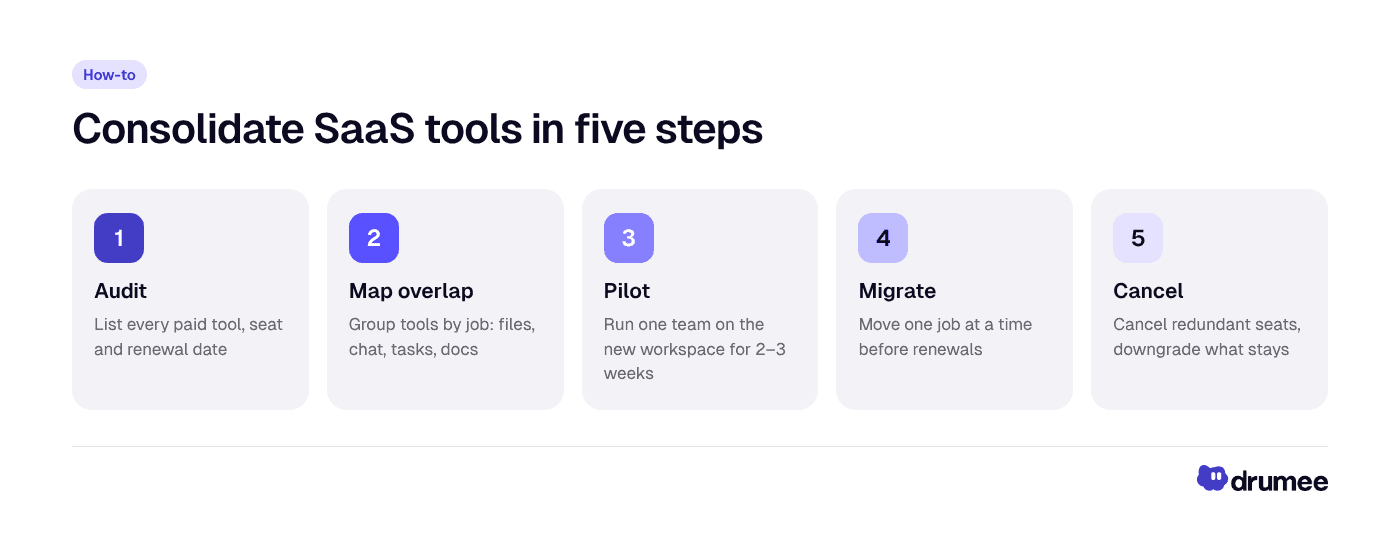
A consolidation project moves from audit to cancellation in five steps, and the savings only appear in the final step, when redundant seats are actually cancelled.
Step 1: Audit every paid tool (week 1)
Pull the last three months of card and invoice data, not just the tools you remember. List each tool, its plan, seat count, billing cycle, renewal date and owner.
- Action: export transactions from your company card and accounting software.
- Result: a single sheet with every recurring software charge.
- Why it matters: forgotten tools and unused seats are often the fastest saving available, before you touch anything else.
Step 2: Map the overlap (week 1–2)
Group tools by job: files, chat, meetings, tasks, docs, email, wiki. Most teams find two or three tools doing the same job, such as files in both Drive and Notion, or tasks in both ClickUp and Notion databases.
- Action: for each job, mark the tool you would keep if you could keep only one.
- Result: a clear list of "replace", "keep" and "downgrade" decisions.
- Why it matters: this is where you decide honestly what a consolidated workspace covers, as in the table above.
Step 3: Pilot with one team (weeks 2–4)
Start Drumee's Free plan (up to 3 users) or Team plan with one team, ideally one that complains about tool sprawl. Run real work through it for two to three weeks: files, project boards, chat and meetings.
- Action: define three success criteria up front, such as "all project files in one place" or "no task tracked outside the board".
- Result: evidence from your own team, not a vendor demo.
- Why it matters: a pilot surfaces missing features before you commit everyone.
Step 4: Migrate in phases (weeks 4–8)
Move one job at a time: files first, then tasks, then chat. Export from each source tool and import into the new workspace, keeping the old tool read-only for a short overlap.
For Google, plan ahead: the Google Workspace Data Export tool requires a super admin with 2-step verification and typically takes 72 hours, and up to 14 days, to complete. Exports land in a Cloud Storage bucket; they are not a direct import into another platform. Our guide to migrating from Google Workspace to a self-hosted workspace covers the details.
- Action: schedule each migration phase before the source tool's next renewal date.
- Result: no double-paying for longer than one billing cycle.
- Why it matters: cutover dates force decisions; open-ended overlaps become permanent.
Step 5: Cancel and downgrade (week 8–10)
Cancel redundant tools and downgrade the ones you keep, such as moving Google from Business Standard to Business Starter. Then set a quarterly review so sprawl does not return.
- Action: cancel on the renewal date; remove seats for anyone who no longer needs a kept tool.
- Result: the savings actually reach your bank account.
- Why it matters: consolidation that stops before cancellation saves nothing.
Common mistakes when cutting SaaS costs
Most failed consolidations break the same few ways. Watch for these.
- Promising 100% replacement. Email and real-time docs usually stay. Budget for them from day one.
- Ignoring annual contracts. If you prepaid a year, the saving starts at renewal. Time your cutover to it.
- Skipping the pilot. A team that never tested the new workspace will route around it and keep paying for the old tools.
- Leaving the old tools active "just in case". Set a read-only overlap of two weeks, then cancel.
- Comparing annual to monthly prices. Pick one billing basis for every vendor, as we did above.
- Forgetting exit planning. Choose tools you can leave. Per-seat SaaS tools rarely make export easy.
Best tools for a 10-person EU startup in 2026
There is no single right stack, but there is a sensible default for a 10-person EU team that wants to keep costs low and data under control.
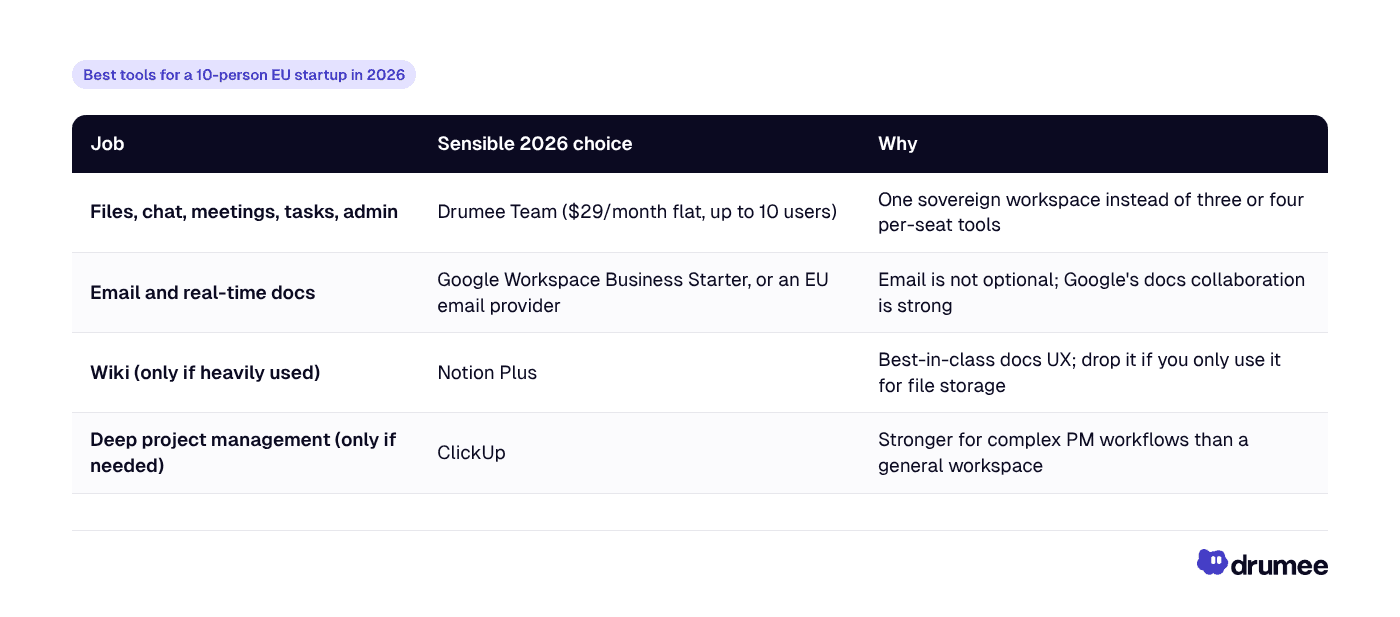
If you are weighing alternatives, our comparisons of Drumee vs. Notion and Drumee vs. ClickUp go feature by feature.
Standalone answer: For a 10-person EU startup in 2026, a cost-efficient stack is one sovereign workspace for files, chat, meetings and tasks, such as Drumee Team at $29/month flat, plus an email provider. On monthly list prices, that is $1,356 a year with Google Business Starter, versus $5,706 for Google Standard, Slack, Notion and ClickUp.
Cost, control and sovereignty: why EU teams consolidate
Cost is usually the trigger, but it is rarely the only reason EU startups consolidate. Three benefits arrive together.
- Cost: flat pricing ($29 for up to 10 users, $99 for unlimited) instead of seats × tools × months.
- Control: one admin panel, one permission model and, on Business, audit logs and SSO/SAML across files, chat and tasks.
- Sovereignty: the option to run the same workspace on your own infrastructure through a Sovereign Node, so data never leaves systems you control.
On the Drumee-hosted plans, ask Drumee sales for the current hosting region and data processing agreement before you sign. If you need full operator control from day one, the Sovereign Node is the self-hosted path. We cover the trade-offs in self-hosted vs. SaaS for startups, and the concept itself in what a sovereign workspace is.
Use cases: who saves the most
Consolidation pays off differently by team type. Three common patterns:
- Founder at a 10-person product studio: paying for four per-seat tools while clients share files by email → moves files, client chat (via guest access) and project boards onto Drumee Team → model saving of $2,910–$4,350 a year on monthly list prices.
- Ops lead at a 25-person agency: hiring fast and adding seats every month → moves to Drumee Business at a flat $99/month → per-seat costs stop rising with each hire, with $6,957–$10,557 modelled annual savings.
- CTO at a regulated-adjacent startup (fintech or legal tech): customers asking where data lives → pilots on a managed plan, then moves to a Sovereign Node on company infrastructure → one system to document in security questionnaires instead of four.
FAQ
How can a startup reduce SaaS costs quickly?
Start with an audit of every recurring software charge, then cancel unused seats and tools nobody owns. The larger saving comes from consolidating overlapping tools, such as separate apps for files, chat and tasks, into one flat-priced workspace. Time cancellations to renewal dates so you do not pay twice.
How do I consolidate SaaS tools into one workspace?
Follow five steps: audit every paid tool, map which tools do the same job, pilot one workspace with a single team, migrate one job at a time, and cancel redundant seats at renewal. Expect 6–10 weeks. Keep email and any tool your team genuinely depends on, such as a heavily used wiki.
Is a 48% reduction in SaaS costs realistic?
It is one customer's reported result. Northstack Digital's CEO Daniel Weber reports a 48% cost reduction after consolidating onto Drumee. Our model of a 10-person team on monthly list prices shows 51–76% savings on the collaboration stack depending on which tools stay, but your result depends on your seats, tiers and needs.
Does Drumee replace Google Workspace completely?
Not entirely. Drumee covers files, chat, meetings, task management and admin, but it does not provide business email, and Google Docs and Sheets remain the stronger choice for real-time co-editing. Many teams keep Google Business Starter for email and docs and move everything else.
What happens to Drumee pricing when we pass 10 people?
Drumee Team covers up to 10 users at $29/month. From the 11th user you move to Business at $99/month with unlimited users, which adds audit logs, SSO/SAML and API access. Yearly billing saves 50% on either plan. Larger or regulated teams can run a self-hosted Sovereign Node; pricing is via sales.
Conclusion: run the math on your own invoices
A typical four-tool stack costs a 10-person team $5,706 a year at monthly list prices, and $14,265 at 25 people, rising with every hire. Consolidating files, chat, meetings and tasks into one sovereign workspace brings that down to $1,356–$2,796 for 10 people, while keeping email and the tools you truly need.
Northstack Digital reports 48%. Your number will differ, so model it on your real invoices, pilot with one team, and cancel only once the new workspace earns its place. You get lower cost, one place to control access, and a path to running everything on your own infrastructure.
Next step: start on Drumee's Free plan or compare Team and Business on the pricing page, and run your pilot this month.
Keep reading
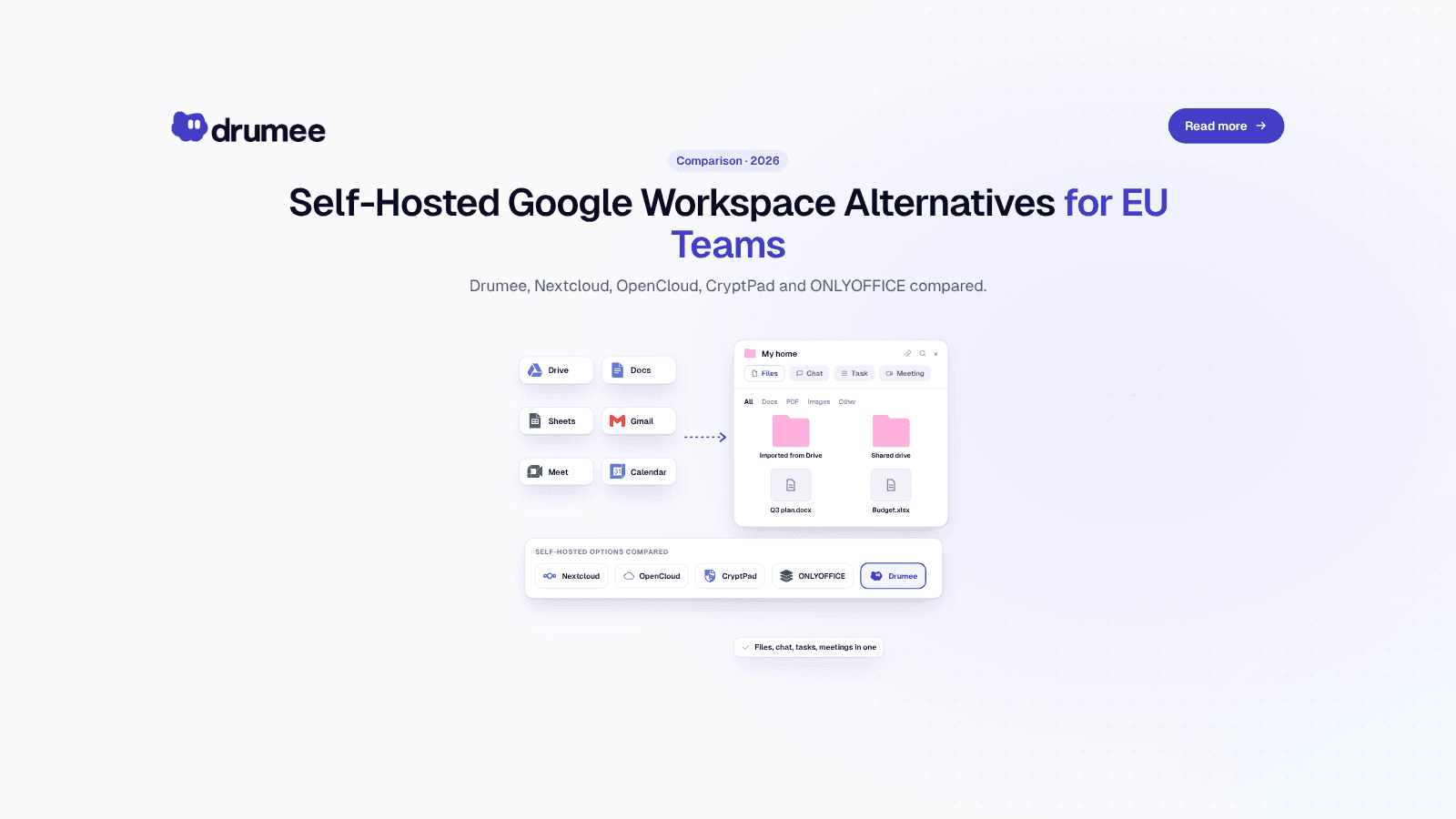
Self-Hosted Alternatives to Google Workspace: 2026 Guide for EU Teams
Google Workspace is the default office stack for most European startups. It is also a US-controlled service whose list price went up in January 2025, whose data sits under US legal reach, and whose exit path takes days of admin work. For a growing...
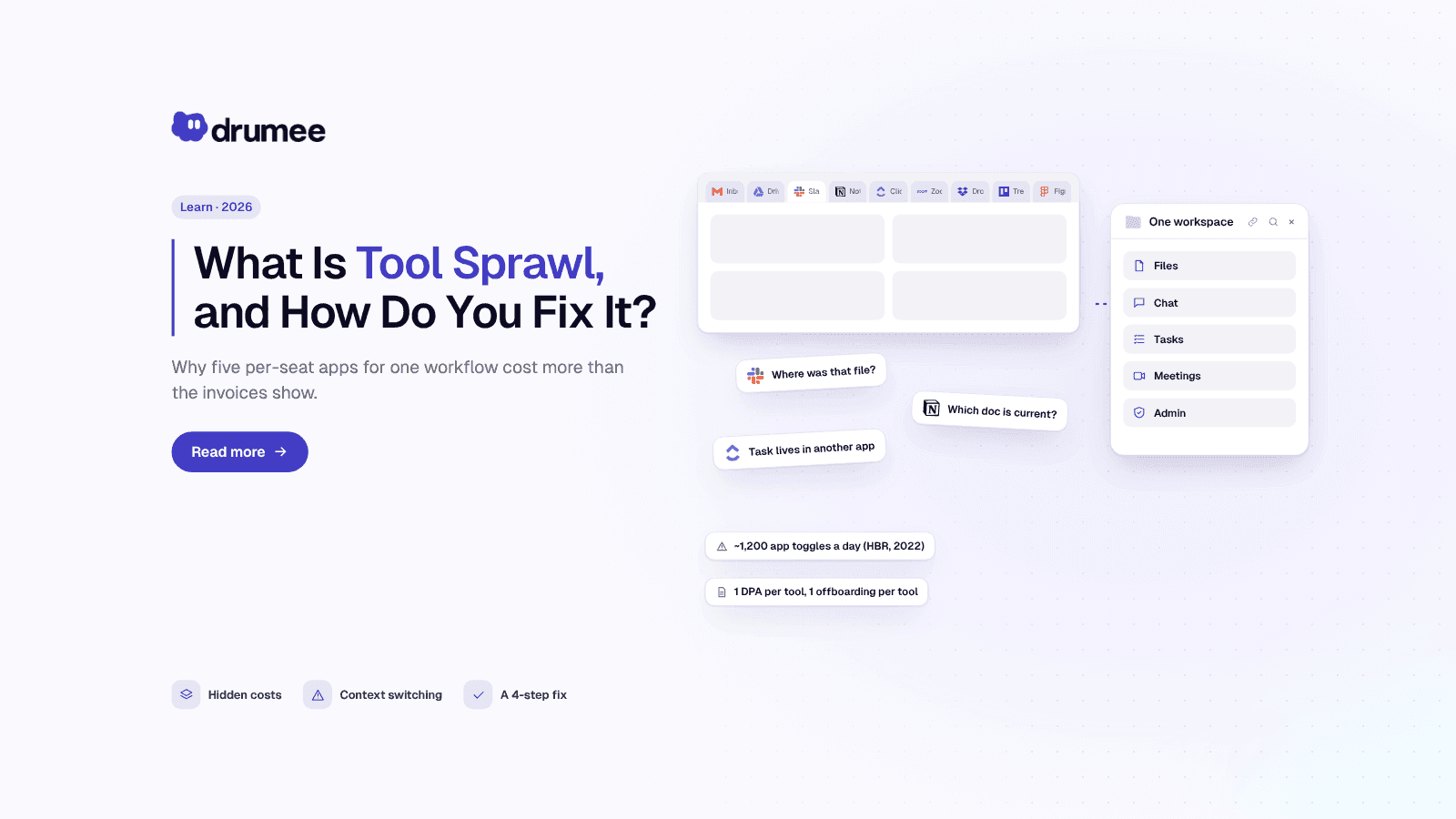
What Is Tool Sprawl and How to Fix It in 2026
Nobody decides to build a messy stack. A startup adds Slack on day one, Google Drive on day two, Notion when the wiki gets real and ClickUp when the roadmap stops fitting in a spreadsheet. Two years later, a simple question like "where did we deci...
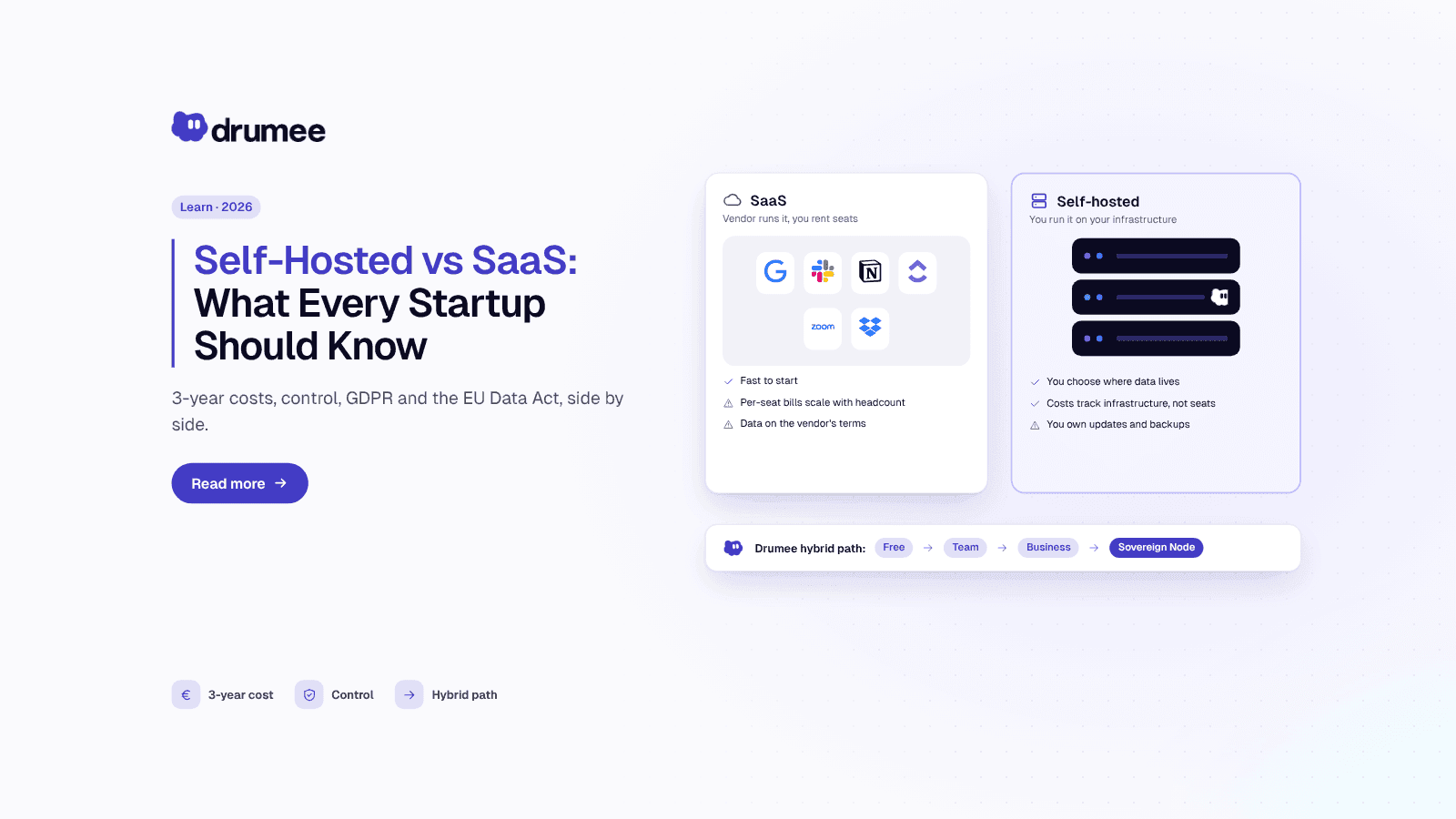
Self-Hosted vs SaaS: What Every Startup Should Know Before Choosing
Every startup makes the self-hosted vs SaaS decision, usually without noticing. The first tool someone signs up for with a company card becomes the default, and three years later the team is renting a dozen per-seat products it never consciously c...