
Drumee vs ClickUp: One Sovereign System vs Another Per-Seat SaaS
ClickUp promises "one app to replace them all", yet most teams still run it next to Google Drive and Slack. That means three vendors, three per-seat bills and three places where company data lives on someone else's servers. For an EU startup, the ...
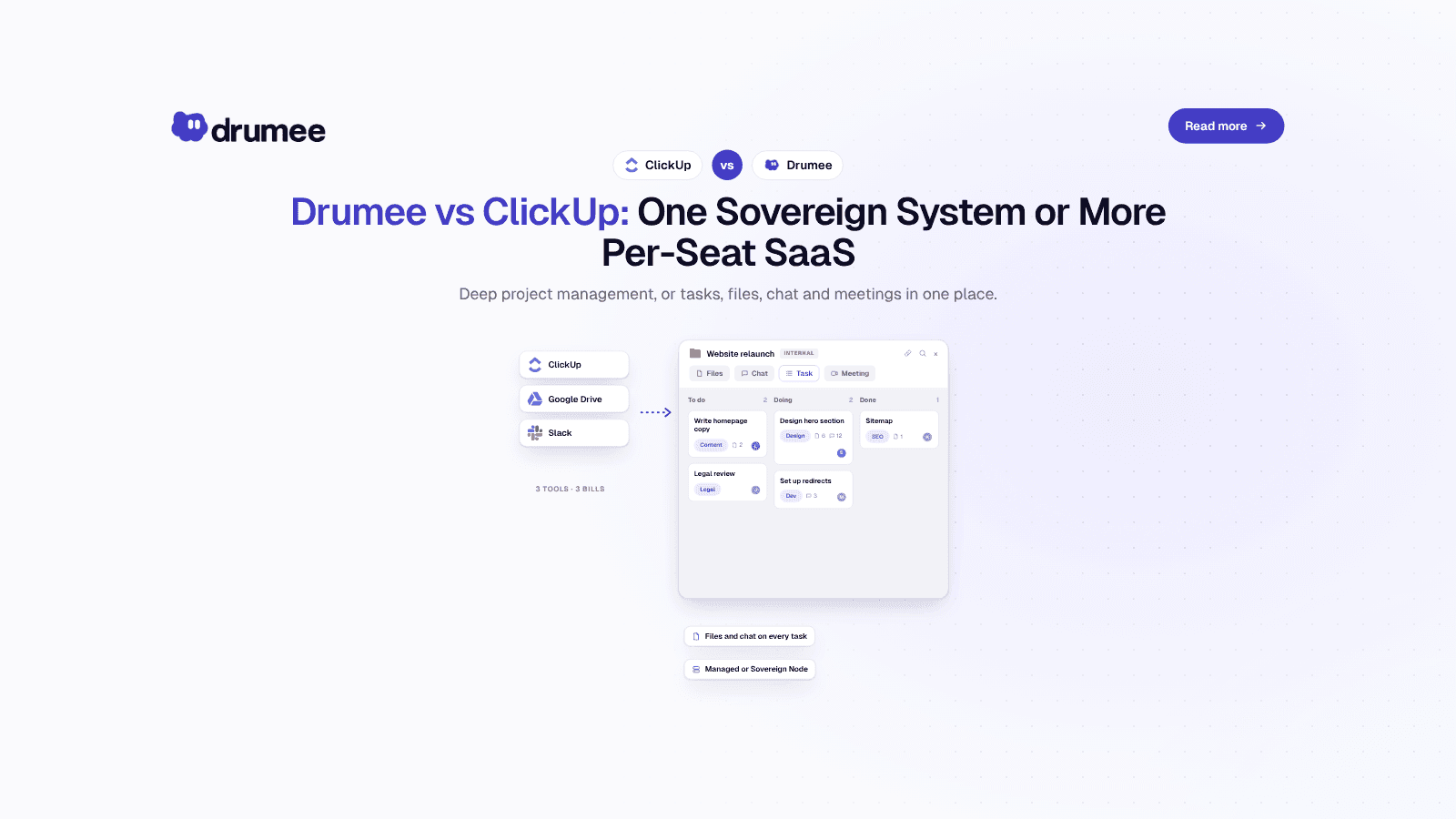
Drumee vs ClickUp: ClickUp leads on project-management depth, Drumee replaces ClickUp, Drive and Slack with one flat-priced sovereign workspace
ClickUp promises "one app to replace them all", yet most teams still run it next to Google Drive and Slack. That means three vendors, three per-seat bills and three places where company data lives on someone else's servers. For an EU startup, the result is a cost line that grows with every hire and a GDPR map that keeps getting harder to draw.
If you are looking for a self-hosted ClickUp alternative, you are usually after two things: predictable cost and control over where your work data sits. Drumee is a sovereign workspace that puts task boards, files, chat and meetings in one system, priced per team instead of per seat, and available as a managed plan or a self-hosted Sovereign Node.
This comparison is written for founders, CTOs and ops leads at teams of 5–25 people. We run the per-seat math for 5, 10 and 25 users, compare features honestly (ClickUp has deeper project management), cover GDPR and data control, and list the best self-hosted project management tools, including task-only options like Plane, Vikunja and OpenProject.
How does Drumee compare to ClickUp?
ClickUp is a deeper project-management tool, with goals, docs, automations and dashboards, sold per seat as a hosted service. Drumee is a sovereign workspace that combines task boards with files, chat and meetings, priced flat at $29/month for up to 10 users or $99/month unlimited, and deployable on your own infrastructure.
Drumee is best for small teams that want to replace ClickUp plus Google Drive plus Slack with one operator-controlled system. Compared with ClickUp, Drumee trades advanced PM features for three things ClickUp does not offer: flat team pricing, a self-hosted Sovereign Node option, and files, chat and tasks in a single sovereign workspace under one audit trail.
The short version: pick ClickUp if project management depth is your core need and per-seat SaaS is acceptable. Pick Drumee if you want to consolidate your stack, cap your costs and keep data under your control.
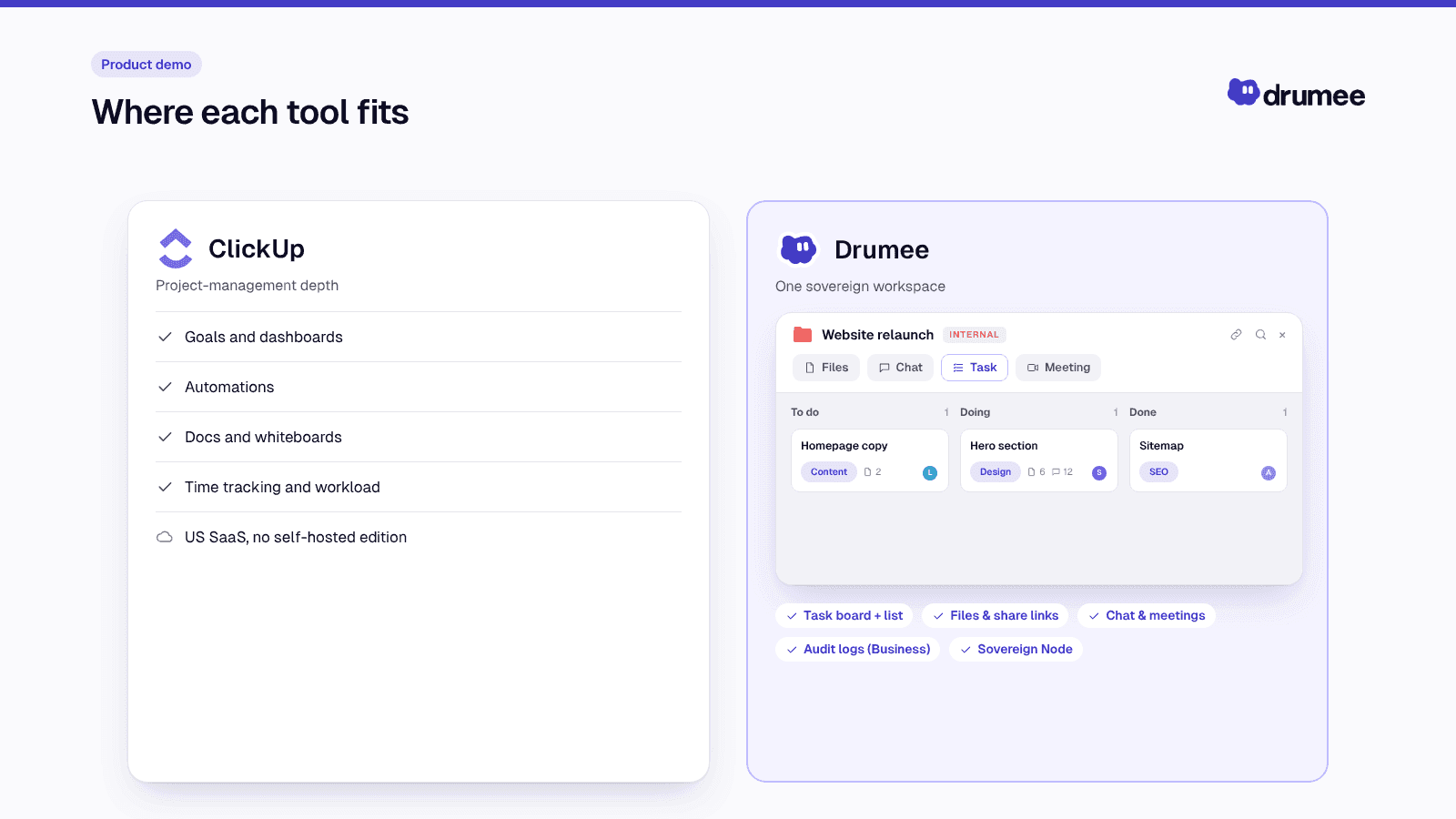
Where each tool fits.
The per-seat spiral: why teams look for a ClickUp alternative
Per-seat pricing feels cheap at five people and expensive at twenty-five. Every new hire adds a seat in your PM tool, your file platform and your chat tool at the same time. According to Zylo's 2026 SaaS Management Index, median SaaS spend is now $9,455 per employee per year.
The second cost is attention. A Harvard Business Review study of 137 workers found people toggle between apps about 1,200 times a day, losing just under four hours a week to reorienting. A task in ClickUp, the file in Drive and the discussion in Slack is exactly that pattern.
Teams typically hit three moments when the per-seat model starts to hurt:
- The hiring burst. Going from 8 to 15 people nearly doubles three tool bills in one quarter.
- The renewal email. Annual plans lock in seats you might not need, while monthly plans cost more per seat.
- The GDPR question. A customer or investor asks where project data is stored and who can access it, and the honest answer spans three US vendors.
That is the context in which a flat-priced, self-hostable workspace becomes worth evaluating.
Evaluation criteria we used
We compared Drumee and ClickUp on what a 5–25 person team actually decides on. Each criterion reflects a question that comes up in a tool review.
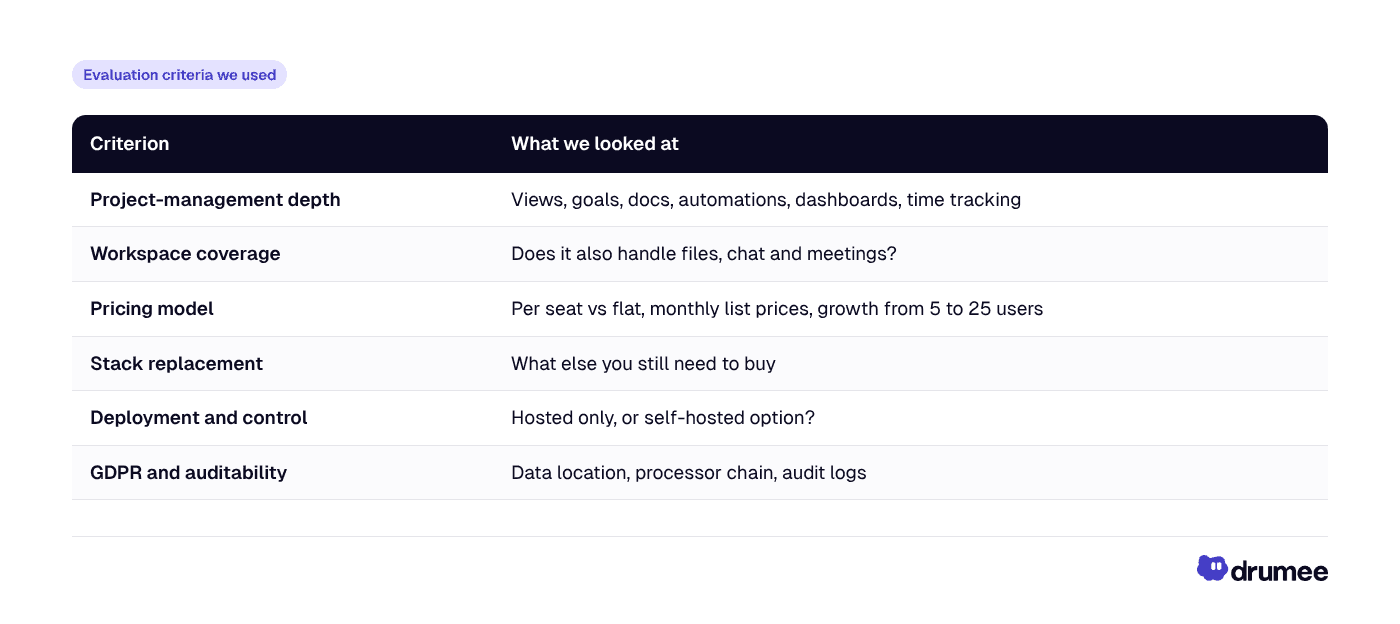
All prices are monthly-billing list prices as of November 2026, unless stated. Check each vendor's pricing page before buying, since plans change.
Feature comparison: tasks, files, chat and meetings
The table below shows where each product is strong. "Partial" means the capability exists but is limited or relies on integrations.
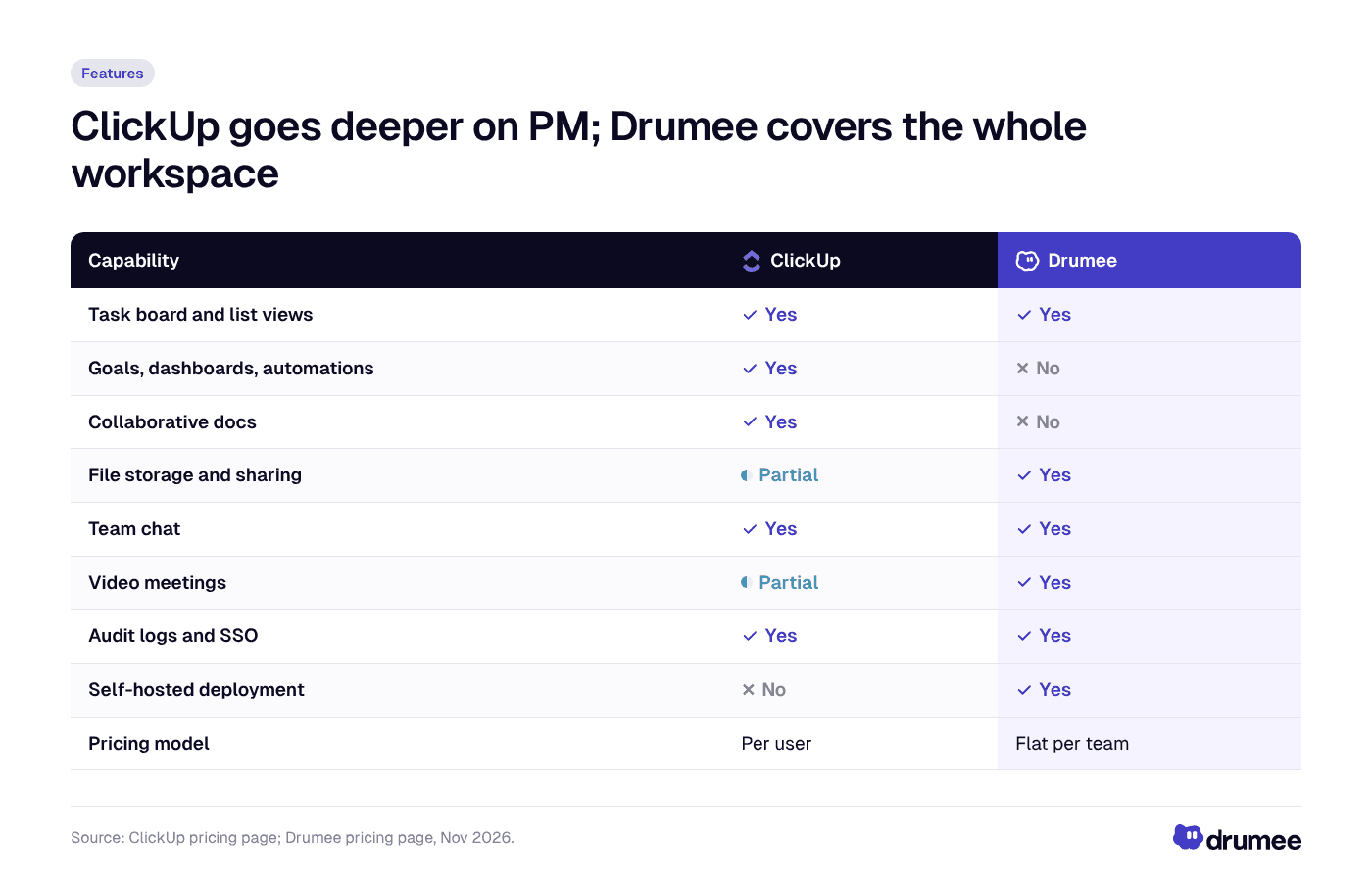
ClickUp is the stronger pure project-management tool; Drumee covers more of the workspace and is the only one of the two you can self-host.
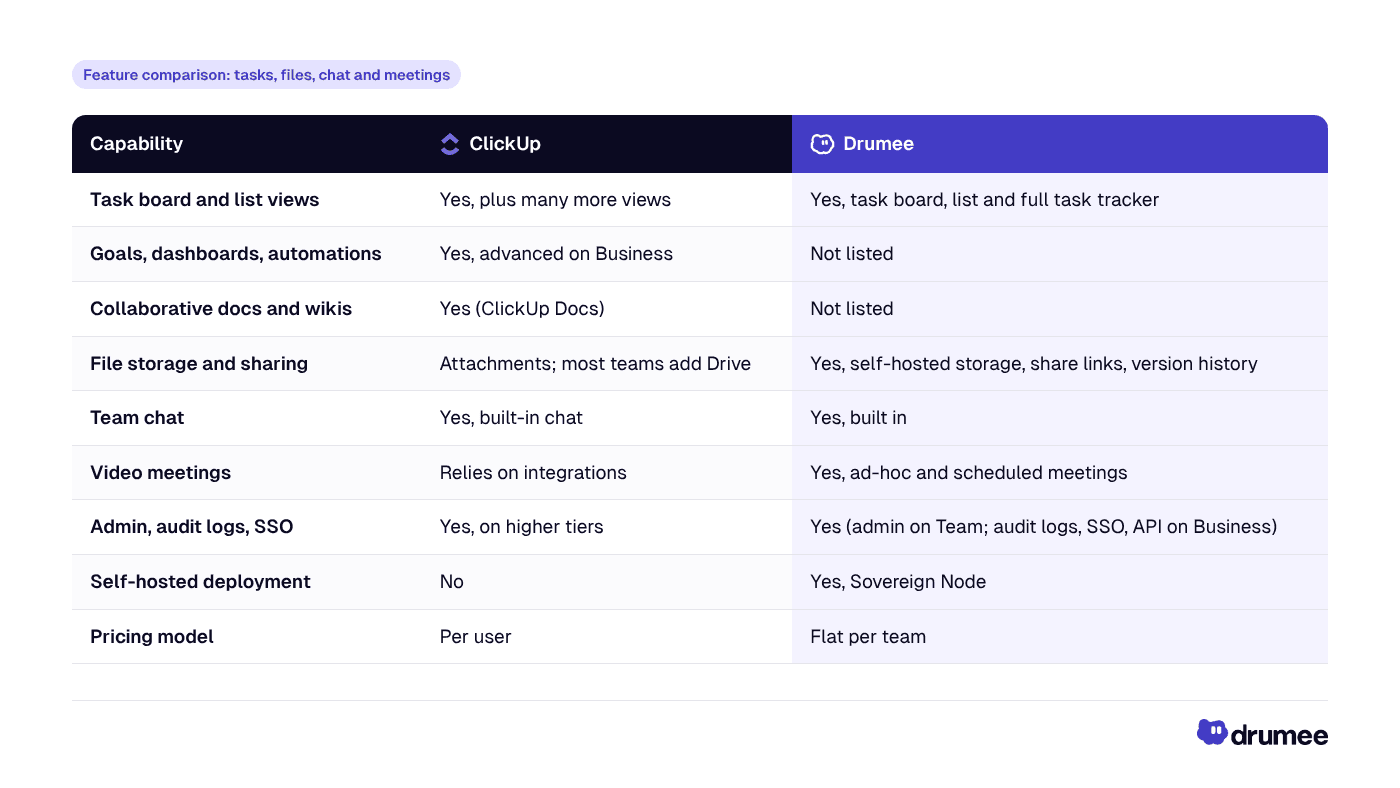
ClickUp's depth is real. Its pricing page shows the Business plan adding advanced automations, advanced dashboards, goals, time tracking and workload management on top of docs and multiple views. If your PMO runs on OKRs, sprint dashboards and automated workflows, ClickUp has years of product work in exactly that area.
Drumee's work-management layer is simpler: a task board, a list view and a full task tracker. Its advantage is what surrounds the tasks. The files, conversations and meetings about the work live in the same sovereign workspace, so a task never points to a document on another vendor's servers.
ClickUp breakdown: strengths and limits
Where ClickUp wins
- Project-management depth. Goals, docs, automations, dashboards, timelines and workload views give managers far more reporting and process control than Drumee's task tracker.
- Flexibility of views. List, board, calendar, Gantt-style timelines and more let each team work its own way.
- Ecosystem. A large integration catalogue connects ClickUp to most SaaS tools a startup already uses.
- Low entry price. A free tier and an Unlimited plan at $10/user/month (monthly billing) make it easy to start.
Where ClickUp asks more of you
ClickUp is a hosted service with per-user pricing, and it does not offer a self-hosted edition. As of November 2026, Business costs $19 per user per month on monthly billing or $12 on annual billing, and AI features are an extra add-on, according to ClickUp's pricing page.
ClickUp also does not replace your file platform or meeting tool for most teams. The common reality is ClickUp plus Google Drive plus Slack, which brings back the per-seat stacking and context switching it set out to remove.
Feature depth has a cost too. Teams often report spending significant time configuring spaces, statuses and automations before ClickUp feels right, which favours organisations with a dedicated ops or PMO role.
Drumee breakdown: strengths and limits
Drumee is a sovereign workspace built by Thidima SA, a Swiss-registered company. It runs files, chat, task boards, meetings and admin in one system, either on Drumee-hosted plans (Free → Business) or on a self-hosted Sovereign Node.
Where Drumee wins
- Flat pricing. Team is $29/month for up to 10 users; Business is $99/month for unlimited users. Yearly billing saves 50%. Adding your eleventh or fortieth person does not change the bill on Business.
- Stack consolidation. Tasks, files, chat and meetings in one interface replace the ClickUp + Drive + Slack pattern for most daily work.
- Self-hosted option. The Sovereign Node runs fully on your infrastructure with SDK access and a dedicated SLA, which is the strongest answer to "where is our data?".
- Unified audit trail. On Business and Sovereign Node, audit logs, SSO/SAML and API access cover the whole workspace, not just one tool.
Where Drumee asks more of you
Drumee is not a full project-management suite. It does not list goals, dashboards, automations or Gantt timelines, so teams that depend on those will feel the gap. It is also younger and smaller, reporting 50+ teams, 2,000+ beta users and 10M+ files secured.
The Team plan caps at 10 users and 100 GB of storage, so growing teams move to Business ($99/month, 1 TB). Sovereign Node pricing is on request.
Pricing comparison: ClickUp per-seat math for 5, 10 and 25 users
Here is the transparent math, using monthly-billing list prices as of November 2026. ClickUp Business is $19/user/month; Drumee Team is $29/month flat for up to 10 users; Drumee Business is $99/month flat with unlimited users. Formula: seats × list price × 12.
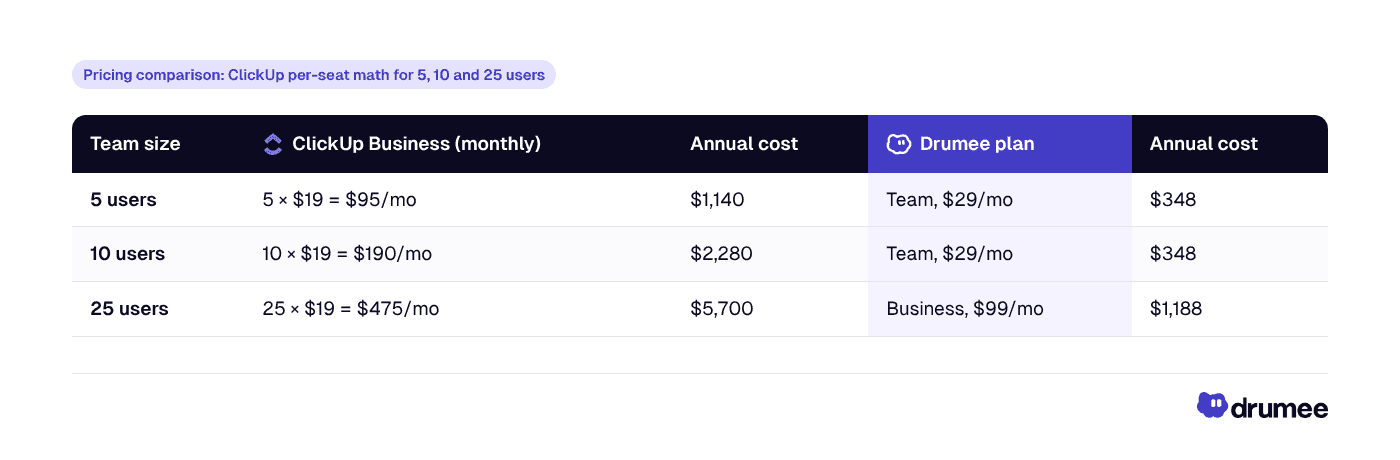
On annual billing, both get cheaper: ClickUp Business drops to $12/user/month ($720, $1,440 and $3,600 per year for 5, 10 and 25 users). Drumee's yearly billing halves its price, to $174 per year for Team and $594 per year for Business.
The crossover points are easy to remember. At monthly list prices, ClickUp Business costs more than Drumee Team from 2 users ($38 vs $29), and more than Drumee Business from 6 users ($114 vs $99).
Standalone answer: For a 10-person team on monthly billing, ClickUp Business costs 10 × $19 × 12 = $2,280 a year, while Drumee Team costs $29 × 12 = $348 a year flat. At 25 users, ClickUp Business reaches $5,700 a year versus $1,188 for Drumee Business with unlimited users.
This is not a like-for-like feature comparison, since ClickUp Business includes PM features Drumee does not. It is a like-for-like comparison of what a team pays to run its task management, and Drumee's figure also includes files, chat and meetings.
The real comparison: ClickUp + Drive + Slack vs Drumee
Most teams evaluating ClickUp alternatives are not paying for ClickUp alone. The typical stack is ClickUp for tasks, Google Workspace for files and Slack for chat. Here is that stack at monthly-billing list prices, as of November 2026:
- ClickUp Business: $19/user/month (ClickUp)
- Google Workspace Business Standard: $16.80/user/month on the flexible plan (Google Workspace Admin Help)
- Slack Pro: $8.75/user/month on monthly billing (Slack)
That totals $44.55 per user per month. Multiply by seats and 12 months:
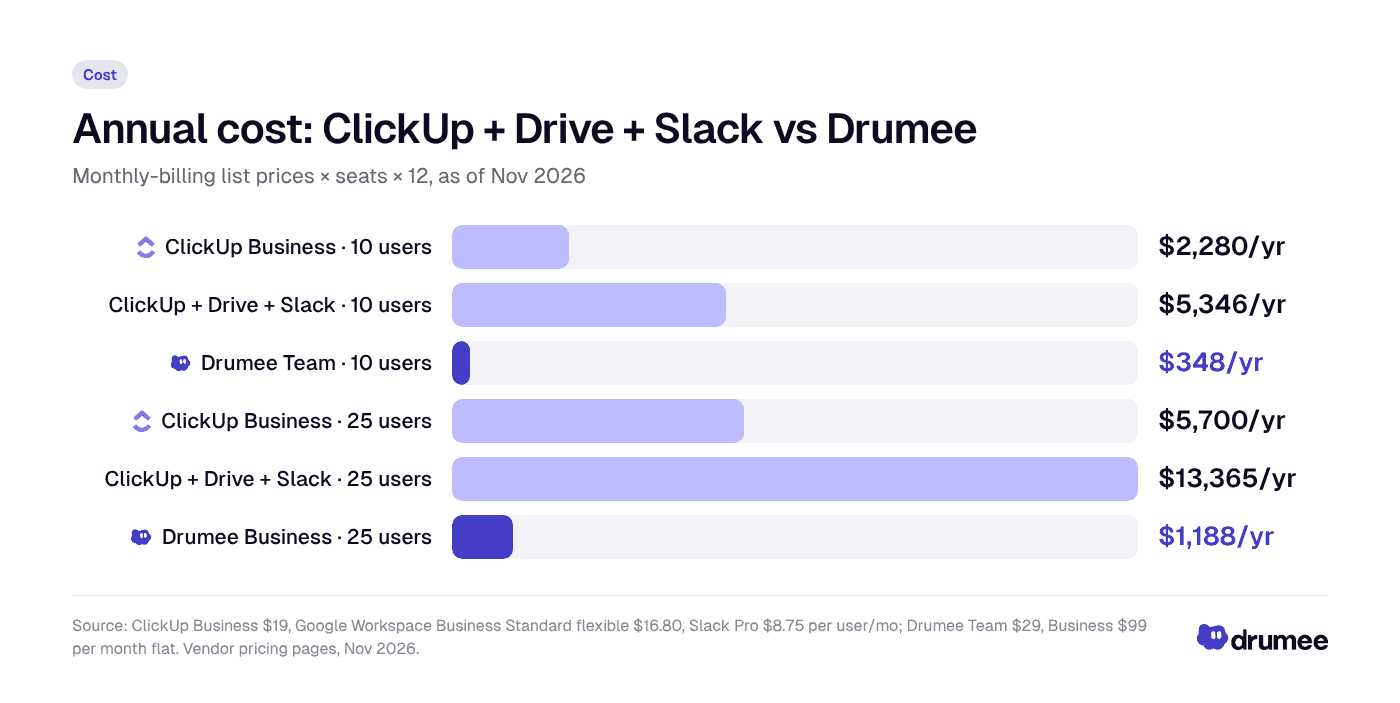
At monthly list prices, the three-tool stack costs about 15 times more than Drumee Team for 10 users and about 11 times more than Drumee Business for 25 users.
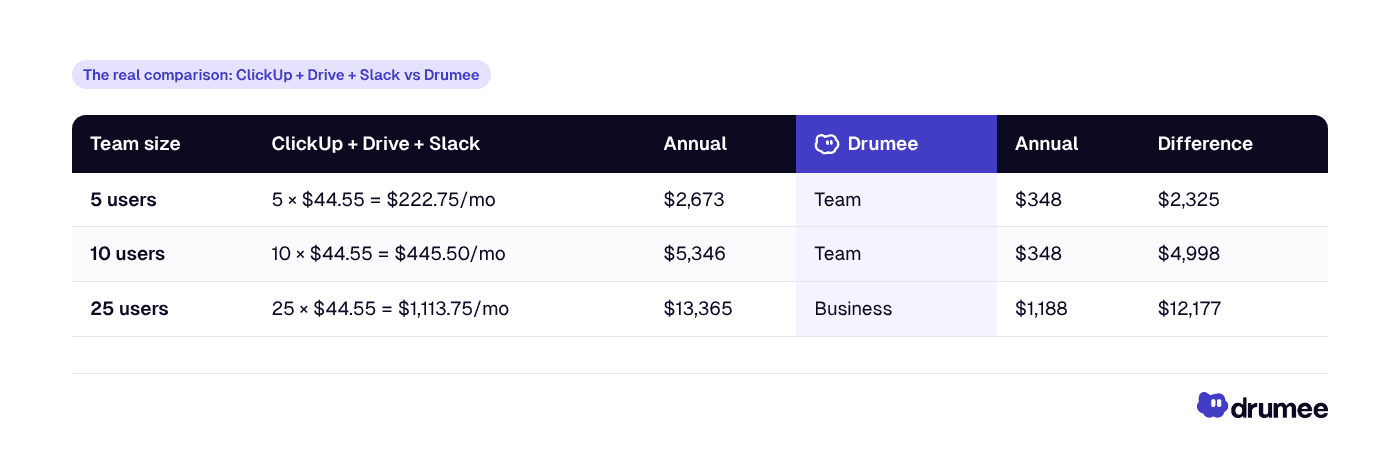
Two fairness caveats matter. Google Workspace includes Gmail, Docs, Sheets and Meet, which Drumee's published feature set does not fully replace, so many teams will keep some email and office tooling. And Drumee's managed storage is 100 GB on Team and 1 TB on Business, so check your current file volume.
Even with those caveats, the direction is clear. Northstack Digital's CEO Daniel Weber reports a 48% cost reduction after consolidating the team's stack onto Drumee (customer-reported). For a full breakdown of stack costs, see our guide on how EU startups reduce SaaS costs.
GDPR and data control: hosted per-seat SaaS vs a sovereign workspace
Project tools hold more personal data than teams expect: client names, contracts, HR tasks, candidate notes and meeting recordings. Under GDPR, each SaaS vendor in your stack is a processor that needs an Article 28 processor contract, and each US-based vendor raises international-transfer questions.
Jurisdiction is the core issue. The US CLOUD Act requires US providers to disclose data in their "possession, custody, or control" regardless of where it is stored. A stack of three US vendors means three exposures to that rule.
Enforcement is significant. The DLA Piper GDPR Fines and Data Breach Survey (January 2026) reports €7.1 billion in cumulative fines since May 2018, with about €1.2 billion issued in 2025 alone.
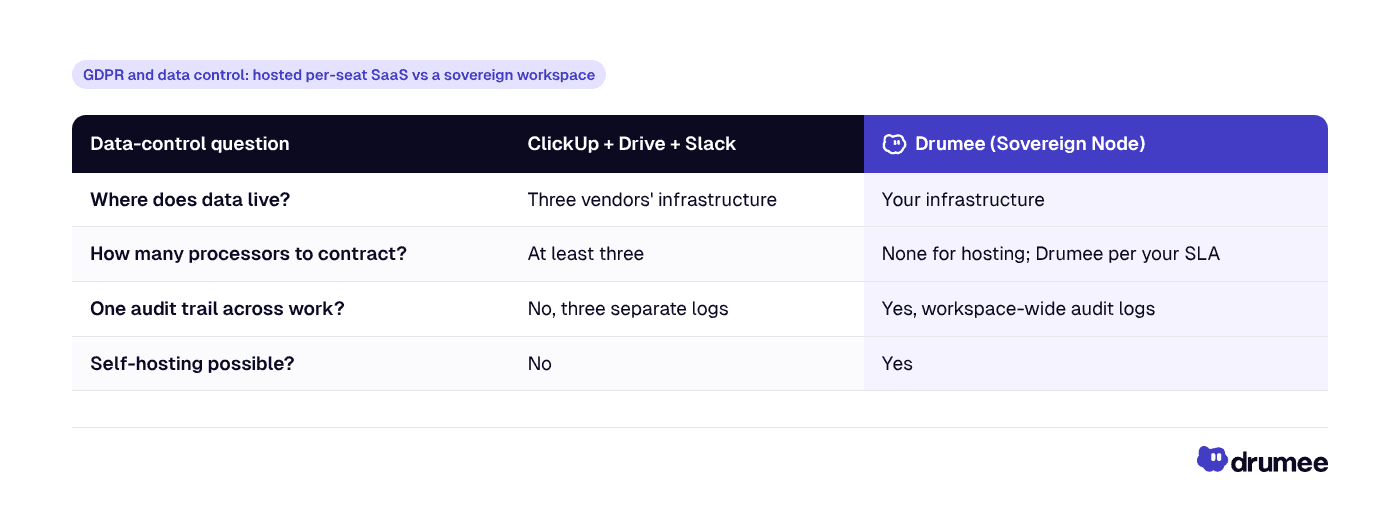
On Drumee's managed plans, Drumee acts as your hosting provider. Ask Drumee sales for the current hosting region and data processing agreement before moving sensitive data.
Brightlane Studio's CTO Lucas Meyer reports a 65% reduction in audit time after consolidating onto Drumee, citing data traceability (customer-reported). For the full compliance picture, read our Drumee GDPR compliance guide.
Best self-hosted project management tools in 2026
If "self-hosted project management" is your real requirement, ClickUp is out of the running, since it has no self-hosted edition. The question becomes whether you need a task tool or a full workspace. Here are the options worth evaluating.
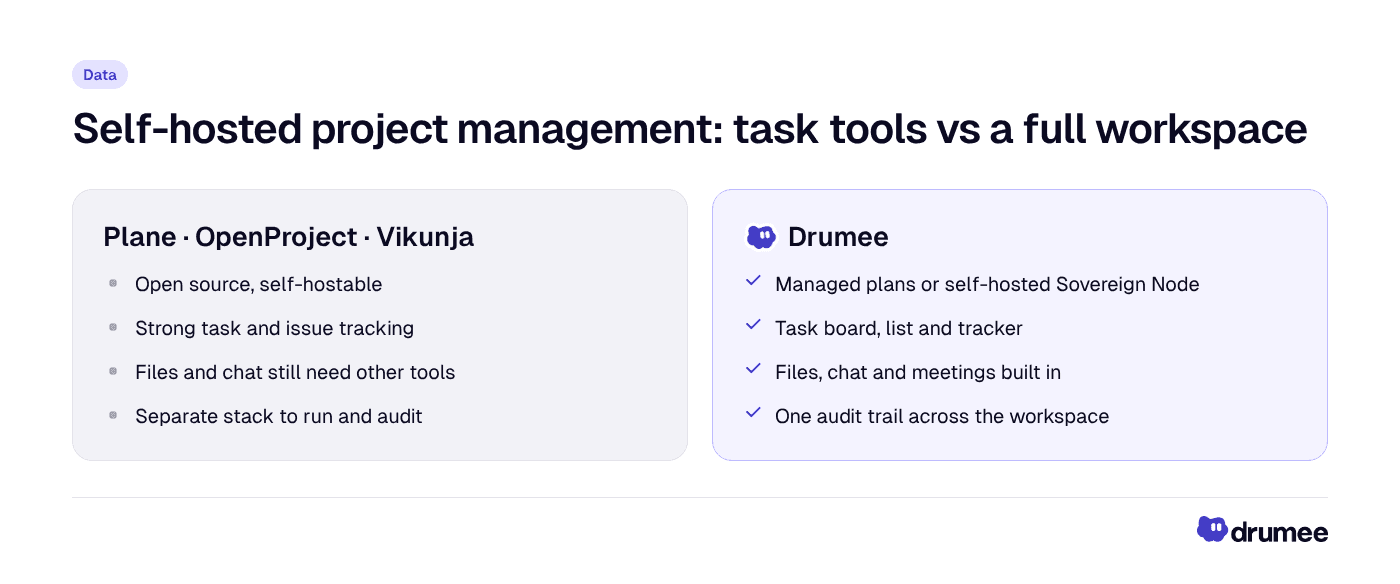
Open-source PM tools are strong task-only choices; Drumee is the pick when you want tasks, files, chat and meetings under one self-hosted roof.
- Drumee — best full-workspace pick. Task board, list and tracker plus files, chat, meetings and admin, on managed plans or a self-hosted Sovereign Node. Best for teams replacing ClickUp, Drive and Slack together.
- Plane — best for agile issue tracking. An open-source, Jira- and Linear-style tool whose Community Edition is self-hostable under the AGPL-3.0 licence, as Plane's own roundup describes. Task-focused; you still need files and chat elsewhere.
- OpenProject — best for classic project management. GPL-3.0 licensed with a free self-managed Community Edition, strong on Gantt charts and traditional PM, according to WZ-IT's comparison of OpenProject, Plane and Vikunja.
- Vikunja — best lightweight to-do and task lists. An open-source (AGPL) task app suited to personal or small-team lists rather than full project portfolios.
Best self-hosted project management tool? For task tracking alone, Plane (agile), OpenProject (classic, Gantt) and Vikunja (lightweight) are strong open-source picks. If you also want files, chat and meetings in the same self-hosted system, Drumee is the full-workspace option, deployable on your own Sovereign Node.
The trade-off is the same one ClickUp users face in reverse. A task-only tool keeps you assembling a stack, just a self-hosted one. A workspace like Drumee gives up some PM depth in exchange for one system to run, secure and audit.
Who should choose ClickUp, and who should choose Drumee
Choose ClickUp if
- Your team runs a structured PMO with OKRs, sprint dashboards and automation-heavy workflows.
- You need many views (timeline, workload, calendar) and deep reporting for managers.
- Per-seat, US-hosted SaaS is acceptable to your customers and your DPO.
- You already standardise on Google Workspace and Slack and are not trying to consolidate.
Choose Drumee if
- You want one system for tasks, files, chat and meetings instead of three per-seat tools.
- You need predictable cost as you grow from 5 to 25 people and beyond.
- Customers, investors or regulators ask where your work data lives, and you want to answer "on our own infrastructure".
- Your task management needs are real but not PMO-grade: boards, lists and tracking cover them.
Three scenarios show how this plays out:
- Founder of a 6-person product studio: paying for ClickUp, Drive and Slack → moves to Drumee Team at $29/month → one bill, one login, client files next to the tasks.
- Ops lead at a 20-person agency: seats in three tools growing every quarter → moves to Drumee Business at $99/month flat → hiring no longer changes tool spend. Pixelcraft Labs' product manager Sofia Laurent reports a 70% reduction in tab switching after a similar move (customer-reported).
- CTO at a 40-person regulated SME: needs work data on its own servers → pilots a Drumee Sovereign Node → tasks, files and chat self-hosted with SSO and audit logs.
Verdict: Drumee vs ClickUp
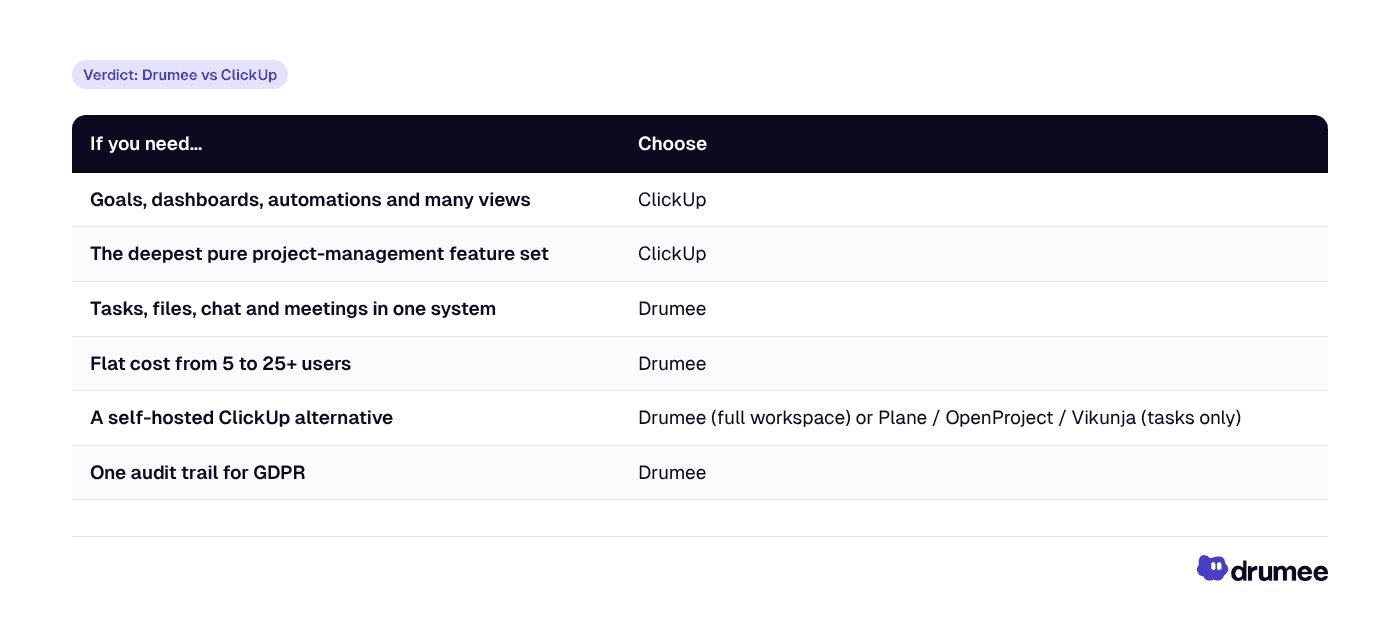
ClickUp wins on project-management depth. It is the better tool for teams whose main problem is process, reporting and automation. Drumee wins on cost, control and sovereignty. It is the better choice for small teams that want to replace ClickUp, Drive and Slack with one flat-priced system they can run on their own infrastructure.
If you are also weighing an all-in-one docs tool, see our Drumee vs Notion comparison, and for the broader decision, our analysis of self-hosted vs SaaS for startups.
FAQ
Is there a self-hosted version of ClickUp?
No. ClickUp is offered as a hosted service only. Teams that need self-hosted project management typically choose an open-source task tool such as Plane, OpenProject or Vikunja, or a sovereign workspace like Drumee that adds files, chat and meetings to task management on a self-hosted Sovereign Node.
How much does ClickUp cost for 10 users?
As of November 2026, ClickUp Business is $19 per user per month on monthly billing, so 10 users cost $190 a month or $2,280 a year; on annual billing it is $12 per user, or $1,440 a year. AI features cost extra. Drumee Team covers up to 10 users for $29 a month flat, or $348 a year.
Can Drumee replace ClickUp, Google Drive and Slack?
For most daily work, yes. Drumee combines task boards and a task tracker with self-hosted files, chat and meetings in one workspace. It does not replace ClickUp's goals, dashboards or automations, or Google's email and office suite, so check which of those your team relies on before switching.
What is the best self-hosted project management tool?
It depends on scope. Plane is strong for agile issue tracking, OpenProject for classic Gantt-based project management, and Vikunja for lightweight task lists. If you want tasks plus files, chat and meetings in one self-hosted system, Drumee's Sovereign Node is the full-workspace option.
Is ClickUp GDPR compliant for EU teams?
ClickUp is a US-headquartered hosted service, so EU teams need a data processing agreement and must assess international transfers under GDPR Articles 44–49, plus US CLOUD Act exposure. Check ClickUp's own trust documentation for its current position. Self-hosting a workspace removes the third-party processor for that data entirely.
Conclusion
ClickUp is an excellent project-management tool, and if PM depth is what you need, it remains a strong choice. But for most 5–25 person teams, the real cost is ClickUp plus Drive plus Slack: $44.55 per user per month at list prices, or $5,346 a year for ten people.
Drumee replaces that stack with one sovereign workspace for $348 a year on Team, or $1,188 a year for unlimited users on Business, with the option to run it on your own Sovereign Node. That is cost, control and sovereignty in one decision. Start on Drumee's Free plan or book a Sovereign Node call from the pricing page.
Keep reading
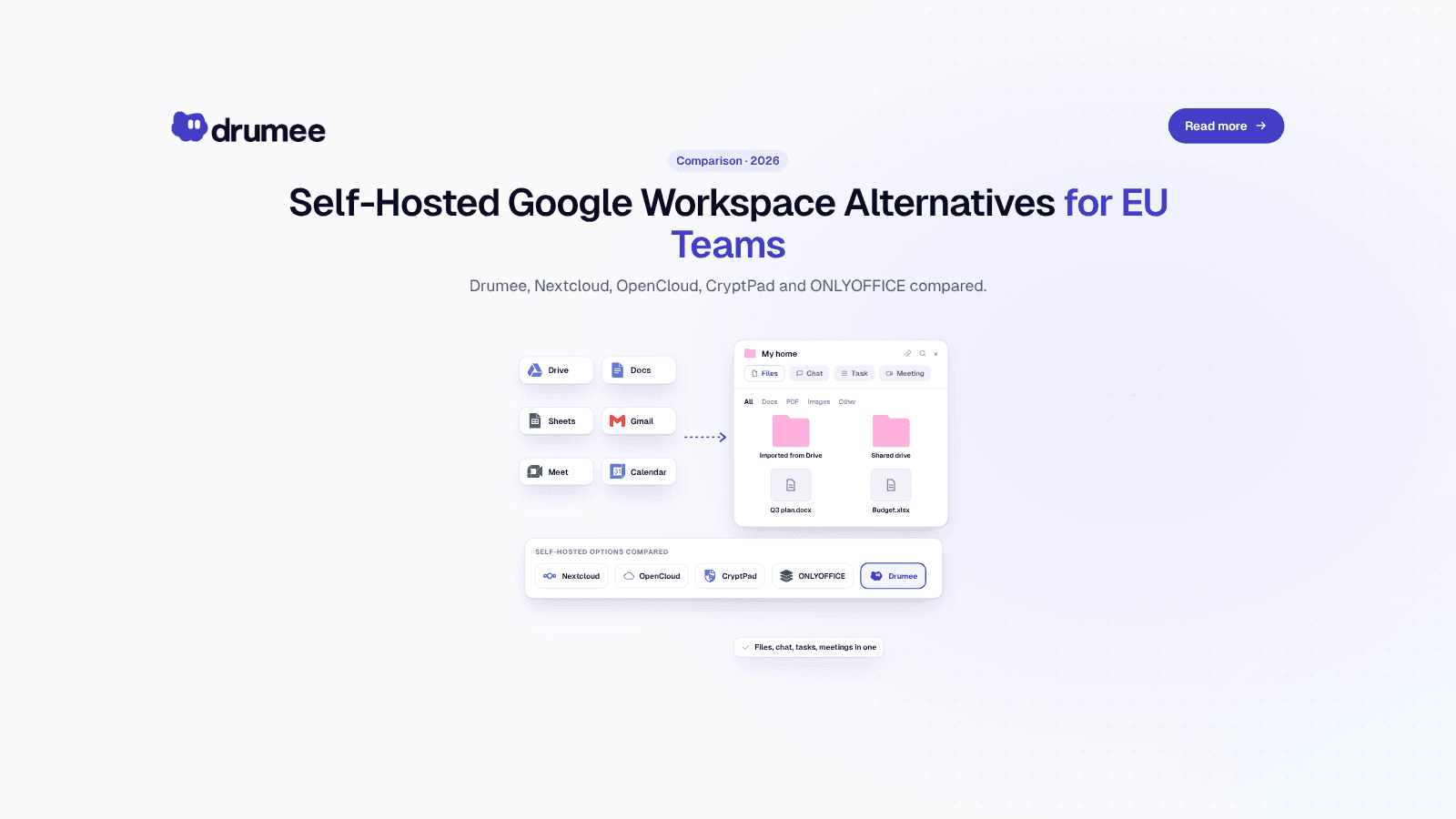
Self-Hosted Alternatives to Google Workspace: 2026 Guide for EU Teams
Google Workspace is the default office stack for most European startups. It is also a US-controlled service whose list price went up in January 2025, whose data sits under US legal reach, and whose exit path takes days of admin work. For a growing...
What Is Tool Sprawl and How to Fix It in 2026
Nobody decides to build a messy stack. A startup adds Slack on day one, Google Drive on day two, Notion when the wiki gets real and ClickUp when the roadmap stops fitting in a spreadsheet. Two years later, a simple question like "where did we deci...
Self-Hosted vs SaaS: What Every Startup Should Know Before Choosing
Every startup makes the self-hosted vs SaaS decision, usually without noticing. The first tool someone signs up for with a company card becomes the default, and three years later the team is renting a dozen per-seat products it never consciously c...