
How Drumee Stores Files: Resumable Uploads to S3-Compatible Storage
Drumee stores every file in two places. What the file is (name, folder, owner, current version) is a node in MongoDB. What the file contains is an object in S3-compatible storage. Browsers upload bytes directly to that storage in resumable par...
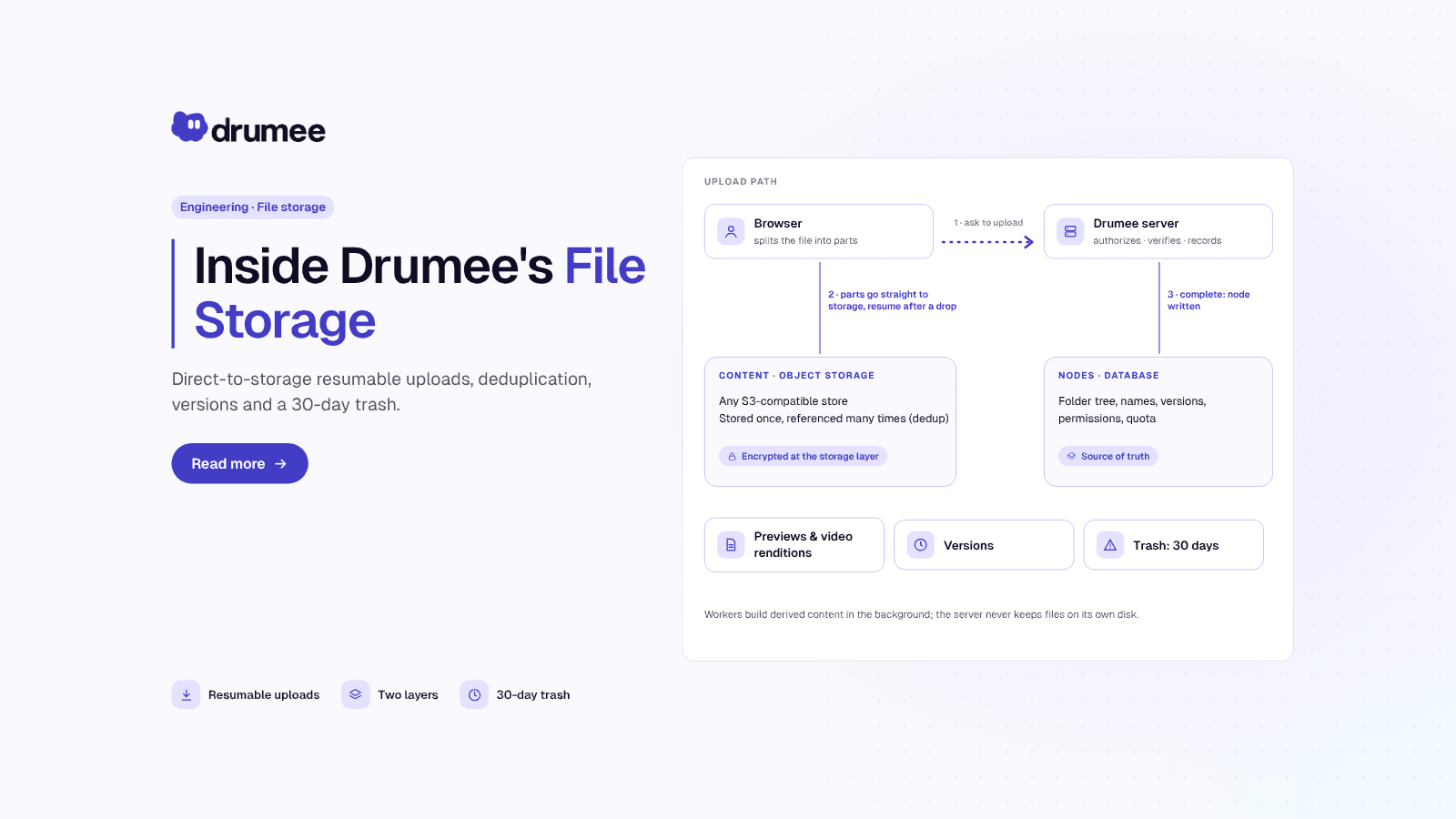
Drumee file storage at a glance: file metadata lives as nodes in MongoDB while file bytes go from the browser straight to S3-compatible object storage
Drumee stores every file in two places. What the file is (name, folder, owner, current version) is a node in MongoDB. What the file contains is an object in S3-compatible storage. Browsers upload bytes directly to that storage in resumable parts, and the API server only authorizes, verifies and records the result.
This post walks through that design as it runs today on the hosted service at app.drumee.com. Every number below comes from the Drumee File Storage documentation.
The short answer
Drumee keeps file metadata (the folder tree, names, owners, locks, versions, upload sessions) in MongoDB and file content in any S3-compatible object store. Uploads go from the browser straight to storage through presigned URLs: files under 8 MiB in one PUT, larger files in 8 MiB parts that can resume for 48 hours. The server never stores file bytes on its own disk.
That last sentence is the constraint everything else follows from: with no files on local disk, servers and workers can run side by side and be replaced freely, as the modular monolith post explains.
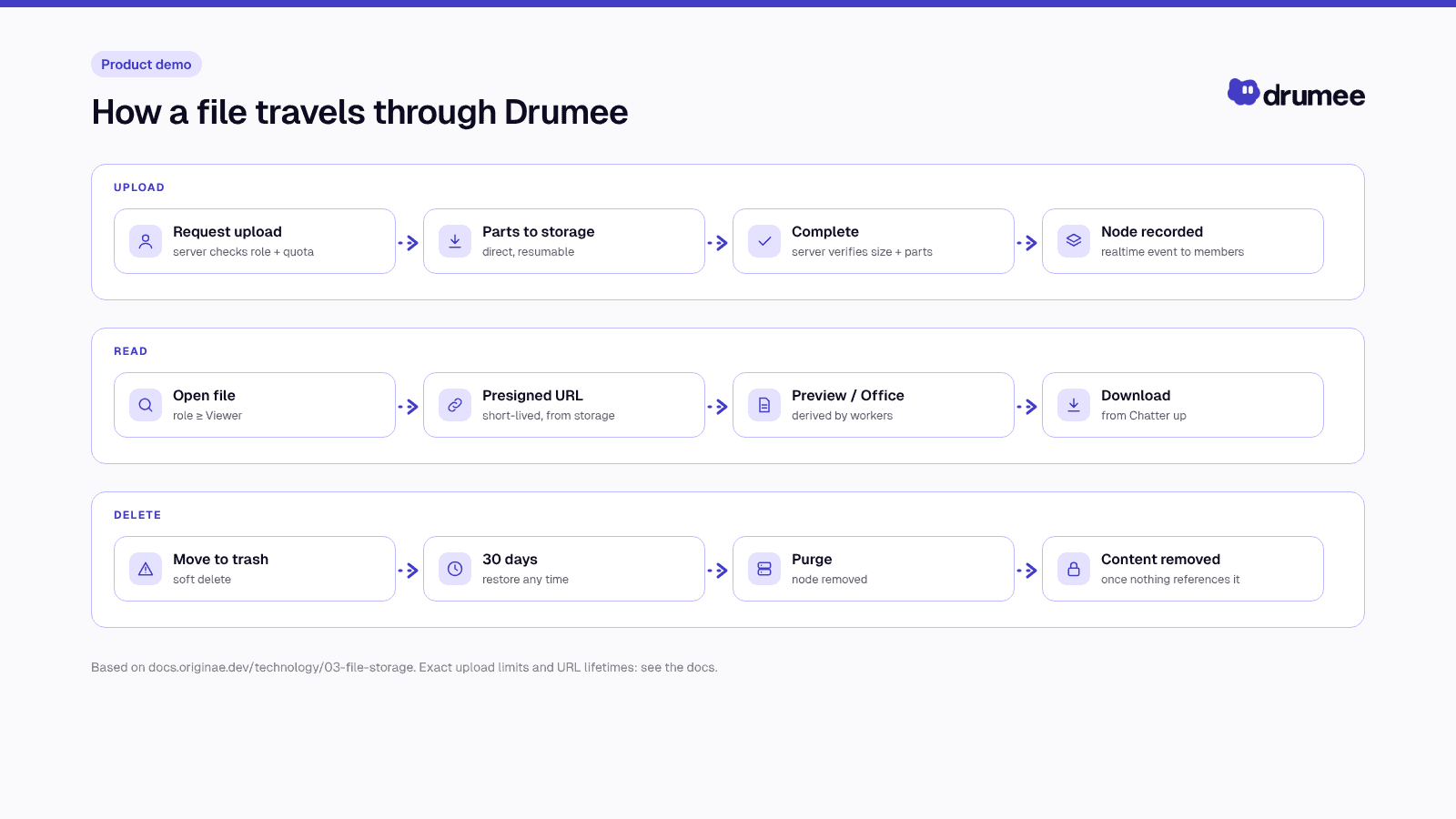
How a file moves through Drumee: bytes to object storage, metadata to MongoDB, previews to background workers.
Two layers: nodes and blobs
Drumee's storage model has two nouns. A node is a folder or a file in a workspace tree. A blob is one stored piece of content. A file node points to exactly one blob, and several nodes may point to the same blob: copies, deduplicated uploads and versions all share content. The blob keeps a reference count.
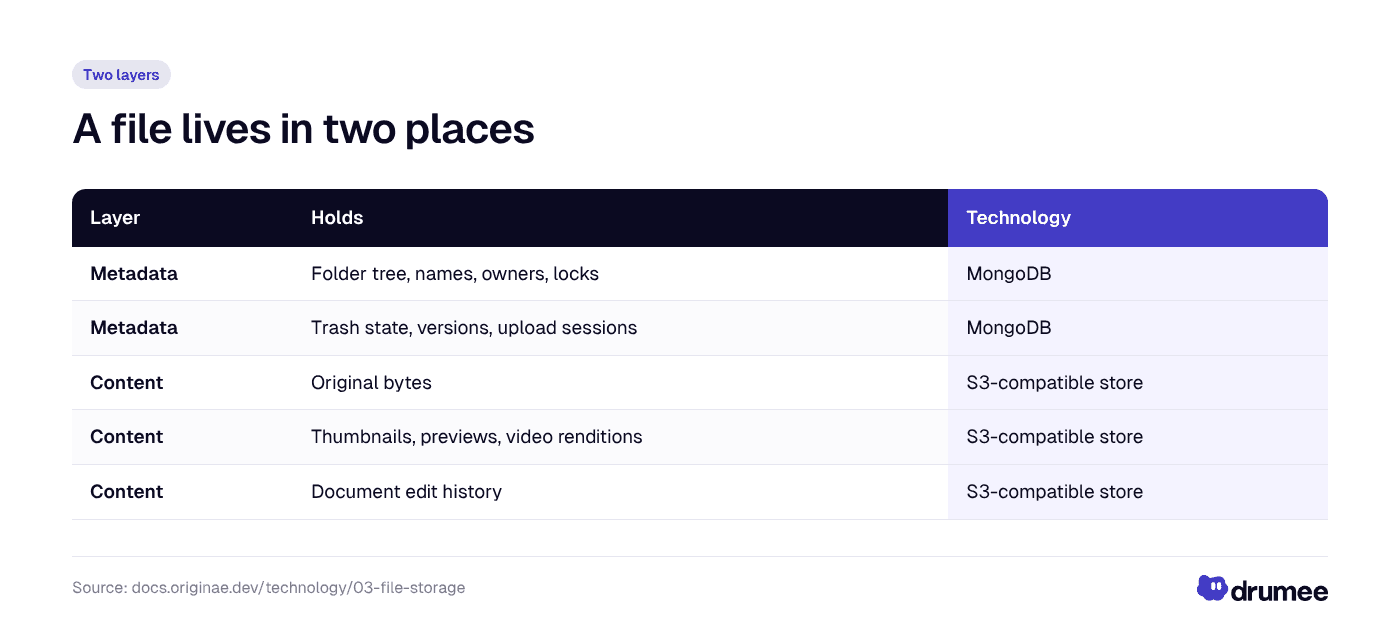
Metadata lives in MongoDB and content lives in S3-compatible object storage; a file node points to one blob, and a blob can back many nodes.
Why split them? Each half goes to the system that is good at it. Listing a folder, checking a name collision or resolving a breadcrumb are indexed database queries. Large immutable bytes, parallel transfers and range reads are what object storage is built for. And with durable state in those two stores, an API server holds nothing a replacement could not pick up.
The trade-off is that a file is never in one place, so every write must keep the halves consistent. Upload sessions, server-side completion, reference counts and a delayed garbage collector all exist for that.
The folder tree: an adjacency list with an ancestor path
Every workspace has one tree of nodes. Drumee stores it as an adjacency list (each node knows its parent_id) plus a materialized list of ancestors (path_ids, root first). A simplified node looks like this:
node
  _id          node ID
  tenant_id    owning tenant
  workspace_id owning workspace
  parent_id    parent folder (empty at the root)
  path_ids     [root, ..., parent]
  kind         folder | file
  name, name_lc
  size, blob_id
  locked, trashed, derived
No path string is stored anywhere. A breadcrumb is resolved from path_ids, and a subtree is simply "every node whose path_ids contains this folder". That makes listing and subtree queries cheap. The cost appears on moves: moving a folder rewrites path_ids for its whole subtree, so a single move is limited to 10,000 nodes. It is a deliberate trade, fast reads for bounded writes, in a system where people browse far more often than they reorganize.
Names are normalized to Unicode NFC and unique per folder, case-insensitively, among active nodes. Colliding uploads, copies and moves are numbered (report (1).pdf), but a rename is never numbered silently: it fails with 409 file.name_conflict.
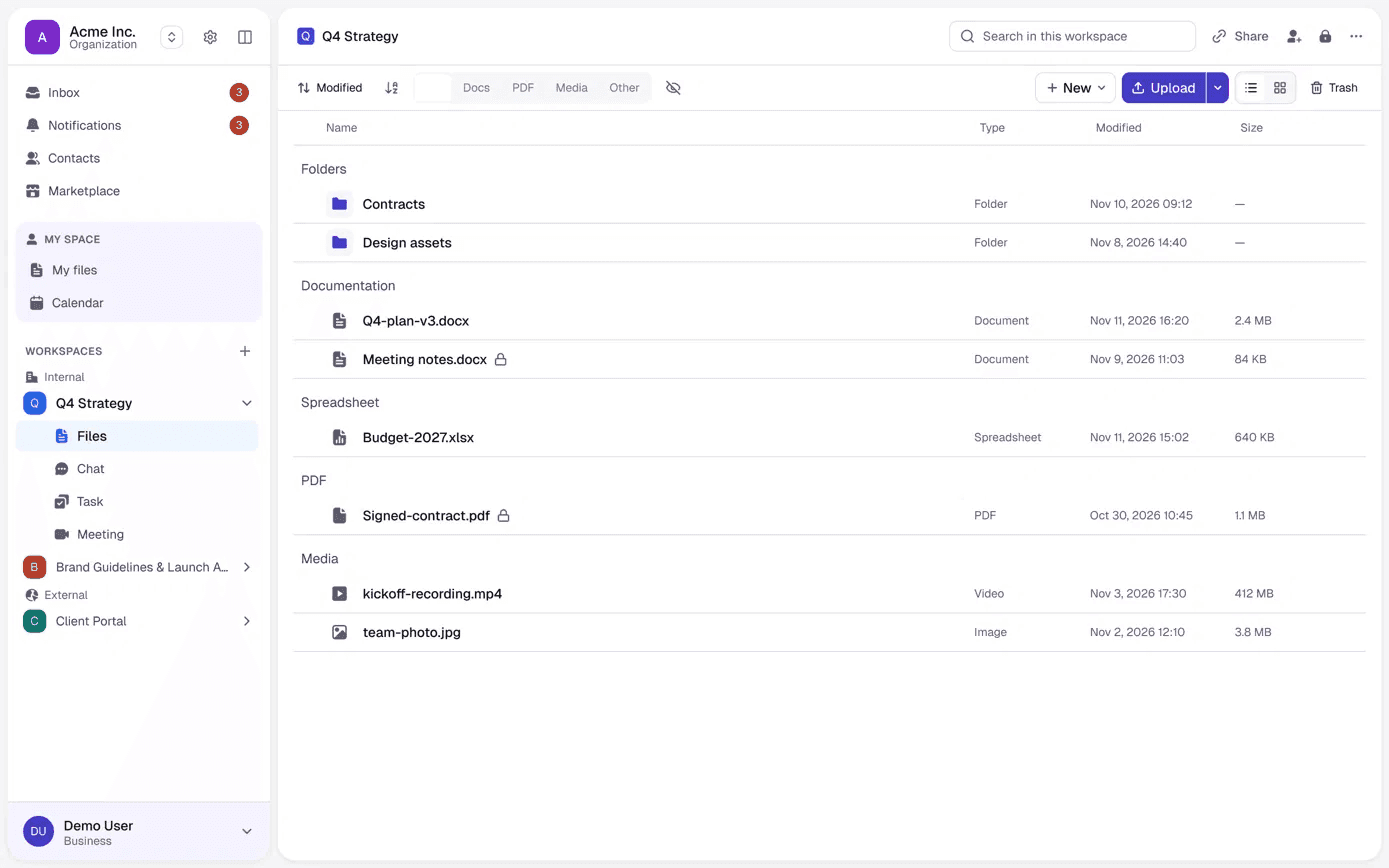
The node tree as a member sees it: folders first, filters by type, and a lock on files that cannot be changed.
Object keys carry no names
All tenants share one bucket, separated by key prefix:
t/<tenant_id>/b/<blob_id>              original content
t/<tenant_id>/d/<blob_id>/<kind>       thumbnail, previews, video renditions
t/<tenant_id>/tmp/...                  upload staging, account exports
t/<tenant_id>/office/<node_id>/...     document edit history
The blob ID is random and keys contain no file name or path, so renaming or moving a file never touches object storage, and a bucket listing reveals nothing about what files are called. The tenant prefix ties every object to its owner, which the data protection and tenant isolation post explains in depth.
Drumee talks to storage only through the S3 API, so any S3-compatible store works on the same code path.
Why uploads go straight from the browser to storage
The classic design streams bytes through the application server. It is simple, and it pushes the largest, slowest traffic through the process that answers every API call. Drumee does the opposite: bytes go from the browser straight to object storage, and the API only authorizes the upload and records the result.
The reasons are practical:
- API servers stay responsive. A large video upload never occupies server memory or a request slot for minutes.
- Storage does what it is built for. S3-style multipart uploads handle parallel parts and retries natively.
- Statelessness holds. No server keeps half an upload on disk.
The trade-off is trust. When the server never sees the bytes, it has to verify what arrived some other way. Drumee's answer is to authorize narrowly up front and verify against storage at the end.
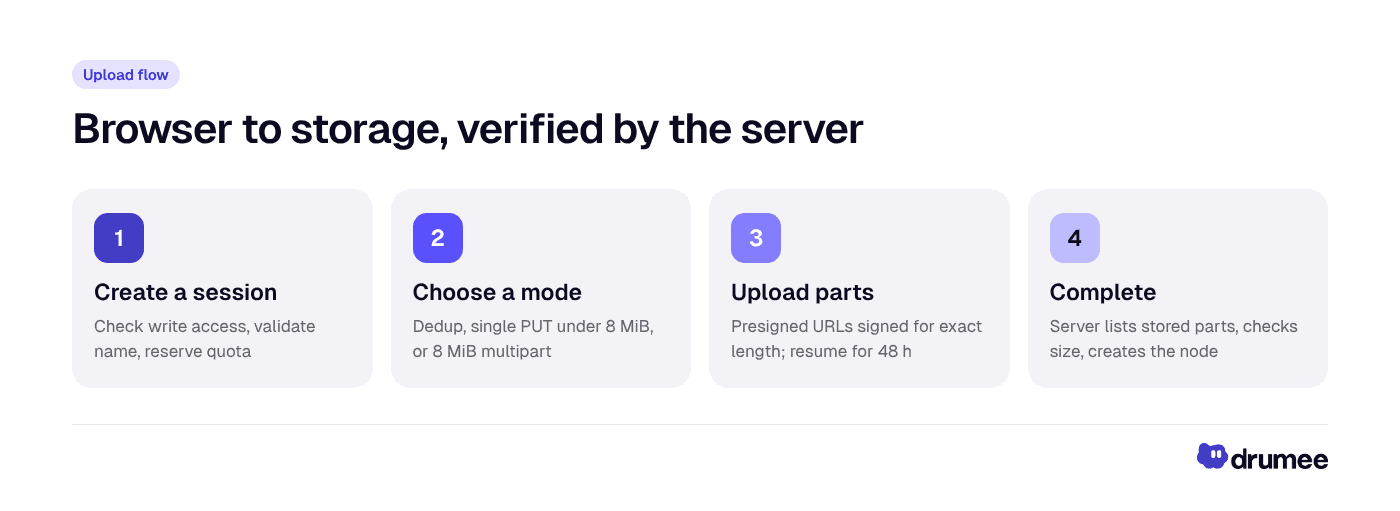
Four steps: create a session, choose a mode, upload with size-signed URLs, and complete only after the server checks what storage actually holds.
Step 1: create a session
The client sends the destination folder, name, size and, optionally, a SHA-256 of the content. The server checks that the caller may write there, validates the name and reserves the size against the tenant's storage quota. An upload that would exceed the quota fails here, before a single byte is sent.
Step 2: choose a mode
if verified identical content exists  -> deduplicated (nothing to send)
else if size < 8 MiB                   -> single PUT
else                                   -> multipart: 8 MiB parts, several in parallel,
                                          up to 10,000 parts (about 78 GiB)
Step 3: upload with size-signed URLs
Every presigned URL is signed for an exact content length, so storage rejects a body of any other size.
Step 4: complete, trusting storage rather than the client
On completion the server ignores any part list sent by the client. It lists the parts actually present in storage, assembles the object and checks that the stored size equals the declared size. Only then does it create the node and convert the quota reservation into usage. Completion is idempotent: repeating the call returns the same node, and two concurrent completions cannot both run.
Resume after a dropped connection
An upload session lives for 48 hours. If the tab closes or the network drops, the client asks the session which parts already arrived and sends only the missing ones; transient errors are retried automatically. Dropping a folder creates its tree in one batch call, then opens sessions in batches of up to 100 files.
Deduplication without a hash oracle
For files up to 32 MiB, the browser computes a SHA-256 of the content and announces it when creating the session. If the same tenant already stores identical content, the upload is skipped and the new node references the existing blob.
Naive hash-based dedup is a known leak: if announcing a hash is enough to "receive" a file, anyone who learns a hash can obtain the content. Drumee closes that with two rules:
- The server does not trust the announced hash. A blob becomes a dedup target only after the server has read the object back and verified its hash itself.
- A hash never grants access. Dedup applies only when the uploader can already download a file that holds that content. Knowing a hash and a size is not enough, and content is never deduplicated across tenants.
Shared bytes still count toward quota once per file, so dedup never makes quota accounting unpredictable.
Reading files: two paths, one safety rule
Downloads and previews take different roads, chosen by purpose.
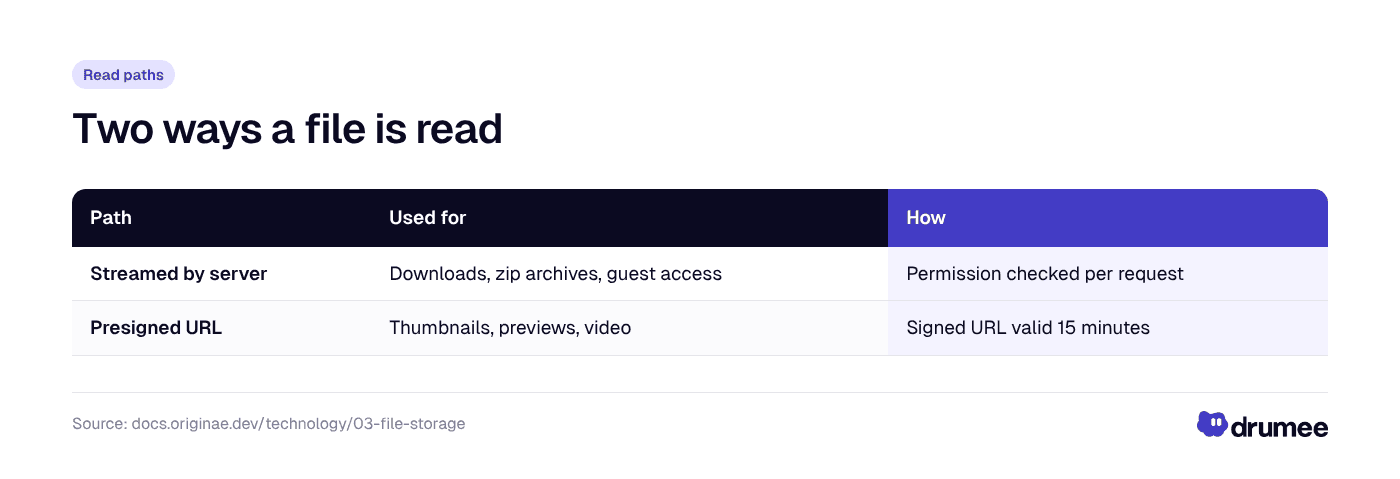
Originals are streamed by the server so permission is checked on every request; viewers use short-lived presigned URLs straight from storage.
Server streaming passes Range through, and zip downloads stream straight from storage with no temporary file (up to 20,000 entries). Either way, user content is never served as something a browser could execute in the app's origin: the response type is derived from the file, only common images, PDF, plain text, audio and video display inline, and everything else downloads as application/octet-stream. Responses carry X-Content-Type-Options: nosniff and a sandboxing Content-Security-Policy, and a presigned URL has its response type and disposition signed in, so nobody can edit the link to render a file differently.
Viewing in the browser and downloading the original are separate permissions. A Viewer can open files but not download originals; downloading starts at Chatter. The RBAC post covers the full role ladder.
Previews and renditions are background jobs
Thumbnails, previews and video renditions are produced by workers, never by the request that uploaded the file. When a file is created the server queues a job; when it finishes, clients receive a node.derived_ready event and swap the placeholder for the real preview.
- Images: JPEG
thumb(256 px),preview-lq(1280 px) andpreview-hq(2560 px, only for larger originals). - Video: a poster frame, an H.264/AAC MP4
streamup to 1920 px and a lighterstream-lqup to 1280 px. - PDF, text, audio: rendered by the browser from the original; SVG is served under a restrictive content policy.
Derived objects belong to the blob, so copies and deduplicated files share them, and they do not count toward quota. Video jobs run on their own queue so a long transcode never delays image thumbnails.
Office files are a special case. docx, xlsx, xlsm and pptx open and are co-edited in the browser: rendering and merging happen client-side, while the server orders the editors' operations, keeps a durable log and relays presence. Periodic snapshots become new versions. The Office engine post covers the editing experience.
Versions, trash and garbage collection
Every write that replaces content keeps the previous content as a version, up to 200 per file; how far back history goes depends on the plan. A restore turns the replaced content into a version, so it can be undone, and a save based on outdated content is rejected with 409 file.version_conflict.
Deletion is always two steps:
- Trash. The node and everything under it are marked trashed, hidden from listings and unreachable by ID, and kept for 30 days. Trashed items still count toward quota.
- Purge. After 30 days a background job removes the nodes, or an administrator or the item's owner purges earlier. Purging releases versions and edit history and returns the bytes to the quota.
Purging a node only decrements the blob's reference count. A separate garbage-collection pass deletes the object, with every derived object, once nothing references it and a 24-hour safety delay has passed. The delay leaves a margin between the last reference disappearing and the bytes being destroyed, which matters in a design where a file is never in one place.
Quota: reserve, then commit
Usage is tracked per tenant as two counters: bytes used and bytes reserved by uploads in progress. A session reserves its size; completion commits it; a failed or abandoned upload gives the reservation back. A periodic job reconciles the counters with the database.
Files (active or trashed) and versions count; thumbnails, previews, renditions, edit logs and avatars do not. When a tenant goes over its limit it becomes read-only for a grace period, then locked for writes until space is freed or the plan changes. Reading and downloading keep working throughout. Plan allowances are not published in the docs yet; see Drumee pricing for current plans.
Sharing, import and realtime events
A share link points at one file or folder and carries its own permissions (view, download, chat, edit), with optional password, expiry and email restriction. A guest reaches only nodes inside the shared item, never hidden files or system folders, and every guest request is checked against the link on the server. The internal and external workspaces post shows the client-facing side, and our guide to secure file sharing covers the wider checklist.
Google Drive import is a background job that writes straight to object storage, converts Docs, Sheets and Slides to docx, xlsx and pptx, and never overwrites an existing name. Realtime events (node.created, node.moved, node.trashed, node.derived_ready and the rest) keep every open tab current; delivery runs through the WebSocket hub described in the Request Pipeline docs.
Integrity, encryption and what it means for your data
Uploads are verified by size at three points: the signed length per request, storage's own part checks and the final stored size. File content is protected in transit by TLS, and at rest it is encrypted at the storage layer; end-to-end encryption is in development and will ship in stages, as the Data Storage & Encryption docs state.
For a CTO evaluating a sovereign workspace, three properties stand out. Control: content sits behind the plain S3 API under random keys, and metadata lives in one database with a documented schema. Cost: quota counts files and versions, not previews or renditions. Sovereignty: the docs describe the self-hosted edition, which is coming soon, as the hosted platform packaged for your own infrastructure, and moving data from the hosted service to your own deployment is in its final stage on the roadmap.
FAQ
Why does Drumee upload files directly to object storage?
It keeps large transfers off the API servers, lets storage handle parallel parts and retries, and keeps servers stateless. The API still authorizes each upload, reserves quota and verifies the stored object before recording the file.
How large a file can I upload to Drumee?
A multipart upload can have up to 10,000 parts of 8 MiB, which is about 78 GiB per file. Your plan's storage quota still applies, and an upload that would exceed it is refused before any bytes are sent.
How do resumable uploads work in Drumee?
Each upload session lives for 48 hours. If the tab closes or the connection drops, the client asks the session which parts already arrived and sends only the missing ones, and individual requests retry automatically on transient errors.
Can deduplication leak someone else's file?
No. The server only deduplicates against content whose hash it has verified itself, only when the uploader can already download a file with that content, and never across tenants. Knowing a hash and a size is not enough to obtain a file.
What happens to deleted files in Drumee?
They go to the trash for 30 days and can be restored. After that they are purged, and the content is removed from object storage by a garbage-collection pass once nothing references it and a 24-hour safety delay has passed.
Conclusion
Drumee's file layer is a set of narrow, verifiable contracts: metadata in MongoDB, bytes under random keys in S3-compatible storage, uploads that the server authorizes and then checks against storage, and deletion that is slow on purpose. The next post in the series shows how the same platform is built as one Go binary instead of a fleet of services. To see the file layer in action, try Drumee at app.drumee.com.
Try Drumee with your team: your first month is $1. Start your team for $1
Keep reading
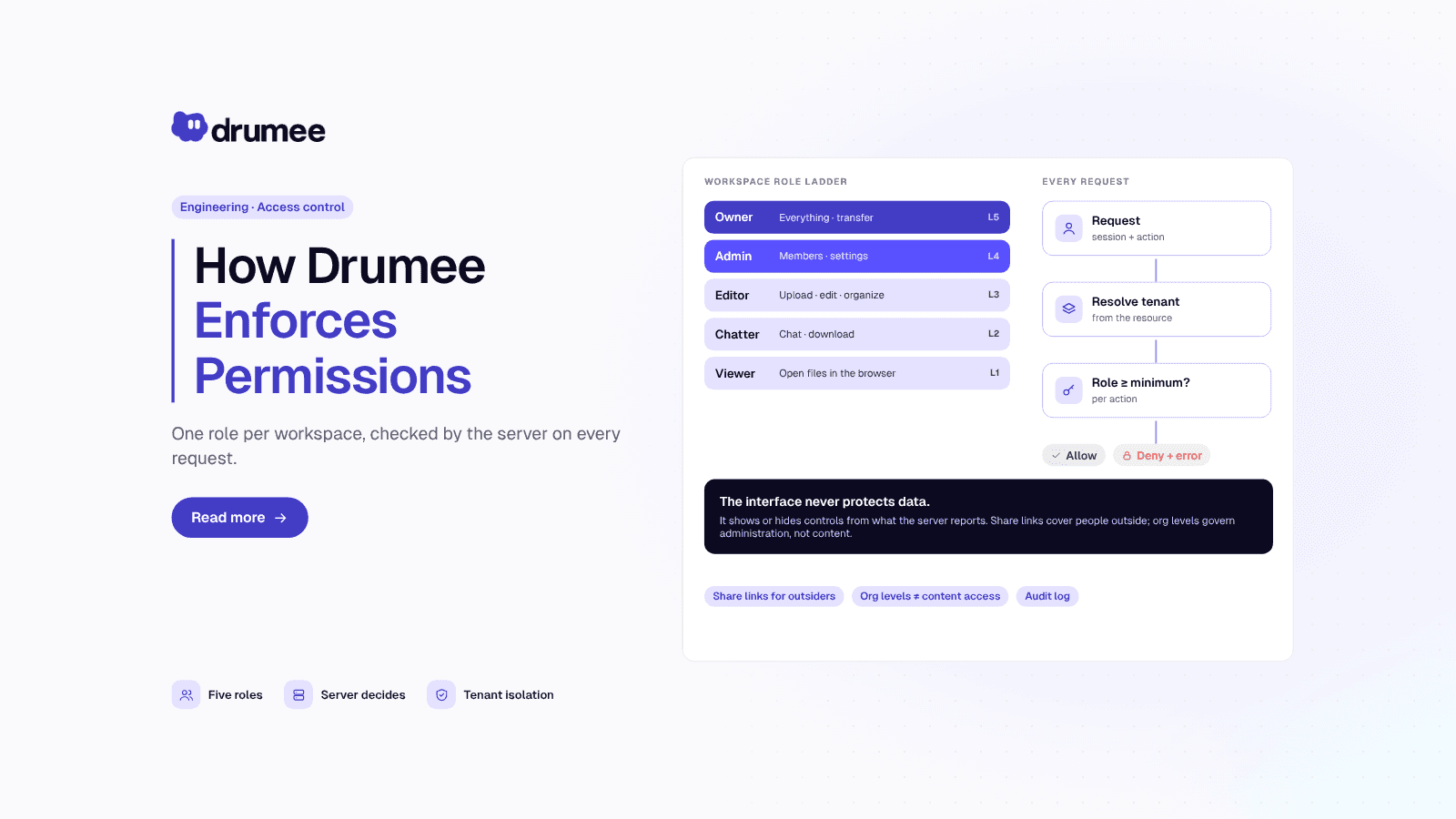
Role-Based Access Control for Collaboration Apps: Drumee's RBAC Model
Role-based access control (RBAC) for a collaboration app means permissions follow from a person's role, not from per-file settings. In Drumee, each person holds exactly one role per workspace, on a ladder from Viewer to Owner, and the server check...
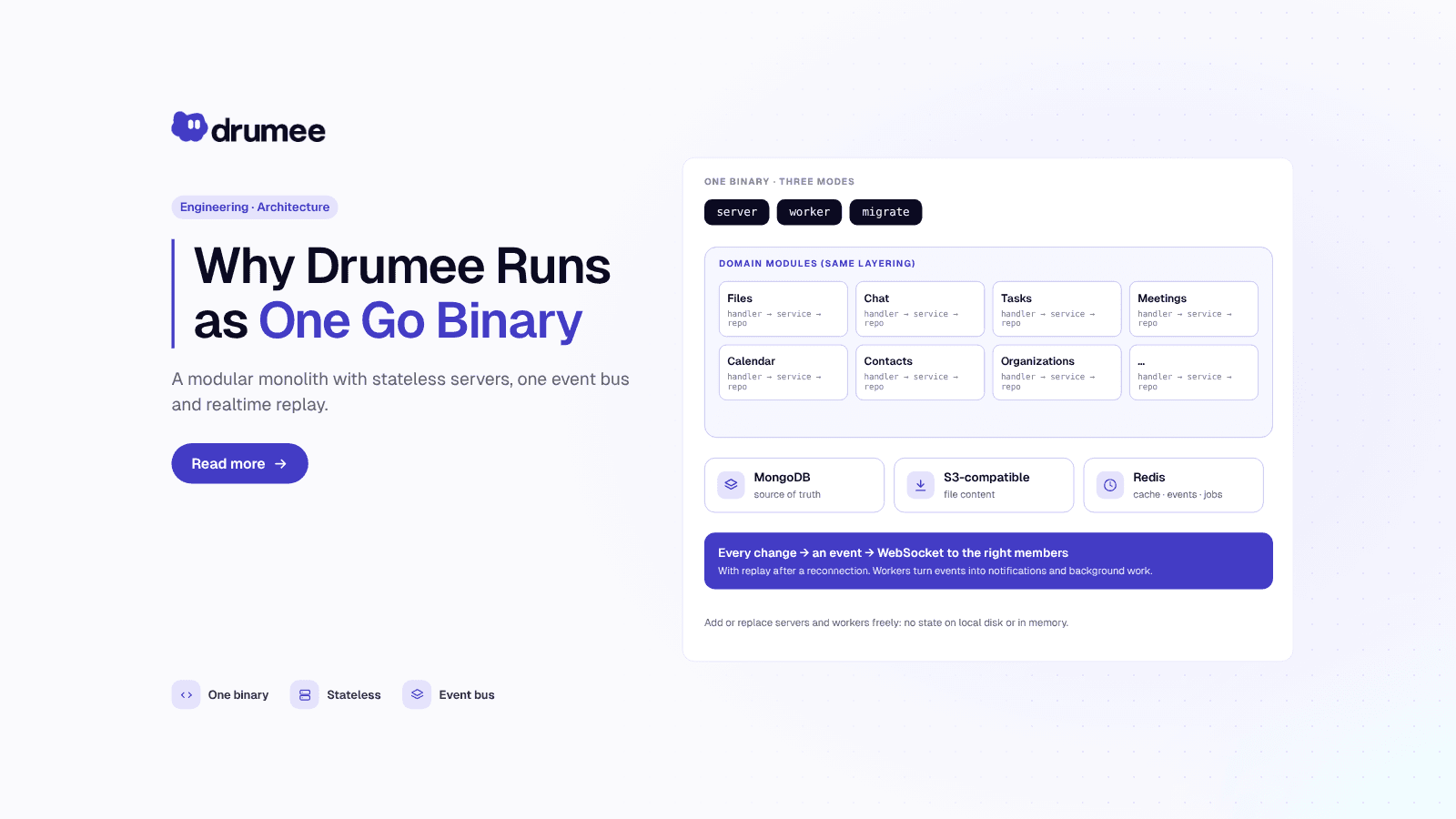
Why Drumee Is a Modular Monolith: One Go Binary, Many Modules
A modular monolith is one deployable program split into self-contained modules with explicit boundaries. Drumee is built this way: a single Go binary runs as an API server, a background worker or a migration job, and each domain (files, chat, task...
How Drumee Isolates Tenant Data: Multi-Tenant Isolation and Encryption
Multi-tenant data isolation means one customer's data can never be read through another customer's account, even though both run on shared infrastructure. In Drumee, every document carries the ID of the tenant that owns it, every query filters by ...